 PluginStats
WakaTime installs statistics
By WakaTime (3 listings) · VS Code Marketplace · Visualization
Metrics, insights, and time tracking automatically generated from your programming activity.
WakaTime has 23,102,497 recorded installs on VS Code Marketplace, ranking #50 of 2,501 tracked listings.
Rating: 4.07 / 5 from 43 ratings
About WakaTime
WakaTime for Visual Studio Code



WakaTime is an open source VS Code plugin for metrics, insights, and time tracking automatically generated from your programming activity.
Installation
-
Press
F1or⌘ + Shift + Pand typeinstall. PickExtensions: Install Extension.
-
Type
wakatimeand hitenter.
-
Enter your api key, then press
enter.(If you’re not prompted, press
F1or⌘ + Shift + Pthen typeWakaTime API Key.) -
Use VSCode and your coding activity will be displayed on your WakaTime dashboard
Usage
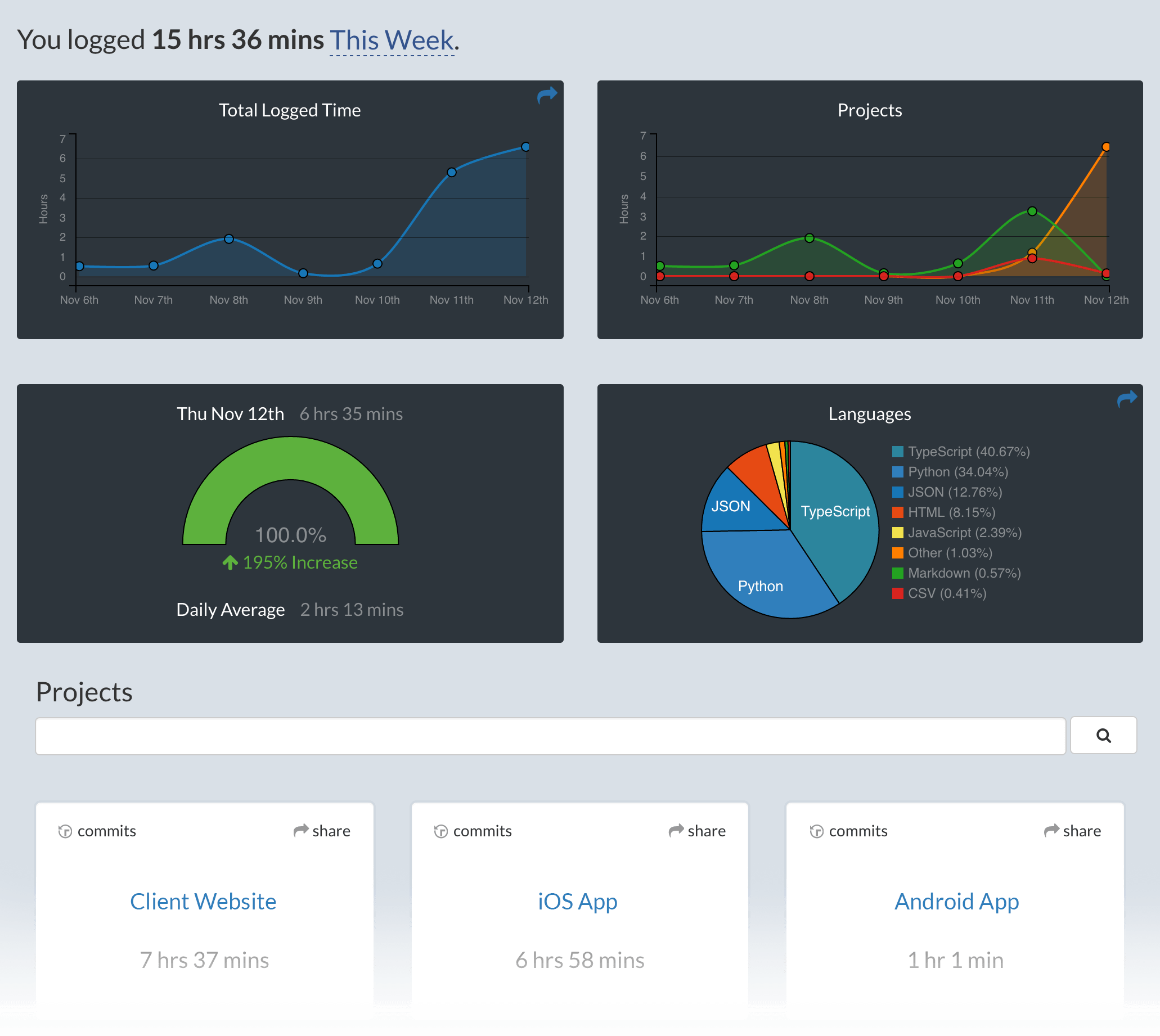
Visit https://wakatime.com to see your coding activity.
Configuring
VS Code specific settings are available from ⌘ + Shift + P, then typing wakatime.
For example, to hide today's coding activity in your status bar:
Press ⌘ + Shift + P then set WakaTime: Status Bar Coding Activity to false.
Status Bar Alignment
You can customize the position and priority of the WakaTime status bar item:
- Alignment: Set
wakatime.aligntoleftorrightto control which side of the status bar shows the WakaTime item - Priority: Set
wakatime.alignPriorityto a number to control the order (higher values appear more to the left)
Both settings require restarting VS Code to take effect.
Extension settings are stored in the INI file at $HOME/.wakatime.cfg.
More information can be found from wakatime-cli.
If using an online IDE like gitpods, add your api key to global ENV key WAKATIME_API_KEY.
Notes:
$HOMEdefaults to$HOME- To disable the extension at startup add
disabled=trueto your config, this operation can also be performed by pressing⌘ + Shift + Pand selectingWakaTime: Disable.
Troubleshooting
First, turn on debug mode:
- Press
F1or⌘ + Shift + P - Type
> WakaTime: Debug, and pressEnter. - Select
true, then pressEnter.
Next, open your Developer Console to view logs and errors:
Help → Toggle Developer Tools
Errors outside the scope of vscode-wakatime go to $HOME/.wakatime/wakatime.log from wakatime-cli.
If your error message contains "won't send heartbeat due to backoff" then delete your ~/.wakatime/wakatime-internal.cfg file to trigger an API connection so we can see the real error message.
The How to Debug Plugins guide shows how to check when coding activity was last received from your editor using the Plugins Status Page.
Microsoft Windows Only: Using WakaTime behind a corporate proxy? Try enabling your Windows Root Certs inside VS Code with the win-ca extension:
Press Ctrl + Shift + X, search for win-ca, press Install.
For more general troubleshooting info, see the wakatime-cli Troubleshooting Section.
SSH configuration
If you're connected to a remote host using the ssh extension you might want to force WakaTime to run locally instead on the server. This configuration is needed when the server you connect is shared among other people. Please follow this guide.
Uninstalling
-
Click the Extensions sidebar item in VS Code.
-
Type
wakatimeand hit enter. -
Click the settings icon next to WakaTime, then click Uninstall.
-
Delete the
~/.wakatime*files in your home directory, unless you’re still using WakaTime with another IDE.
Contributing
Pull requests, bug reports, and feature requests are welcome! Please search existing issues before creating a new one.
To run from source:
git clone git@github.com:wakatime/vscode-wakatime.gitcd vscode-wakatimenpm installnpm run watch- Install the extension from the marketplace
- Then symlink
~/.vscode/extensions/wakatime.vscode-wakatime-*/dist/extension.jsto./dist/extension.js
Or to run the web version from source:
git clone git@github.com:wakatime/vscode-wakatime.gitcd vscode-wakatimenpm installnpm run compilenpm run open-in-browser- Go to localhost:3000 in your web browser
Many thanks to all contributors!
Made with :heart: by the WakaTime Team.
Description from the VS Code Marketplace listing.
- analytics
- code
- code time
- codetime
- flow
- focus
- metrics
- productivity
- slack
- standup
- time
- time tracker
- time tracking
- timer
- todo
- tracker
- tracking
- wakatime
- worktime
README badge
Show your rank in a README or on your website. The badge updates automatically.
Charts
Images: 30d · 1y · all time · 1600×900 dark
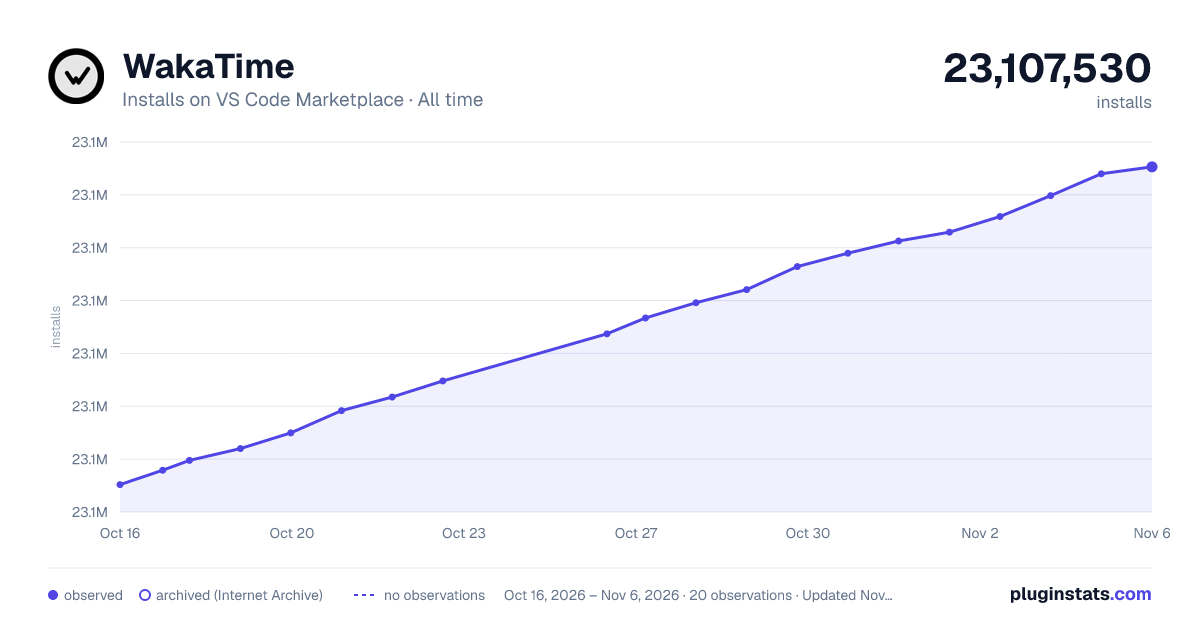
Adoption over time
7/30/90-day growth
Ranking history
Ratings over time
Listing placement
Listing placement
Listing placement
Filled points are observed values; hollow points come from Internet Archive snapshots of the listing page. Dashed segments span periods with no observations — values between points are not interpolated.
Each band is one page of 20. Installs on a linear scale. Placement is projected from installs, so it can differ from the marketplace's own sort order. Hover a dot to see the listing.
Recent observations
Full history (5)Similar VS Code Marketplace Visualization plugins
All 20 WakaTime alternatives



WakaTime on other marketplaces
Data source
Install counts, average rating, and rating counts come from the public Visual Studio Marketplace gallery API. Installs are cumulative and exclude updates.
Listing: https://marketplace.visualstudio.com/items?itemName=WakaTime.vscode-wakatime. First seen Oct 16, 2026; last successful collection Oct 20, 2026. See the methodology.