 PluginStats
EchoAPI for VS Code installs statistics
By EchoAPI · VS Code Marketplace · Programming Languages
Ultra-lightweight Rest API debugging tool for VS Code.
EchoAPI for VS Code has 109,702 recorded installs on VS Code Marketplace, ranking #2241 of 2,501 tracked listings.
Rating: 4.50 / 5 from 30 ratings
About EchoAPI for VS Code
EchoAPI for VS Code
EchoAPI for VS Code is a lightweight REST API client extension for Visual Studio Code, designed with a focus on simplicity, clean design, and local storage, and it's free to use.
Why EchoAPI?
EchoAPI has a few standout features: 1. No login required: Just install and start using it. 2. Supports Scratch Pad: Makes jotting down quick notes and ideas super easy. 3. Ultra-lightweight: It’s incredibly fast and doesn’t bloat your system. 4. 100% compatible with Postman script syntax: You can switch over without having to relearn anything.
Installing EchoAPI for VS Code
Getting started with EchoAPI is a breeze. Just navigate to the VS Code Extensions Marketplace, search for EchoAPI, and hit install. No additional tools or sign-ins are necessary—everything operates straight from your VS Code sidebar.
API Design (Designing a New Request)
In the Design area, simply click on “HTTP/1.2 Request” to quickly generate the API design documentation. It supports real-time editing and instant document updates, ensuring a smooth and efficient design process.
API Debug (Creating a New Request)
To create a new request, start by opening the EchoAPI tab where you’ll see options for recent activities, collections, and environments. It’s pretty intuitive if you’ve used Postman before. Right-click on the collection list to create a New Collection, name it, and then right-click on the collection name to add a new request.
API Tests (Running a collection)
Just pick the folder you want to run, right-click, and hit "Run All." That’s it!
Variables and Environments
Just like in Postman, you can use variables and manage environments in EchoAPI. EchoAPI is 100% compatible with Postman script syntax. To activate a specific environment for your tests, just set it as active (indicated by a star next to the environment name). Importing and exporting environments is compatible with Postman 2.1.0 format and .env files.
System Variables
EchoAPI also has a set of system variables that streamline generating unique data. Prepend $ before the variable name to use them: • {{$guid}} - random UUID number • {{$email}} - random email string
Script-less Testing
Testing in EchoAPI is straightforward and script-less. Choose a parameter from the dropdown menu, set your condition and value, and you’re done! There are plenty of parameters and conditions to choose from, like ResponseCode, ResponseBody, or Content-Type. You can even set values from API responses to environment variables or verify specific JSON path values.
Authentication
EchoAPI supports various authorization types, including None, Inherit, Basic Auth, Bearer, and OAuth 1.0. This is super useful for testing secured APIs that require credentials or tokens.
Useful Links
EchoAPI is continually growing, and I’ll definitely keep an eye on its progress. Here are some useful links: • Website • Documentation • Twitter • Youtube
Give EchoAPI a try and see how it compares to Postman for your API testing needs!
Description from the VS Code Marketplace listing.
- api client
- api debbug
- api design
- api testing
- apiclient
- bruno
- http client
- insomnia
- postman
- rest api
- rest client
- restclient
- server sent events
- socket.io
- socket.io client
- sse
- testing
- thunder client
- thunderclient
- websocket client
README badge
Show your rank in a README or on your website. The badge updates automatically.
Charts
Images: 30d · 1y · all time · 1600×900 dark


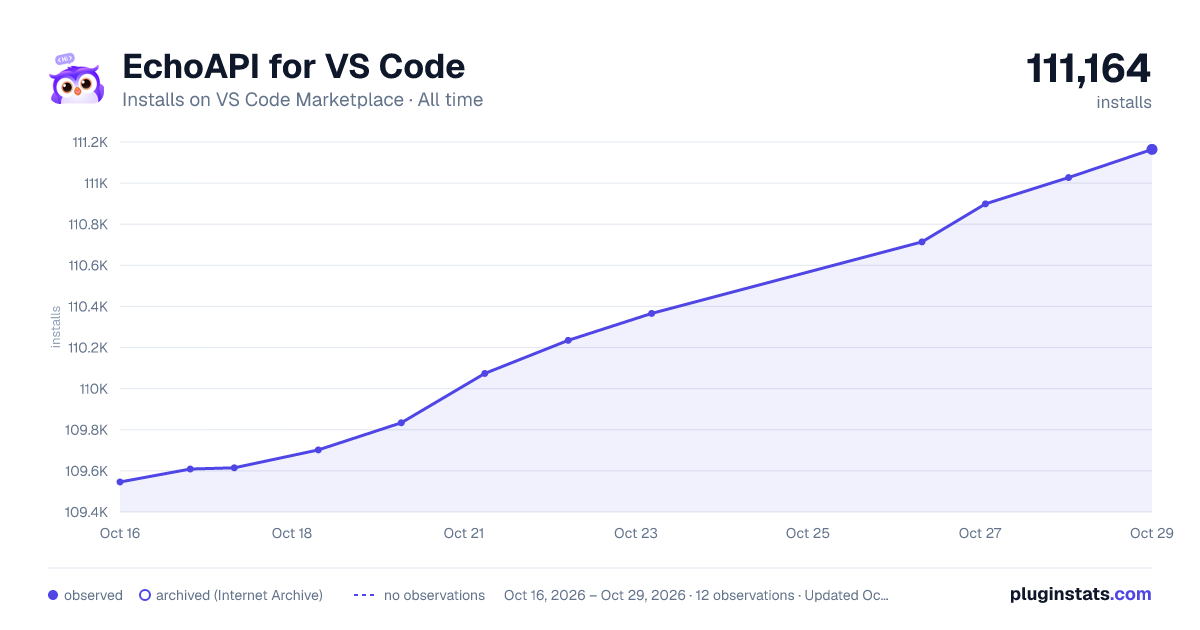

Adoption over time
7/30/90-day growth
Ranking history
Ratings over time
Listing placement
Listing placement
Listing placement
Listing placement
Filled points are observed values; hollow points come from Internet Archive snapshots of the listing page. Dashed segments span periods with no observations — values between points are not interpolated.
Each band is one page of 20. Installs on a linear scale. Placement is projected from installs, so it can differ from the marketplace's own sort order. Hover a dot to see the listing.
Recent observations
Full history (4)Similar VS Code Marketplace Programming Languages plugins
All 20 EchoAPI for VS Code alternativesData source
Install counts, average rating, and rating counts come from the public Visual Studio Marketplace gallery API. Installs are cumulative and exclude updates.
Listing: https://marketplace.visualstudio.com/items?itemName=EchoAPI.echoapi-for-vscode. First seen Oct 16, 2026; last successful collection Oct 19, 2026. See the methodology.