 PluginStats
GistPad installs statistics
By Jonathan Carter (5 listings) · VS Code Marketplace · Other
Manage your code snippets and developer notes using GitHub Gists and repositories.
GistPad has 472,064 recorded installs on VS Code Marketplace, ranking #872 of 2,501 tracked listings.
Rating: 4.88 / 5 from 66 ratings
About GistPad
GistPad 📘
GistPad is a Visual Studio Code extension that allows you to edit GitHub Gists and repositories from the comfort of your favorite editor. You can open, create, delete, fork, archive, and star gists/repositories, and then seamlessly begin editing files as if they were local, without ever cloning, pushing or pulling anything. It's like your very own developer library for building and referencing code snippets, commonly used config/scripts, programming-related notes, knowledge bases and interactive samples.
<img src="https://user-images.githubusercontent.com/116461/69910156-96274b80-13fe-11ea-9be4-d801f4e9c377.gif" width="750px" />🏃 Getting Started
-
Install this extension from the marketplace, then run
Developer: Reload Window. -
Open the
GistPadtab (look for the notebook icon in the activity bar). From there, you can open a gist or GitHub repo by ID/URL, or sign in with a GitHub account in order to manage your gists and repositories. To sign-in, simply click theSign Inbutton and follow the provided flow in order to authenticate with your GitHub account.
From here, you can create and edit gists, repositories, wikis and runnable code samples. And in addition to doing this from the Gists tree view, you can also do it from Copilot chat (thanks to a built-in MCP server). Have fun, and let us know how we can make your knowledge-management experience even more awesome! 🙌
<details open> <summary><h2> ✍️ Gist Management</h2></summary>
In order to create a new gist, simply open the Gists tree in the GistPad tab, and click the + icon in the toolbar. Specify the description and files to seed it with (including support for directories!). Additionally, you can create gists from local files or snippets by right-clicking them in the Explorer tree, or by right-clicking an editor window/tab and selecting Copy File to Gist, Add Selection to Gist, or Paste Gist File Contents (details).
Alternatively, you can run the
GistPad: New GistandGistPad: New Secret Gistcommands.
From here, you can edit gists by expanding the gist and clicking on the desired file. You can open, rename, delete, etc. gists by right-clicking them in the tree and selecting the desired command.
Sorting and Grouping
By default, the Gists tree sorts gists by their update time, which allows you to focus on your most recently used gists. If you'd like to sort your gists alphabetically, click the Sort toggle button on the Gists tree's toolbar.
By default, your gists are displayed as a flat list. If you'd like to group them by type, you can click the group toggle button on the Gists tree's toolbar.
Gist Types
When grouping is enabled, gists are grouped into the following built-in types:
- note - Gists that are composed of nothing but
.txt,.md/.markdownor.adocfiles. - notebook - Gists that are composed of nothing but Jupyter Notebook files (
.ipynb). - code-swing - Gists that include either a
codeswing.jsonfile and/or anindex.htmlfile. Read more about swings here. - code-swing-template - Swings whose
codeswing.jsonfile sets thetemplateproperty totrue. Read more about swing templates here. - code-swing-tutorial - Swings whose
codeswing.jsonfile specifies atutorialproperty. Read more about tutorials here. - code-tour - Gists that include a
main.tourfile, and were created by exporting a CodeTour. - diagram - Gists that include a
.drawiofile. - flash-code - Gists that include a
.deckfile. - code-snippet - Gists that don't match any of the above more-specific types.
If you want to group gists by your own custom types, add a tag to the end of the gist's description in the format #tag or #tag-name. Then, when you enable grouping, your gists will be grouped by both the aforementioned types, as well as by your custom tags. You can identify tag groups by the # icon.
Files and Directories
When you create a gist with the New Gist or New Secret Gist commands, you can specify a comma-separated list of file names to seed the gist with. Furthermore, you can add / to your filenames to add them to a sub-directory within the gist.
For example, if you create a new gist, and specify reminders.txt,todos/personal.txt,todos/work.txt, the gist will include a reminders.txt file at the root of the gist, and files called personal.txt and reminders.txt in a directory called todos.
You can add new files to a gist or directory from the Explorer at any time by right-clicking them and selecting Add New File(s) or Upload File(s). You can also rename/delete directories as well, by right-clicking them in the tree and selecting the appropriate command. If you'd like to move a file from one directory to another, simply right-click the file, select Rename File and edit the directory name that it's in. It's that simple!
Archiving Gists…
Description from the VS Code Marketplace listing.
- gist
- json
- language-model-tools
- notes
- snippets
- wiki
README badge
Show your rank in a README or on your website. The badge updates automatically.
Charts
Images: 30d · 1y · all time · 1600×900 dark


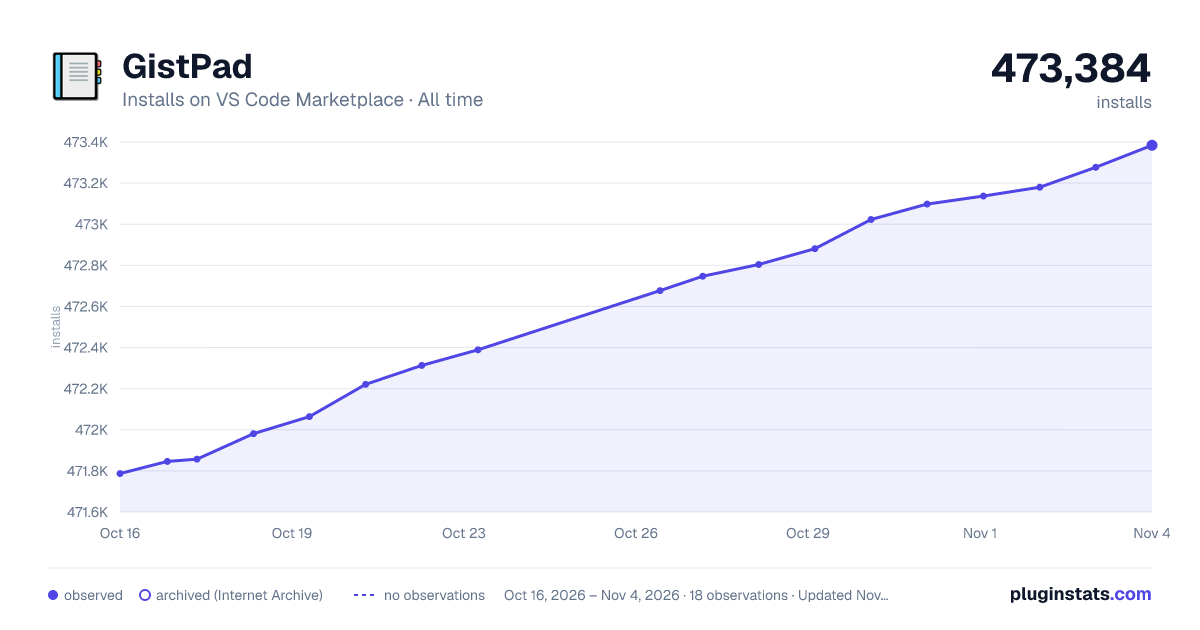

Adoption over time
7/30/90-day growth
Ranking history
Ratings over time
Listing placement
Listing placement
Filled points are observed values; hollow points come from Internet Archive snapshots of the listing page. Dashed segments span periods with no observations — values between points are not interpolated.
Each band is one page of 20. Installs on a linear scale. Placement is projected from installs, so it can differ from the marketplace's own sort order. Hover a dot to see the listing.
Recent observations
Full history (5)Similar VS Code Marketplace Other plugins
All 20 GistPad alternativesData source
Install counts, average rating, and rating counts come from the public Visual Studio Marketplace gallery API. Installs are cumulative and exclude updates.
Listing: https://marketplace.visualstudio.com/items?itemName=vsls-contrib.gistfs. First seen Oct 16, 2026; last successful collection Oct 20, 2026. See the methodology.