 PluginStats
GLSL Lint installs statistics
By DanielToplak · VS Code Marketplace · Programming Languages
Linting of GLSL shader code
GLSL Lint has 248,739 recorded installs on VS Code Marketplace, ranking #1310 of 2,501 tracked listings.
Rating: 4.44 / 5 from 9 ratings
About GLSL Lint
GLSL Linting for Visual Studio Code
This extension supports linting of GLS (OpenGL Shading Language). It uses the OpenGL and OpenGL ES shader validator Every shader type which is supported by the glslangValidator can be validated.
Features
- Linting GLSL Shader files
- Supporting glslify
- Linting Shader code in string literals
Requirements
- Visual Studio Code 1.34.0
- The Shader languages support for VS Code extension
- The OpenGL and OpenGL ES shader validator
Extension Settings
This extension contributes the following settings:
All settings are prefixed with glsllint.
| Setting | Default | Description |
|---|---|---|
glslangValidatorPath | "" | The path to the glslangValidator executable, let it empty when have it in $PATH |
glslangValidatorArgs | "" | Arguments for the glslangValidator executable (e.g: using -V for vulkan shaders), string or array of strings |
additionalStageAssociations | {} | Additonal file extension -> glslangValidator stage mapping. Format: {".EXT": "STAGEID"}, example see below |
fallBackStage | "" | Fallback stage for when the shader stage could not be determined, see Available stages below |
supportedLangsWithStringLiterals | ["javascript", "javascriptreact", "typescript", "typescriptreact", "elm" ] | VSCode language id's to support for string literal validation |
linkShader | true | Link all input files together to form a single module ('-l' option for glslangValidator, used for includes) |
useIncludeDirOfFile | true | Add -I[DIR_OF_FILE] to the glslangValidator command |
languageSettings.[LANGID] | see below | Settings per language VScode language ID, there are built in configurations for JS, JSX, TS, TSX and ELM. |
glslifyPattern | #pragma glslify: | Regex pattern for glslify pragma |
glslifyAutoOpenOnError | true | Opens the glslified code when there is a linting error |
glslifyOptions.basedir | "" | Specify the base directory for glslify.compile() |
glslifyUseCurrentFileAsBasedir | false | Use the current file as the base directory for glslify (only if glslifyOptions.basedir is not set) |
additionalStageAssociations example
"glsllint.additionalStageAssociations": {
  ".fs": "frag",
  ".vs": "vert"
}
Built-in mappings:
{
  ".vert": "vert", // for a vertex shader
  ".vs": "vert", // for a vertex shader
  ".frag": "frag", // for a fragment shader
  ".fs": "frag", // for a fragment shader
  ".gs": "geom", // for a geometry shader
  ".geom": "geom", // for a geometry shader
  ".comp": "comp", // for a compute shader
  ".tesc": "tesc", // for a tessellation control shader
  ".tese": "tese", // for a tessellation evaluation shader
  ".rgen": "rgen", // for a ray generation shader
  ".rint": "rint", // for a ray intersection shader
  ".rahit": "rahit", // for a ray any hit shader
  ".rchit": "rchit", // for a ray closest shader
  ".rmiss": "rmiss", // for a ray miss shader
  ".rcall": "rcall", // for a ray callable shader
  ".mesh": "mesh", // for a mesh shader
  ".task": "task" // for a task shader
}
Available stages:
["vert", "frag", "geom", "comp", "tesc", "tese", "rgen", "rint", "rahit", "rchit", "rmiss", "rcall", "mesh", "task"]
languageSettings notation
"glsllint.languageSettings": {
  "LANGID": {
    "parser": "TSAST|REGEX",
    "patternStart": "[START_REGEX_PATTERN]", // only used when parser: REGEX
    "patternEnd": "[END_REGEX_PATTERN]" // only used when parser: REGEX
  }
}
languageSettings default
"glsllint.languageSettings": {
  "javascript": {
    "parser": "TSAST"
  },
  "javascriptreact": {
    "parser": "TSAST"
  },
  "typescript": {
    "parser": "TSAST"
  },
  "typescriptreact": {
    "parser": "TSAST"
  },
  "elm": {
    "parser": "REGEX",
    "patternStart": "\\[glsl",
    "patternEnd": "\\|\\]"
  }
}
Shader code in string literals…
Description from the VS Code Marketplace listing.
- Fragment shader
- GLSL
- linters
- OpenGL
- OpenGL Shading Language
- Shader
- Vulkan
- WebGL
README badge
Show your rank in a README or on your website. The badge updates automatically.
Charts
Images: 30d · 1y · all time · 1600×900 dark


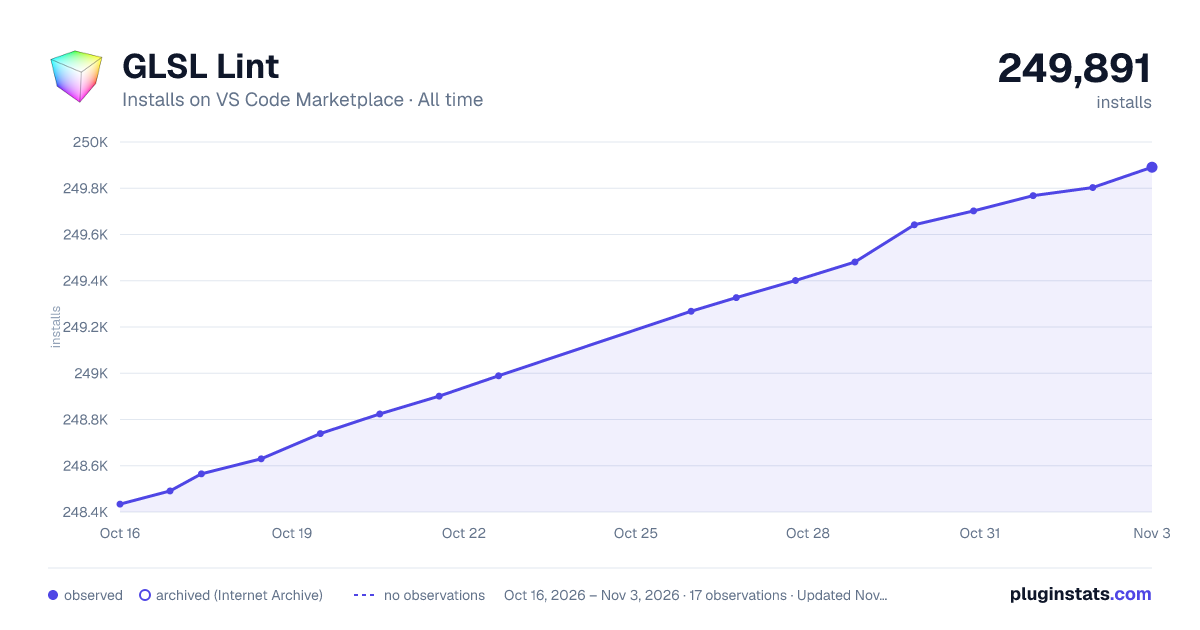

Adoption over time
7/30/90-day growth
Ranking history
Ratings over time
Listing placement
Listing placement
Listing placement
Filled points are observed values; hollow points come from Internet Archive snapshots of the listing page. Dashed segments span periods with no observations — values between points are not interpolated.
Each band is one page of 20. Installs on a linear scale. Placement is projected from installs, so it can differ from the marketplace's own sort order. Hover a dot to see the listing.
Recent observations
Full history (5)Similar VS Code Marketplace Programming Languages plugins
All 20 GLSL Lint alternativesData source
Install counts, average rating, and rating counts come from the public Visual Studio Marketplace gallery API. Installs are cumulative and exclude updates.
Listing: https://marketplace.visualstudio.com/items?itemName=dtoplak.vscode-glsllint. First seen Oct 16, 2026; last successful collection Oct 20, 2026. See the methodology.