 PluginStats
Chat Customizations Evaluations installs statistics
By Microsoft (224 listings) · VS Code Marketplace · Programming Languages
Extension for analyzing, validating, and improving AI prompts
Chat Customizations Evaluations has 990,387 recorded installs on VS Code Marketplace, ranking #543 of 2,501 tracked listings.
Rating: 2.08 / 5 from 26 ratings
About Chat Customizations Evaluations
Chat Customizations Evaluations
An extension for analyzing and improving AI prompt files. Works with SKILL.md, .agent.md, .instructions.md, and .prompt.md files — providing LLM-powered semantic analysis directly in VS Code.
Features
LLM-Powered Analysis (via GitHub Copilot)
• Contradiction Detection — Finds logical, behavioral, and format conflicts • Semantic Ambiguity — Ambiguity analysis with rewrite suggestions • Persona Consistency — Detects conflicting personality traits and tone drift • Cognitive Load Assessment — Warns about overly complex prompts with too many nested conditions • Semantic Coverage — Identifies gaps in intent handling and missing error paths • Composition Conflict Analysis — Detects conflicts between a prompt and other prompt files it imports via markdown links
Waza Integration
• Create Eval Scaffold — Generates eval files for a skill via waza new eval • Run Evaluation — Executes skill evaluation via waza run --context-dir • Automatic Local Fallback — If waza is not on PATH, commands attempt a local fallback via go run ./cmd/waza when a sibling waza repo is available
Editor Integration
• Editor Title Bar — Analyze Prompt button appears when editing prompt files • Command Palette — Chat Customizations Evaluations: Analyze Prompt command • Problems Panel — All diagnostics appear in the standard VS Code Problems panel with precise line and column locations
Supported File Types
| Pattern | Type |
| SKILL.md | Skill | | *.agent.md | Agent | | *.instructions.md | Instructions | | *.prompt.md | Prompt (VS Code only) |
Usage
- Open any supported prompt file in VS Code 2. Run Chat Customizations Evaluations: Analyze Prompt from the command palette or click the beaker icon in the editor title bar 3. View results in the Problems panel (Ctrl+Shift+M / Cmd+Shift+M)
LLM analysis requires GitHub Copilot — no API keys needed. Just sign in to GitHub Copilot in VS Code.
You can also trigger analysis from Copilot Chat with the slash command /analyze-prompt.
Commands
| Command | Description |
| Chat Customizations Evaluations: Analyze Prompt | Run full LLM-powered analysis on the active file | | /analyze-prompt | Run analysis for the active customization file and summarize diagnostics in chat | | Chat Customizations Evaluations: Create Waza Eval Scaffold | Create wazaEval.yaml and task files for the active skill | | Chat Customizations Evaluations: Run Waza Evaluation | Run the skill's eval suite | | Chat Customizations Evaluations: Download Waza Binary | Download the latest platform-specific Waza binary and configure the extension to use it | | Chat Customizations Evaluations: Open Analysis and Fix User Guide | Open the analysis and fix workflow guide |
Guides
• Analysis and Fix User Guide — Learn how to run analysis, interpret diagnostics, implement suggestions, and optionally run Waza evaluations. • Waza User Guide — Set up and run Waza evaluations, configure graders, and validate your customizations.
Configuration
| Setting | Default | Description |
| chatCustomizationsEvaluations.enable | true | Enable/disable the extension | | chatCustomizationsEvaluations.trace.server | off | Trace communication between VS Code and the language server | | chatCustomizationsEvaluations.customDiagnostics | [] | Array of custom diagnostic objects with name and description fields | | chatCustomizationsEvaluations.waza.command | waza | Command used to run Waza (for example /usr/local/bin/waza) |
Telemetry
The extension now emits usage telemetry events for activation, analysis commands, diagnostics fixes, and Waza workflows.
• Telemetry is gated by VS Code telemetry settings. • Events only include coarse metadata (for example counts, durations, and success/failure outcomes). • File contents, prompt text, and file paths are not sent in telemetry event payloads.
To export telemetry to your own collector, set these environment variables before launching VS Code:
• CHAT_CUSTOMIZATIONS_EVALUATIONS_TELEMETRY_ENDPOINT: HTTPS endpoint that accepts JSON POST payloads. • CHAT_CUSTOMIZATIONS_EVALUATIONS_TELEMETRY_AUTH_TOKEN: Optional bearer token added as the Authorization header.
License
MIT
Description from the VS Code Marketplace listing.
- ai
- language-server
- llm
- prompt
- prompt-engineering
README badge
Show your rank in a README or on your website. The badge updates automatically.
Charts
Images: 30d · 1y · all time · 1600×900 dark


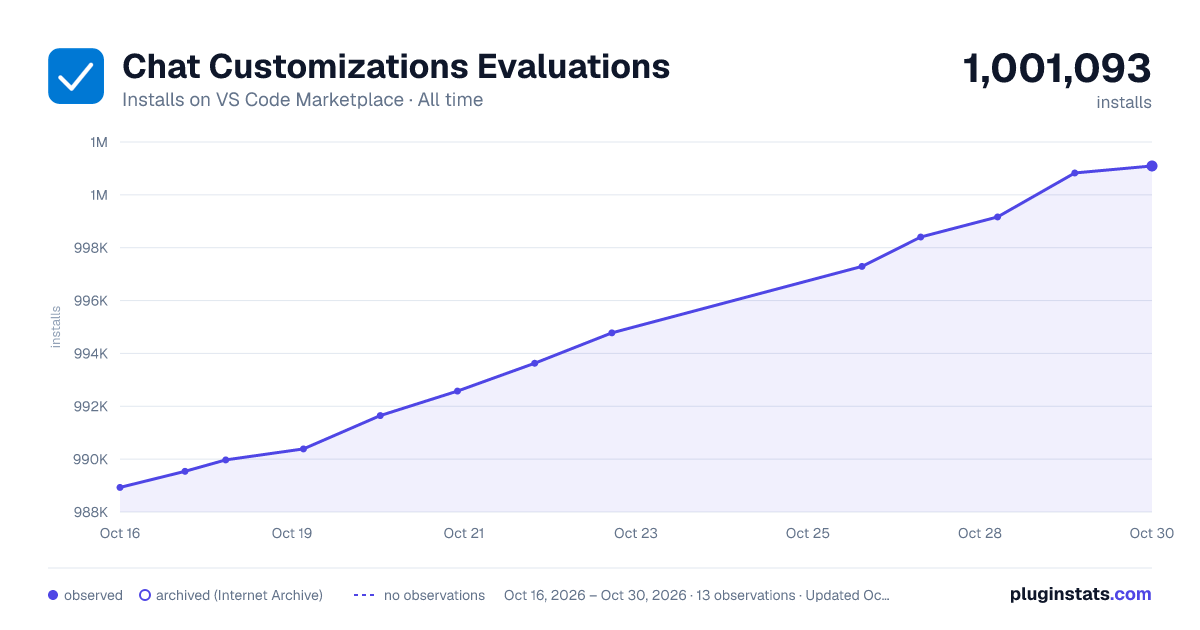

Adoption over time
7/30/90-day growth
Ranking history
Ratings over time
Listing placement
Listing placement
Listing placement
Filled points are observed values; hollow points come from Internet Archive snapshots of the listing page. Dashed segments span periods with no observations — values between points are not interpolated.
Each band is one page of 20. Installs on a linear scale. Placement is projected from installs, so it can differ from the marketplace's own sort order. Hover a dot to see the listing.
Recent observations
Full history (4)Similar VS Code Marketplace Programming Languages plugins
All 20 Chat Customizations Evaluations alternativesData source
Install counts, average rating, and rating counts come from the public Visual Studio Marketplace gallery API. Installs are cumulative and exclude updates.
Listing: https://marketplace.visualstudio.com/items?itemName=ms-vscode.vscode-chat-customizations-evaluations. First seen Oct 16, 2026; last successful collection Oct 19, 2026. See the methodology.