 PluginStats
MSBuild project tools installs statistics
By tintoy · VS Code Marketplace · Programming Languages
Tools for working with MSBuild project files (such as auto-complete for package Ids / versions).
MSBuild project tools has 680,428 recorded installs on VS Code Marketplace, ranking #700 of 2,501 tracked listings.
Rating: 5.00 / 5 from 13 ratings
About MSBuild project tools
MSBuild project file tools
An extension for VS Code that provides intellisense for MSBuild project files, including auto-complete for <PackageReference> elements.

The language service used by this extension can be found here: tintoy/msbuild-project-tools-server
Usage
- Completions for
PackageReferenceandDotNetCliToolReference.- Completions for
IncludeandVersionattributes of these items (invoke theNuGet: toggle pre-releasecommand to include / exclude pre-release packages / package versions). - Completions to create these elements.
- Completions for
- Completions for common top-level elements (e.g.
PropertyGroup,ItemGroup,Target). - Completions for import elements.
- Completions for property elements.
- Completions for item elements.
- Completions for common item attributes.
- Completions for common property
Conditionattributes. - Hover the mouse over imports, targets, items, properties, and conditions to see information about them.
- Document symbols are supported for imports, targets, items, and properties.
- Go-to-definition is implemented for both SDK-style and regular project imports.
- Basic syntax highlighting of MSBuild expressions in attribute values.
To see this highlighting, change the editor language fromXMLtoMSBuild. - Completions for
$()property,@()item, and%()item metadata expressions.
To enable these completions, ensure that the editor language isMSBuild(notXML). - Completions for task elements and attributes based on metadata for tasks declared in the project and its imported projects.
To enable these completions, add the stringTasksto themsbuildProjectTools.language.completionsFromProjectsetting. - Useful snippets for common elements of MSBuild project XML (added by @doggy8088).
To use these snippets, ensure that the editor language isMSBuild(notXML).
File extensions
By default, the language service is automatically available for files with the following extensions:
*.*proj.targets.props.tasks
If you want to use it with additional file types:
- Open the desired file.
- Change the language mode by pressing
Ctrl-Shift-P(orCmd-Shift-Pon Mac) and choosing "Change Language Mode".

- Choose "configure file association".

- Choose language
MSBuild.
Installation
You can install this extension from the VS marketplace, Open VSX or simply download the VSIX package for the latest release and install it by choosing "Install from VSIX" from the menu on the top right of the extensions panel.
Building from source
See BUILDING.md.
Design
See architectural overview for details (this is a work-in-progress; if you have questions, feel free to create an issue).
Limitations
- The VS Code extension API has changed somewhat since this extension was first created, and some features (such as hyperlinks to files in hover tooltips) are only partially functional at present (broken by VS Code API / behaviour changes).
This is still being worked on :-) - Limited intellisense is available for dynamic
PropertyGroup/ItemGroupdeclarations (i.e. those appearing inside aTargetelement); these are only evaluated when the project is built and so very little information about them is available to us when statically evaluating the project (see tintoy/msbuild-project-tools-server#5 for details). - Support for task completions is experimental; if you find a problem with it, please create an issue.
- If you open more than one project at a time (or navigate to imported projects), subsequent projects will be loaded into the same MSBuild project collection as the first project. Once you have closed the last project file, the next project file you open will become the master project. The master project will become selectable in a later release.
Questions / bug reports
If you have questions, feedback, feature requests, or would like to report a bug, please feel free to reach out by creating an issue. When reporting a bug, please try to include as much information as possible about what you were doing at the time, what you expected to happen, and what actually happened.
If you're interested in collaborating that'd be great, too :-)
Description from the VS Code Marketplace listing.
- C#
- dotnet
- msbuild
- nuget
- packagereference
- snippet
- xml
README badge
Show your rank in a README or on your website. The badge updates automatically.
Charts
Images: 30d · 1y · all time · 1600×900 dark


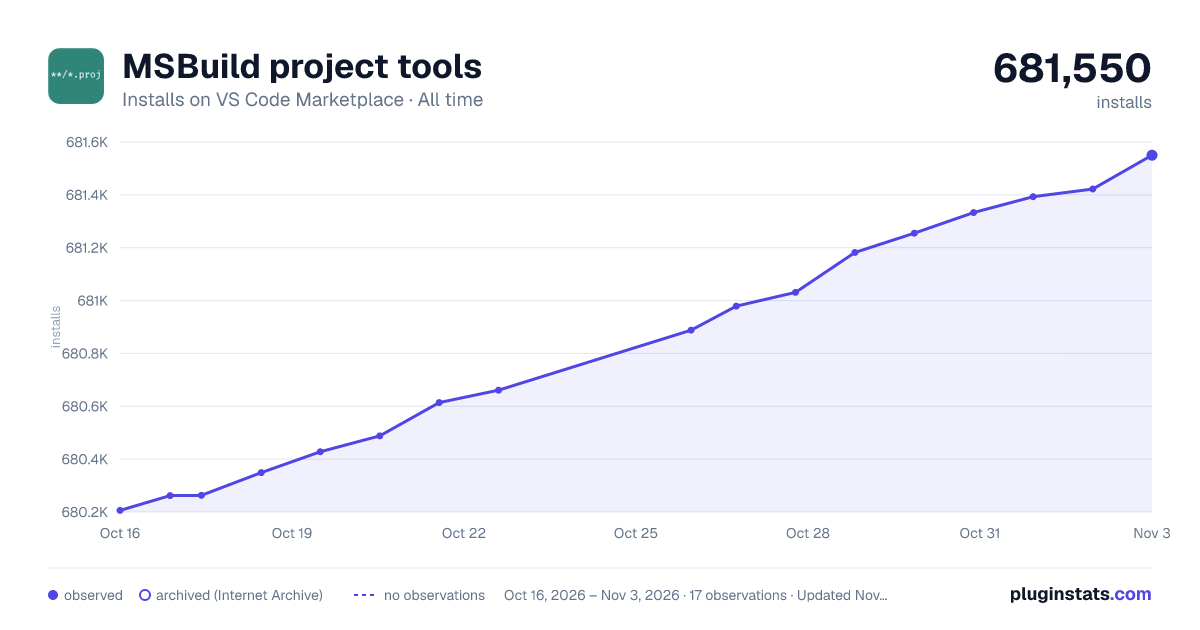

Adoption over time
7/30/90-day growth
Ranking history
Ratings over time
Listing placement
Listing placement
Filled points are observed values; hollow points come from Internet Archive snapshots of the listing page. Dashed segments span periods with no observations — values between points are not interpolated.
Each band is one page of 20. Installs on a linear scale. Placement is projected from installs, so it can differ from the marketplace's own sort order. Hover a dot to see the listing.
Recent observations
Full history (5)Similar VS Code Marketplace Programming Languages plugins
All 20 MSBuild project tools alternativesData source
Install counts, average rating, and rating counts come from the public Visual Studio Marketplace gallery API. Installs are cumulative and exclude updates.
Listing: https://marketplace.visualstudio.com/items?itemName=tintoy.msbuild-project-tools. First seen Oct 16, 2026; last successful collection Oct 20, 2026. See the methodology.