 PluginStats
dbt installs statistics
By dbt Labs LLC (3 listings) · VS Code Marketplace · Programming Languages
The official dbt VS Code Extension: bring all the speed and power of the dbt v2 engine to your local development workflow.
dbt has 145,002 recorded installs on VS Code Marketplace, ranking #1893 of 2,501 tracked listings.
Rating: 4.04 / 5 from 27 ratings
About dbt
Use the dbt VS Code extension to build, test, run, and refactor dbt models faster than ever — right inside your VS Code, Cursor, or Windsurf editor. Enjoy live error detection, blazing-fast parsing, intelligent autocomplete, and real-time lineage — all designed to keep you in flow.
The official dbt extension delivers a hyper-fast, intelligent development experience, powered by the new dbt v2 engine. The extension requires the dbt v2 engine and will automatically install it for you when possible.
Why developers love the extension
- Stay in flow. No waiting for query previews to validate changes — get instant feedback as you type.
- Work faster. Using the v2 engine, parse even the largest projects up to 30x faster than dbt Core.
- Work smarter. Rename models or columns once…then watch every reference update automatically.
- See the whole DAG. Explore lineage and compiled SQL right next to your code.
- Debug faster. Preview models and CTEs inline to verify logic on the fly.
🎥 Watch the interactive demo for more details!
Extension features
| Features | Details |
|---|---|
| Live error detection and detect syntax issues | Instantly surface dbt and SQL errors, invalid columns, or missing group-bys in real time — without running a single query. |
| Lightning-fast parsing | dbt v2’s intelligent parser analyzes even the largest projects up to 30× faster than dbt Core. |
| Powerful IntelliSense | Autocomplete for refs, sources, macros, functions, and more — all tailored to your dialect and project context. |
| Instant refactoring | Rename models or columns safely and globally. See every dependent reference update automatically across your project. |
| Go-to definition & reference | Command-click to jump instantly to any model, macro, or column. Perfect for navigating complex dbt projects. |
| Hover insights metadata | Hover over any SQL element to view data types, column names, or expanded wildcards — no context switching. |
| Live preview for models and CTEs | Preview a CTE’s output or a full model result directly inside VS Code. |
| Rich lineage in context | Visualize table- or column-level lineage as you develop. Double-click to explore dependencies without leaving your editor. |
| View compiled code | See the exact SQL that dbt builds from your source code, updated live as you edit. |
| Flexible dbt commands | Run any dbt command or selector right from the command palette. Stay in VS Code — no terminal switching required. |
Get started
- Install the dbt VS Code extension.
- Open a dbt project folder and start editing — the extension activates automatically for
.sqland.ymlfiles, and installs the dbt v2 engine for you automatically.
See dbt v2 documentation for additional setup details.
To customize behavior in VS Code settings:
- Press
Ctrl+,/Cmd+, - Search for “dbt”
- Adjust options like preview behavior or parse mode to match your workflow.
Considerations
- Remote development: SSH-based remote development is not yet supported; this will be added in a future release.
- YAML updates: Renaming models or columns will not automatically update YAML references; support is planned for a future release.
- Model renaming: When a model file is renamed, the extension updates all ref() calls, but cannot auto-save the edited files. You must manually save them (or use File → Save All) to avoid compiler errors.
We’re actively expanding these capabilities ahead of GA.
Share your feedback
We’d love to have you contribute to the dbt v2 experience!
Share feedback with us: GitHub | Slack | View docs | Install now
Support
dbt platform users can contact dbt Labs support at support@getdbt.com. You can also get in touch with us by reaching out to your Account manager directly.…
Description from the VS Code Marketplace listing.
- color-theme
- dbt
- formatter
- jinja-sql
- keybindings
- linter
- snippet
- sql
- theme
README badge
Show your rank in a README or on your website. The badge updates automatically.
Charts
Images: 30d · 1y · all time · 1600×900 dark


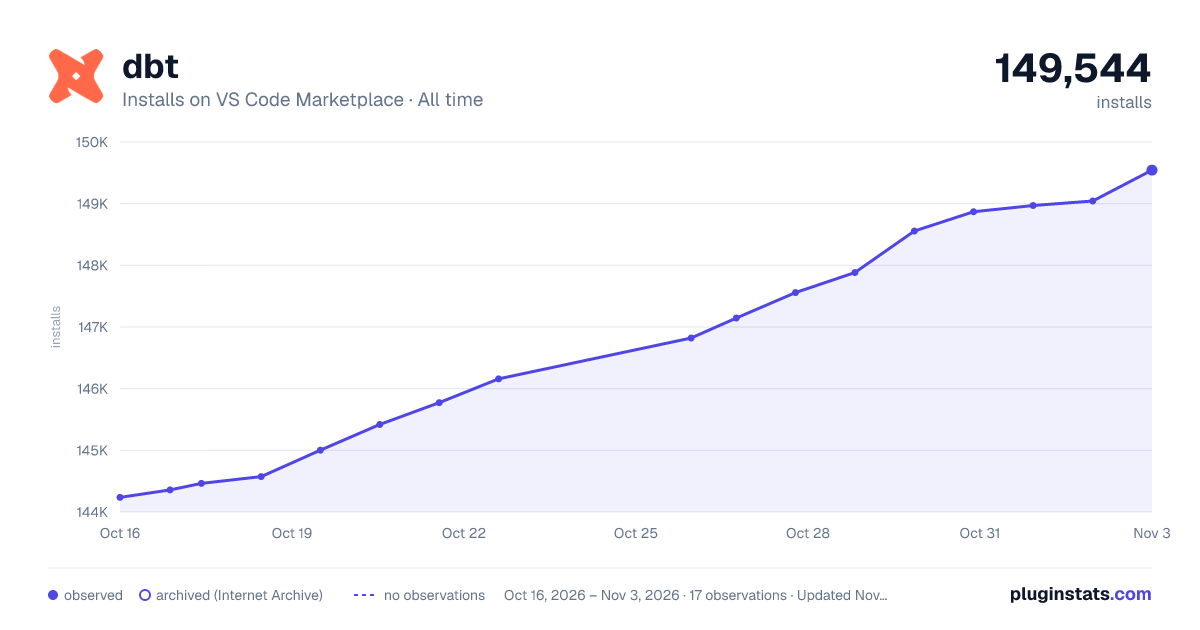

Adoption over time
7/30/90-day growth
Ranking history
Ratings over time
Listing placement
Listing placement
Listing placement
Listing placement
Filled points are observed values; hollow points come from Internet Archive snapshots of the listing page. Dashed segments span periods with no observations — values between points are not interpolated.
Each band is one page of 20. Installs on a linear scale. Placement is projected from installs, so it can differ from the marketplace's own sort order. Hover a dot to see the listing.
Recent observations
Full history (5)Similar VS Code Marketplace Programming Languages plugins
All 20 dbt alternativesdbt on other marketplaces
Data source
Install counts, average rating, and rating counts come from the public Visual Studio Marketplace gallery API. Installs are cumulative and exclude updates.
Listing: https://marketplace.visualstudio.com/items?itemName=dbtLabsInc.dbt. First seen Oct 16, 2026; last successful collection Oct 20, 2026. See the methodology.