 PluginStats
Discord Rich Presence installs statistics
By leonardssh · VS Code Marketplace · Visualization
Highly customizable Discord Rich Presence extension for Visual Studio Code
Discord Rich Presence has 842,430 recorded installs on VS Code Marketplace, ranking #597 of 2,501 tracked listings.
Rating: 4.52 / 5 from 29 ratings
About Discord Rich Presence
[][vsmp-link]
[![Open VSX Version][shield-ovsx-version]][ovsx-link] [![Open VSX Downloads][shield-ovsx-downloads]][ovsx-link] [![Open VSX Rating][shield-ovsx-rating]][ovsx-link]
[![Continuous Integration][shield-workflows-ci]][github-workflows-ci] [![Gitter Support Chat][shield-gitter-support]][gitter-vscord-support]
[![Continuous Delivery][shield-workflows-cd]][github-workflows-cd]
VSCord
Highly customizable Discord Rich Presence extension for Visual Studio Code
Remember to 🌟 this GitHub if you 💖 it.
Disclaimer
This extension does not work with snapstore / flatpak version of VSCode, please use the official version from the VSCode website!
📌 Features
• Shows what you're working on! • Switch between 5 IDE names (Code, Visual Studio Code, VSCodium, Antigravity and Cursor) or a custom one if you wish! • Packed with 60+ extension settings! • Tons of variable to use! • Support for over 130+ of the most popular languages! • Support custom images (using HTTP link) • Support custom button link! • Support flatpak / snapstore version of Discord! • Detect when you are Debugging! • Detect when you are using the Insiders build! • Detect when you are Idling!
👀 Preview
📥 Installation
Launch VS Code Quick Open (Ctrl+P), paste the following command, and press enter.
OR
Use the Extension Marketplace
⚙️ Configuration
The following variables will be replaced with the respective value in custom strings.
| Variable | Value |
| {app_name} | current editor name | | {app_id} | editor name that's suitable for using inside url | | {file_name} | name of the file | | {file_extension} | extension of the file | | {file_size} | size of the file | | {folder_and_file} | folder and file name | | {relative_file_path} | filepath relative to the workspace folder | | {directory_name} | directory name | | {full_directory_name} | full directory name | | {workspace} | name of the workspace | | {workspace_folder} | name of the workspace folder | | {workspace_and_folder} | name of the workspace and folder | | {lang} | {Lang} | {LANG} | format of the lang string (css, Css, CSS) | | {a_lang} | {a_Lang}| {a_LANG} | same as the above, but prefixes with "a" or "an" | | {problems} | problems text defined in settings | | {problems_pluralize} | the word problem, pluralized by count | | {problems_count} | number of problems | | {problems_count_errors} | number of problems that are errors | | {problems_count_warnings} | number of problems that are warnings | | {problems_count_infos} | number of problems that are infos | | {problems_count_hints} | number of problems that are hints | | {line_count} | number of lines | | {current_line} | current line | | {current_column} | current column | | {git_owner} | current git repository owner | | {git_repo} | repository name for current repository | | {git_branch} | current git branch | | {git_protocol} | git protocol (https, http, ssh) | | {git_resource} | git resource link (etc: github.com) (exclude port) | | {git_host} | git host link (etc: github.com) (include port) | | {git_port} | pot for the git link | | {git_href} | href to the git repository | | {git_url} | url link to the git repository | | {empty} | an empty space |
👨💻 Contributing
To contribute to this repository, feel free to create a new fork of the repository and submit a pull request.
- Fork / Clone the main branch. 2. Create a new branch in your fork. 3. Make your changes. 4. Commit your changes and push them. 5. Submit a Pull Request here!
👨💻 Adding a new language
We have a guide for adding a new language here!
🎉 Thanks
• discordjs - Creator of Discord RPC Client • iCrawl - Creator of discord-vscode • Satoqz - Creator of vscode-discord
Much of the code in this repository is based on iCrawl/discord-vscode & Satoqz/vscode-discord. This extension would not exist without them.
📋 License
This project is licensed under the MIT License - see the LICENSE file for details.
Description from the VS Code Marketplace listing.
- discord
- presence
- rich
- rich presence
- rpc
README badge
Show your rank in a README or on your website. The badge updates automatically.
Charts
Images: 30d · 1y · all time · 1600×900 dark


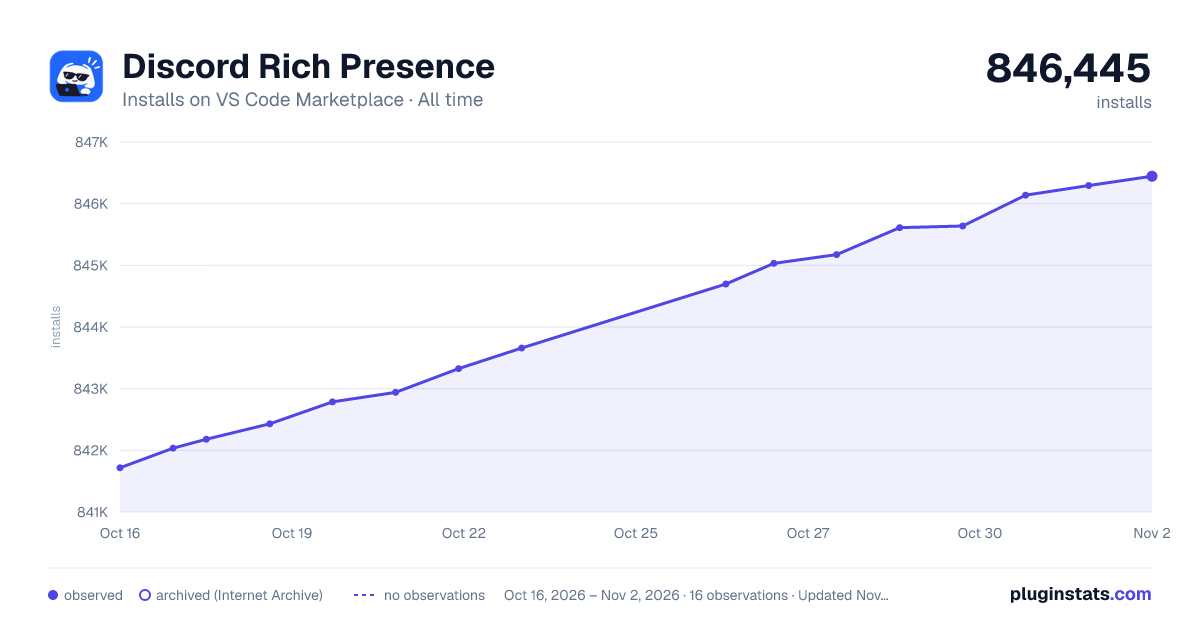

Adoption over time
7/30/90-day growth
Ranking history
Ratings over time
Listing placement
Listing placement
Filled points are observed values; hollow points come from Internet Archive snapshots of the listing page. Dashed segments span periods with no observations — values between points are not interpolated.
Each band is one page of 20. Installs on a linear scale. Placement is projected from installs, so it can differ from the marketplace's own sort order. Hover a dot to see the listing.
Recent observations
Full history (4)Similar VS Code Marketplace Visualization plugins
All 20 Discord Rich Presence alternativesDiscord Rich Presence on other marketplaces
Data source
Install counts, average rating, and rating counts come from the public Visual Studio Marketplace gallery API. Installs are cumulative and exclude updates.
Listing: https://marketplace.visualstudio.com/items?itemName=LeonardSSH.vscord. First seen Oct 16, 2026; last successful collection Oct 19, 2026. See the methodology.