 PluginStats
Metabob: Debug and Refactor with AI installs statistics
By Metabob (2 listings) · VS Code Marketplace · Programming Languages
Generative AI to automate debugging and refactoring Python code
Metabob: Debug and Refactor with AI has 114,162 recorded installs on VS Code Marketplace.
It ranks #2191 of 2,501 tracked VS Code Marketplace listings by installs.
It is rated 4.8 out of 5 from 16 ratings.
PluginStats has 4 daily observations since Oct 16, 2026; the latest is from Oct 19, 2026.
Rating: 4.75 / 5 from 16 ratings
About Metabob: Debug and Refactor with AI
Metabob: Generative AI for debugging & refactoring code
Metabob is an AI-based code review tool that utilizes a combination of Graph Neural Networks (GNNs) and Generative AI (LLMs). Using the underlying techniques, Metabob can detect complex logical problems and vulnerabilities, as well as general opportunities for code quality improvements. Metabob explains its detections in natural language and can generate code recommendations to fix the detections using an integrated fine-tuned LLM.
Supported Languages
• Python • JavaScript • TypeScript • C • C++ • Java
AI Code Review
• Automatically detect problems, vulnerabilities, and code optimization opportunities • View natural language explanations for the detected problems • Generate code recommendations to fix the detected problems • Give feedback on the detections to optimize model performance (discard, endorse)
Features
• Problem, vulnerability & code optimization detection • Detection explanations • LLM interaction: generate code recommendations
Settings
• To disable Metabob anlaysis from running every time code is saved, go to the extension settings and deselect the checkbox under the text "Metabob: Analyze Document On Save" • To change the backend LLM model Metabob uses to generate problem descriptions and code recommendations, select your preferred model from the "Metabob: Backend Selection" drop down menu • If you prefer to use one of the openai models, you need to authenticate by inputting your openai API key into the text field under "Metabob: ChatGPT Token" text field on Metabob's extension settings
Usage
1. Analyze code
2. View detected problems
3. Generate fixes for detected problems
Data Policy
Metabob deletes all data from it's problem detection model one hour after the user has made their last API call. However, as Metabob integrates with third party LLMs to generate problem descriptions and code recommendations to perform fixes, Metabob has to pass data to these models and cannot control how the data is used by the companies hosting these LLMs.
Description from the VS Code Marketplace listing.
- code
- code generation
- copilot
- debugger
- debugging
- generative ai
- generator
- gpt
- lint
- linter
- metabob
- openai
- python
- refactor
Where Metabob: Debug and Refactor with AI sits in the listing
Each band is one page of 20. Installs on a log scale. Placement is projected from installs, so it can differ from the marketplace's own sort order. Hover a dot to see the listing.


Charts
Images: 30d · 1y · all time · 1600×900 dark


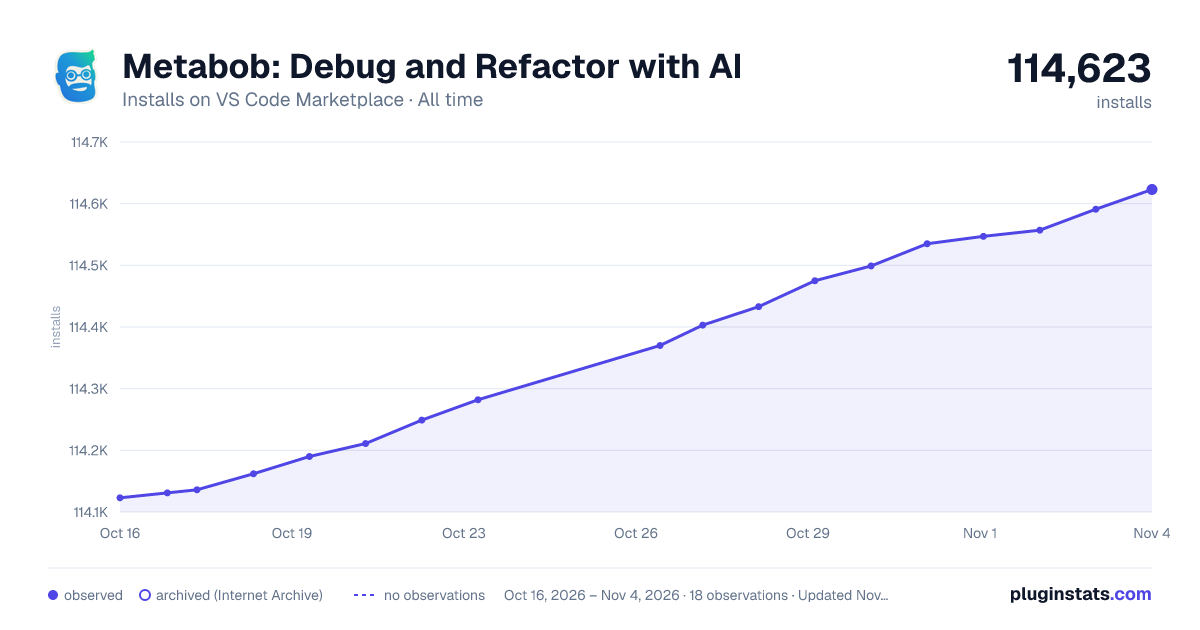

Adoption over time


7/30/90-day growth


Ranking history


Filled points are observed values; hollow points come from Internet Archive snapshots of the listing page. Dashed segments span periods with no observations — values between points are not interpolated.
Recent observations
Full history (4)Similar VS Code Marketplace Programming Languages plugins
Data source
Install counts, average rating, and rating counts come from the public Visual Studio Marketplace gallery API. Installs are cumulative and exclude updates.
Listing: https://marketplace.visualstudio.com/items?itemName=Metabob.metabob. First seen Oct 16, 2026; last successful collection Oct 19, 2026. See the methodology.