 PluginStats
Code Time installs statistics
By Software (2 listings) · VS Code Marketplace · AI
Code Time is an open source plugin that provides programming metrics right in Visual Studio Code.
Code Time has 665,309 recorded installs on VS Code Marketplace.
It ranks #717 of 2,501 tracked VS Code Marketplace listings by installs.
It is rated 3.4 out of 5 from 59 ratings.
PluginStats has 4 daily observations since Oct 16, 2026; the latest is from Oct 19, 2026.
Rating: 3.36 / 5 from 59 ratings
About Code Time
Code Time
Code Time is an open source plugin for automatic programming metrics and time tracking in Visual Studio Code. Join our community of nearly half a million developers who use Code Time to reclaim time for focused, uninterrupted coding. Protect valuable code time and stay in flow.
Looking for more ways to help your team improve their productivity? When you connect your Git provider, you can measure your team’s performance against engineering KPIs and benchmarks, including velocity, quality, and scale. You can identify bottlenecks in your release process — like slow code reviews — and take immediate action, so you can ship faster and more efficiently.
It’s Safe, Secure, and Free
Free for you, forever: We provide 90 days of data history for free, forever. We provide premium plans for advanced features and historical data access.
We never access your code: We do not read, transmit, or store source code. We only provide metrics about programming, and we make it easy to see the data we collect. You can learn more about how we secure your data on our security page.
Your data is private: We will never share your individually identifiable data with your boss. When you create or join a team, we only show KPIs at the team and company level.
Getting Started
Create an account to keep track of your coding data and unlock access to advanced data visualizations in the Code Time dashboard and web app. You can customize your profile, such as your work hours and office type, for advanced time tracking. You can also connect Outlook or Google Calendar to visualize your code time vs. meetings in a single calendar.
Registering an account also lets you connect multiple code editors on multiple devices using the same email account. Your code time data will sync automatically across your devices.
Open Code Time in the sidebar and follow the Getting Started prompts to create a new account, or click Log in to sign into an existing account.
Protect Code Time
Flow Mode makes it easy to eliminate distractions, mute notifications, and stay focused when you are in flow. It detects when you are in a high velocity coding session and automatically silences distractions and prevents interruptions.
With Flow Mode, you can quickly toggle Zen mode or enter full screen. If you connect a Slack workspace, you can pause notifications, update your profile status, and set your presence to *away*. If you connect Google Calendar or Microsoft Outlook, you can also block time on your calendar. You can customize Flow Mode by clicking *Configure settings* in the Code Time sidebar.
Track Development Metrics
Your coding stats can help you understand how you are improving over time.
Your status bar shows you in real-time how many hours and minutes you code each day. A rocket will appear if your active code time exceeds your daily average on this day of the week.
To see an overview of your coding activity and project metrics, open the Code Time panel by clicking on the Code Time icon in your sidebar. Click Dashboard to open your personalized Code Time dashboard in a new editor tab. Your dashboard summarizes your coding data — such as your code time, code time outside work hours, and meeting time — today, yesterday, last week, and over the last 90 days.
Your _code time_ is the total time you have spent in your editor today. Your _active code time_ is the time you spend actively writing and editing code in your editor or IDE. It captures periods of intense focus and flow. Each metric shows how you compare today to your personal averages. Each average is calculated by day of week over the last 90 days (e.g. a Friday average is an average of all previous Fridays).
Explore Data Visualizations
Click More data at antenna.dev in the Code Time sidebar or visit app.antenna.dev to see more advanced data visualizations. You will need to create a free antenna.dev account to use the web app. In the Code Time dashboard, you will be able to track:
Active code time. Visualize your daily active code time. See productivity trends compared to 90-day averages. See how you stack up against the antenna.dev community.
Meeting time. Connect your Google Calendar or Outlook Calendar to visualize meeting time versus code time.
Work-life balance. See how much coding happens during work hours versus nights and weekends so you can find ways to improve your work-life balance.
Engineering KPIs for Teams
Take your team to the next level. antenna.dev makes it easy to automatically track engineering KPIs, including lead time, deployment frequency, and more.
Measure the impact of new tools. See how changes to your engineering organization impact performance over time. Roll out new hiring plans, AI coding tools, platforms, and processes with greater confidence.
Remove bottlenecks and unlock new growth. Setting up the right systems and tools sits at the heart of the developer experience. Development observability helps you uncover hidden bottlenecks and create an environment where every developer can be their most productive.
Build high-performing teams. Better business outcomes are driven by teams that ship predictable and consistent results. Set up standardized metrics across your organization that help teams measure and improve development performance on their own.
Code Time for your entire team. When you upgrade your organization to the Pro plan, you’ll unlock advanced Code Time features for every developer on your team, including custom reports and data exports.
To see your team's engineering KPIs, visit the web app and connect your Git provider app to your antenna.dev account. It's free and takes just a few minutes.
Code Time also collects basic usage metrics to help us make informed decisions about our roadmap.
Data collected and purpose
| Data Collected | Purpose of Data |…
Description from the VS Code Marketplace listing.
- codetime
- flow
- mode
- productivity
- time
Charts
Images: 30d · 1y · all time · 1600×900 dark


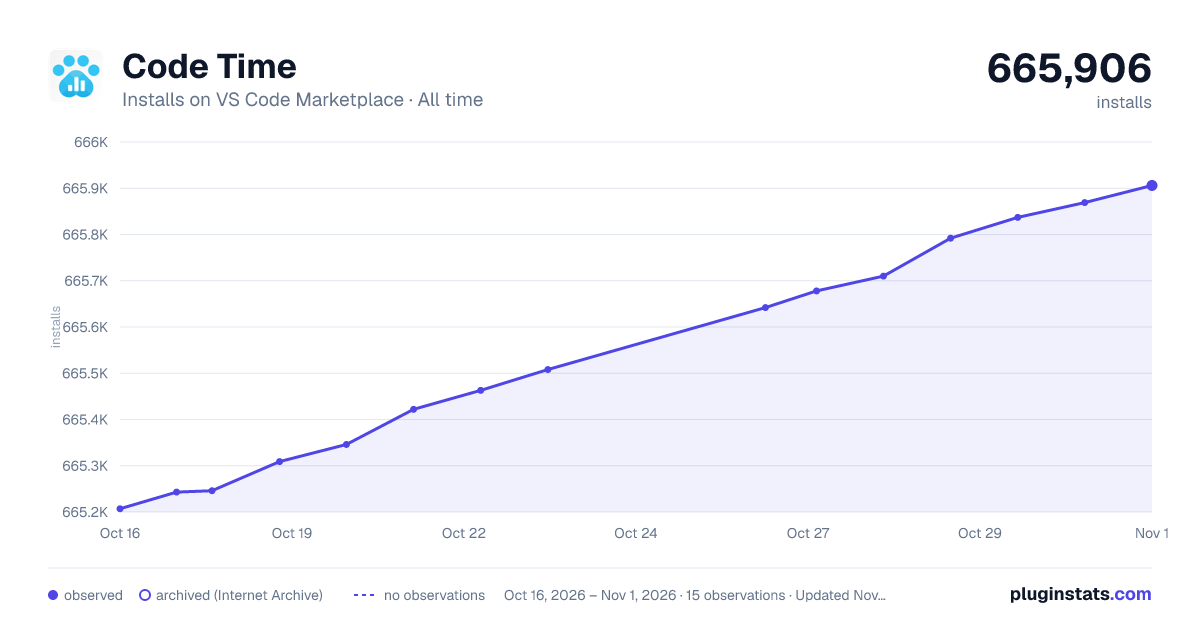

Adoption over time


7/30/90-day growth


Ratings over time


Listing placement


Listing placement


Filled points are observed values; hollow points come from Internet Archive snapshots of the listing page. Dashed segments span periods with no observations — values between points are not interpolated.
Each band is one page of 20. Installs on a log scale. Placement is projected from installs, so it can differ from the marketplace's own sort order. Hover a dot to see the listing.
Recent observations
Full history (4)Similar VS Code Marketplace AI plugins
All 20 Code Time alternativesCode Time on other marketplaces
Data source
Install counts, average rating, and rating counts come from the public Visual Studio Marketplace gallery API. Installs are cumulative and exclude updates.
Listing: https://marketplace.visualstudio.com/items?itemName=softwaredotcom.swdc-vscode. First seen Oct 16, 2026; last successful collection Oct 19, 2026. See the methodology.