 PluginStats
ChatGPT AI installs statistics
By Yale Huang · VS Code Marketplace · Other
Automatically write new code, ask questions, find bugs, and more with ChatGPT AI
ChatGPT AI has 144,086 recorded installs on VS Code Marketplace, ranking #1903 of 2,501 tracked listings.
Rating: 2.50 / 5 from 2 ratings
About ChatGPT AI
ChatGPT AI for VSCode



ChatGPT AI Extension integrates OpenAI's GPT-4, GPT-3.5, GPT-3 and Codex models into Visual Studio Code, providing AI-powered assistance for writing new code, asking questions, finding bugs, refactoring code, and more.
Links:
<br> <img src="https://github.com/yaleh/chatgpt-vscode/raw/HEAD/examples/main.png" alt="Refactoring selected code using chatGPT"/>Features
- 💡 Ask general questions or use code snippets from the editor to query ChatGPT via an input box in the sidebar.
- 💬 View chat history with requests and responses.
- Toggle the display of requests and responses between rendered Markdown and raw text.
- 📝 Insert code snippets from the AI's response into the active editor with corrected indentation.
- 📋 Copy code snippets to the clipboard.
- 📚 Multiple types of context available:
- ❌ No context.
- 📝 Selected text.
- 📂 Whole file.
- 📂🔍 All opened files.
- 🖱️ Right-click on a code selection and run one of the context menu shortcuts for your code:
- 📖 Automatically generate documentation.
- 🤔 Explain the selected code.
- ♻️ Refactor or optimize the code.
- 🐛 Find problems with the code.
- 💻 Complete the code according to the comments.
- 🚀 See the response as it is being generated in real time.
- 💬 Ask follow-up questions to the response and maintain conversation context.
Requirements
To use ChatGPT AI, please ensure that the following requirements are met:
- Visual Studio Code version 1.73.0 or later is installed on your system.
- You have an OpenAI API key or ChatGPT access token.
Installation
To use this extension, install it from the VSCode marketplace.
- After the installation is complete, you will need to add your OpenAI API key to the extension settings in VSCode. To do this, open the
Settingspanel by going to theFilemenu and selectingPreferences, thenSettings. - In the search bar, type
ChatGPTto filter the settings list. - In the ChatGPT section, enter your API key in the top field
After completing these steps, the extension should be ready to use.
API Modes
Currently, there are two modes for accessing the API: "ChatGPTAPI" and "ChatGPTUnofficialProxyAPI".
ChatGPTAPI
To use this extension, you will need an API key from OpenAI. To obtain one, follow these steps:
- Go to OpenAI's website. If you don't have an account, you will need to create one or sign up using your Google or Microsoft account.
- Click on the
Create new secret keybutton. - Copy the key and paste it into the
API Keyfield in the extension settings.
ChatGPTUnofficialProxyAPI
To use the ChatGPTUnofficialProxyAPI, you need an OpenAI access token from the ChatGPT web app. You can obtain the access token in either of two ways:
- Use acheong08/OpenAIAuth, which is a Python script to automatically log in and get an access token. This method works only with email and password accounts; it does not support accounts where you authenticate via Microsoft or Google.
- Manually get an access token by logging in to the ChatGPT web app and opening https://chat.openai.com/api/auth/session, which will return a JSON object containing your access token string.
Access tokens last for approximately eight hours.
Building from source (not applicable for VSCode marketplace version)
To build the extension from source, clone the repository and run npm install to install the dependencies. You have to change some code in chatgpt module because VSCode runtime does not support fetch. Open node_modules/chatgpt/dist/index.js and add the following code at the top of the file:
import fetch from 'node-fetch';
Then remove the following lines (around line 15):
// src/fetch.ts
var fetch = globalThis.fetch;
if (typeof fetch !== "function") {
  throw new Error("Invalid environment: global fetch not defined");
}
You also need to copy encoder.json and vocab.bpe from node_modules/gpt-3-encoder/ into dist/ folder. You can do this by running the following commands:
cp node_modules/gpt-3-encoder/{encoder.json,vocab.bpe} dist/
Using the Extension
To use the extension, open a text editor in Visual Studio Code and open the ChatGPT panel by clicking on the ChatGPT icon in the sidebar. This will open a panel with an input field where you can enter your prompt or question. By clicking enter, it will be sent to ChatGPT. Its response will be displayed below the input field in the sidebar (note that it may take some time for it to be calculated).
<img src="https://github.com/yaleh/chatgpt-vscode/raw/HEAD/examples/create.png" alt="Writing new code using chatGPT" width="500"/>You can also select a code snippet in the editor and then enter a prompt in the side panel, or right-click and select "Ask ChatGPT". The selected code will be automatically appended to your query when it is sent to the AI. This can be useful for generating code snippets or getting explanations for specific pieces of code.
<img src="https://github.com/yaleh/chatgpt-vscode/raw/HEAD/examples/explain.png" alt="Refactoring selected code using chatGPT"/>…
Description from the VS Code Marketplace listing.
- ai
- chatgpt
- copilot
- explain
- find bugs
- gpt3
- openai
- refactor
README badge
Show your rank in a README or on your website. The badge updates automatically.
Charts
Images: 30d · 1y · all time · 1600×900 dark


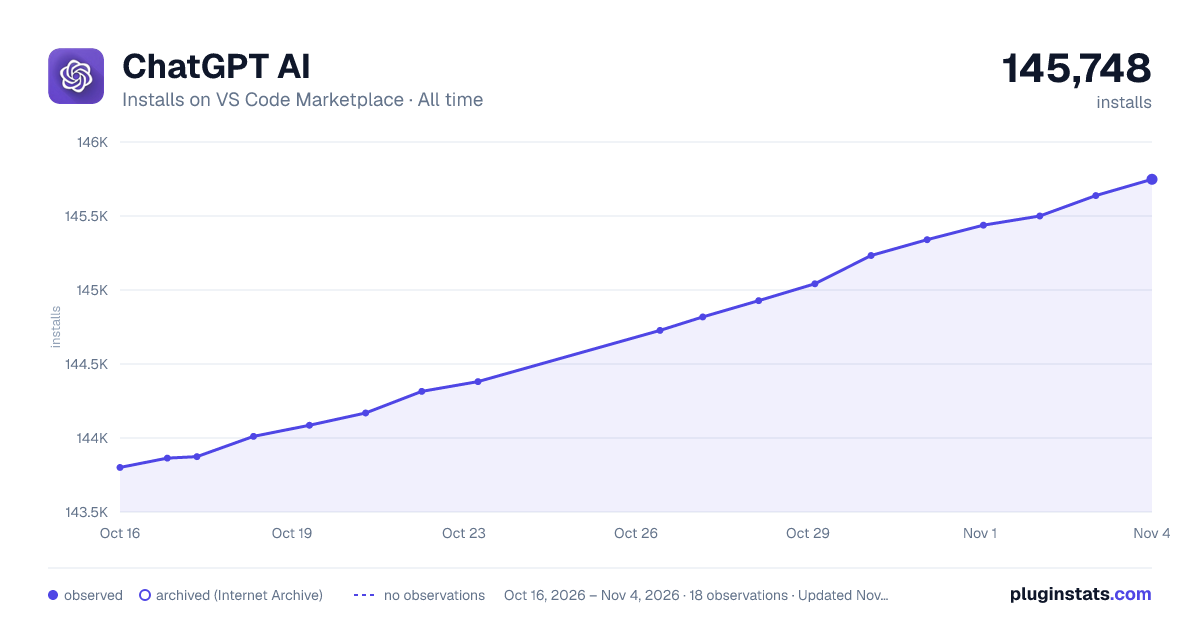

Adoption over time
7/30/90-day growth
Ranking history
Ratings over time
Listing placement
Listing placement
Filled points are observed values; hollow points come from Internet Archive snapshots of the listing page. Dashed segments span periods with no observations — values between points are not interpolated.
Each band is one page of 20. Installs on a linear scale. Placement is projected from installs, so it can differ from the marketplace's own sort order. Hover a dot to see the listing.
Recent observations
Full history (5)Similar VS Code Marketplace Other plugins
All 20 ChatGPT AI alternativesData source
Install counts, average rating, and rating counts come from the public Visual Studio Marketplace gallery API. Installs are cumulative and exclude updates.
Listing: https://marketplace.visualstudio.com/items?itemName=YaleHuang.chatgpt-ai. First seen Oct 16, 2026; last successful collection Oct 20, 2026. See the methodology.