 PluginStats
Numbered Bookmarks installs statistics
By Alessandro Fragnani (8 listings) · VS Code Marketplace · Other
Mark lines and jump to them, in Delphi style
Numbered Bookmarks has 289,366 recorded installs on VS Code Marketplace, ranking #1185 of 2,501 tracked listings.
Rating: 4.65 / 5 from 71 ratings
About Numbered Bookmarks
What's new in Numbered Bookmarks 9
- Fully Open Source again
- Published to Open VSX
- Adds Getting Started / Walkthrough
- Adds Rename file support
- New Sticky Engine
Support
Numbered Bookmarks is an extension created for Visual Studio Code. If you find it useful, please consider supporting it.
<table align="center" width="60%" border="0"> <tr> <td> <a title="Paypal" href="https://www.paypal.com/cgi-bin/webscr?cmd=_donations&business=EP57F3B6FXKTU&lc=US&item_name=Alessandro%20Fragnani&item_number=vscode%20extensions¤cy_code=USD&bn=PP%2dDonationsBF%3abtn_donate_SM%2egif%3aNonHosted"><img src="https://www.paypalobjects.com/en_US/i/btn/btn_donate_SM.gif"/></a> </td> <td> <a title="GitHub Sponsors" href="https://github.com/sponsors/alefragnani"><img src="https://raw.githubusercontent.com/alefragnani/oss-resources/master/images/button-become-a-sponsor-rounded-small.png"/></a> </td> <td> <a title="Patreon" href="https://www.patreon.com/alefragnani"><img src="https://raw.githubusercontent.com/alefragnani/oss-resources/master/images/button-become-a-patron-rounded-small.png"/></a> </td> </tr> </table>Numbered Bookmarks
It helps you to navigate in your code, moving between important positions easily and quickly. No more need to search for code. All of this in in Delphi style.
Features
Available commands
Numbered Bookmarks: Toggle Bookmark '#number'Mark/unmark the current position with a numbered bookmarkNumbered Bookmarks: Jump to Bookmark '#number'Move the cursor to the numbered bookmarkNumbered Bookmarks: ListList all bookmarks from the current fileNumbered Bookmarks: List from All FilesList all bookmarks from the all filesNumbered Bookmarks: Clearremove all bookmarks from the current fileNumbered Bookmarks: Clear from All Filesremove all bookmarks from the all files
Both Toggle Bookmark and Jump to Bookmark commands are numbered from 0 to 9
The Numbered Bookmark 0 has been reactivated in [PR #16](https://github.com/alefragnani/vscode-numbered-bookmarks/pull/16), but because of this issue it has no keyboard shortcut defined. If sometime in the future these OS related limitation disappears, the shortcuts will be restored.
MacOS users should be aware that some commands shortcuts should conflict with native shortcuts, and uses
Cmdinstead ofCtrl(Cmd + Shift + 3andCmd + Shift + 4)
Manage your bookmarks
Toggle Bookmark '#number'
You can easily Mark/Unmark bookmarks on any position.

The default shortcuts are numbered from 0 to 9:
Toggle Bookmark #(Ctrl + Shift + #)
Navigation
Jump to Bookmark '#number'
The default shortcuts are numbered from 0 to 9:
Jump to Bookmark #(Ctrl + #)
List
List all bookmarks from the current file and easily navigate to any one. It shows you the line contents and temporarily scroll to that position.
List from All Files
List all bookmarks from all files and easily navigate to any one. It shows you the line contents and temporarily scroll to that position.

- Bookmarks from the active file shows the line content and the position
- Bookmarks from other files also shows the relative file path
Improved Multi-root support
When you work with multi-root workspaces, the extension can manage the bookmarks individually for each folder.
Simply define saveBookmarksInProject as true on your User Settings or in the Workspace Settings, and when you run the Numbered Bookmarks: List from All Files command, you will be able to select from which folder the bookmarks will be shown.

Remote Development support
The extension now fully supports Remote Development scenarios.
It means that when you connect to a remote location, like a Docker Container, SSH or WSL, the extension will be available, ready to be used.
You don't need to install the extension on the remote anymore.
Better yet, if you use numberedBookmarks.saveBookmarksInProject setting defined as true, the bookmarks saved locally will be available remotely, and you will be able to navigate and update the bookmarks. Just like it was a resource from folder you opened remotely.
Available Settings
- Bookmarks are always saved between sessions, and you can decide if it should be saved in the Project, so you can add it to your Git/SVN repo and have it in all your machines (
falseby default). Set totrueand it will save the bookmarks in.vscode\numbered-bookmarks.jsonfile.
"numberedBookmarks.saveBookmarksInProject": true
- Controls whether to show a warning when a bookmark is not defined (
falseby default)
"numberedBookmarks.showBookmarkNotDefinedWarning": true
- Per User Requests it is now possible to choose how Bookmarks Navigate Through All Files:
"numberedBookmarks.navigateThroughAllFiles"
Possible Values:…
Description from the VS Code Marketplace listing.
- bookmark
- Delphi
- jump
- keybindings
- mark
- multi-root ready
- navigation
- sticky
README badge
Show your rank in a README or on your website. The badge updates automatically.
Charts
Images: 30d · 1y · all time · 1600×900 dark


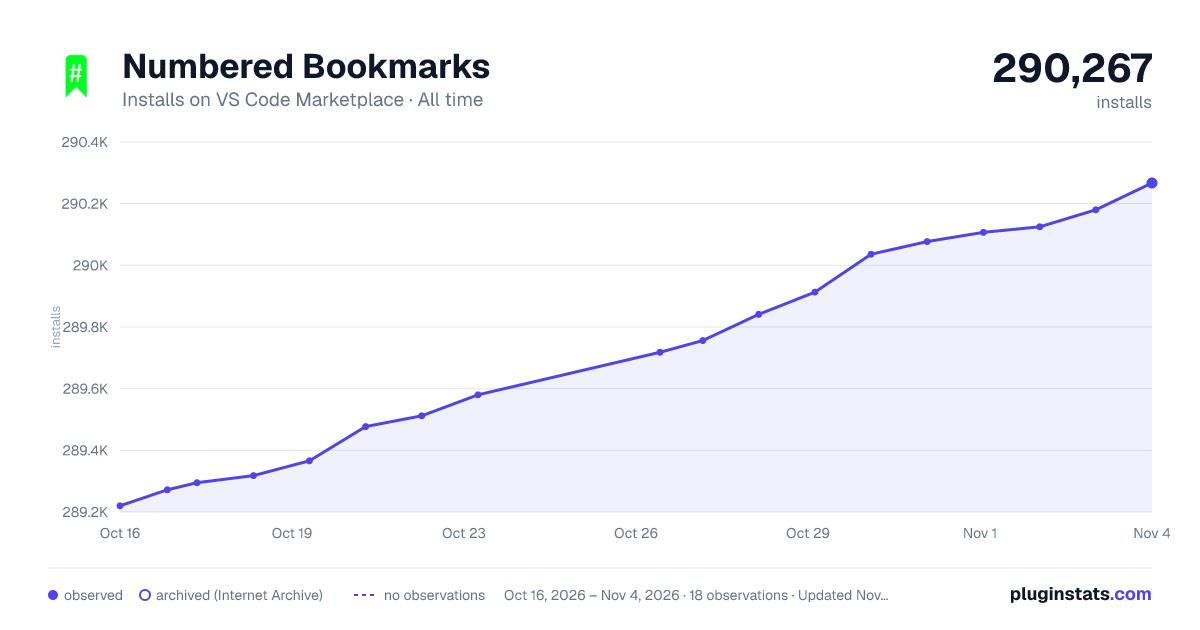

Adoption over time
7/30/90-day growth
Ranking history
Ratings over time
Listing placement
Listing placement
Filled points are observed values; hollow points come from Internet Archive snapshots of the listing page. Dashed segments span periods with no observations — values between points are not interpolated.
Each band is one page of 20. Installs on a linear scale. Placement is projected from installs, so it can differ from the marketplace's own sort order. Hover a dot to see the listing.
Recent observations
Full history (5)Similar VS Code Marketplace Other plugins
All 20 Numbered Bookmarks alternativesData source
Install counts, average rating, and rating counts come from the public Visual Studio Marketplace gallery API. Installs are cumulative and exclude updates.
Listing: https://marketplace.visualstudio.com/items?itemName=alefragnani.numbered-bookmarks. First seen Oct 16, 2026; last successful collection Oct 20, 2026. See the methodology.