 PluginStats
Application Wizard installs statistics
By SAP OS · VS Code Marketplace · Other
Provides rich user experience for Yeoman generators.
Application Wizard has 238,286 recorded installs on VS Code Marketplace.
It ranks #1342 of 2,501 tracked VS Code Marketplace listings by installs.
It is rated 5.0 out of 5 from 12 ratings.
PluginStats has 4 daily observations since Oct 16, 2026; the latest is from Oct 19, 2026.
Rating: 5.00 / 5 from 12 ratings
About Application Wizard
Application Wizard
With the Application Wizard extension, you can benefit from a rich user experience for yeoman generators. This extension allows developers to reuse existing yeoman generators and provide wizard-like experience with no development efforts.
Requirements
• node.js version 10 or higher. • VSCode 1.39.2 or higher or Theia 0.12 or higher.
Installation
From the VS Code Marketplace
In the Application Wizard VS Code marketplace page, click Install.
From GitHub Releases
1. Go to GitHub Releases. 2. Search for the .vsix archive under Assets for the specific release. 3. Follow the instructions for installing an extension from a .vsix file in the VSCode's guide.
Updates
By default, VS Code auto-updates extensions as new versions become available as explained in https://code.visualstudio.com/docs/supporting/faq#_how-do-i-opt-out-of-vs-code-autoupdates. If auto-update is disabled in your VS Code, you should update the extension manually to the latest version frequently to avoid supply-chain attack and other cyberattacks.
Usage
Open VS Code Command Palette and choose "Open Template Wizard" command to open the Wizard.
Enable usage analytics reporting from VS Code
The tool collects non-personally identifiable information about your usage of the tool to improve its services. If you do not want the tool to collect your usage data you can set the "Enable Sap Web Analytics" setting to "false". Go to File > Preferences > Settings (macOS: Code > Preferences > Settings) > Extensions > Application Wizard, and deselect the "Enable Sap Web Analytics" checkbox.
How to obtain support
To get more help, support, and information please open a github issue.
Contributing
Contributing information can be found in the CONTRIBUTING.md file.
Description from the VS Code Marketplace listing.
- generator
- sap
- wizard
- yeoman
- yo
Where Application Wizard sits in the listing
Each band is one page of 20. Installs on a log scale. Placement is projected from installs, so it can differ from the marketplace's own sort order. Hover a dot to see the listing.


Charts
Images: 30d · 1y · all time · 1600×900 dark


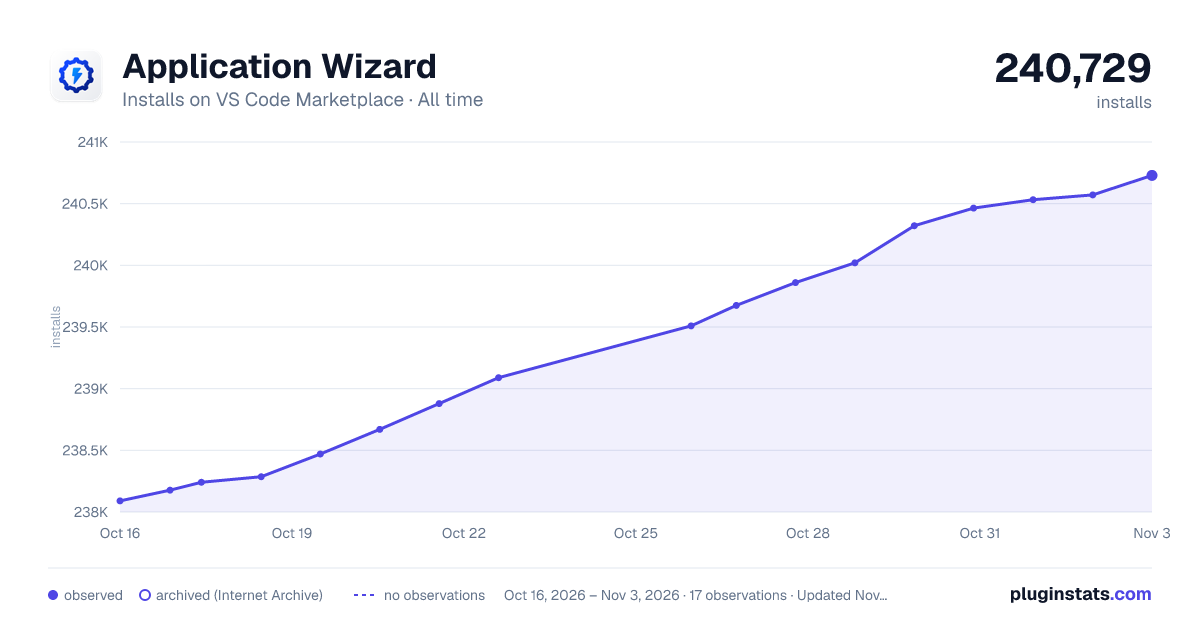

Adoption over time


7/30/90-day growth


Ranking history


Filled points are observed values; hollow points come from Internet Archive snapshots of the listing page. Dashed segments span periods with no observations — values between points are not interpolated.
Recent observations
Full history (4)Similar VS Code Marketplace Other plugins
Data source
Install counts, average rating, and rating counts come from the public Visual Studio Marketplace gallery API. Installs are cumulative and exclude updates.
Listing: https://marketplace.visualstudio.com/items?itemName=SAPOS.yeoman-ui. First seen Oct 16, 2026; last successful collection Oct 19, 2026. See the methodology.