 PluginStats
IntelliJ IDEA Keybindings installs statistics
By Keisuke Kato (2 listings) · VS Code Marketplace · Keymaps
Port of IntelliJ IDEA Keybindings, including for WebStorm, PyCharm, PHP Storm, etc.
IntelliJ IDEA Keybindings has 2,453,320 recorded installs on VS Code Marketplace, ranking #297 of 2,502 tracked listings.
Rating: 4.83 / 5 from 100 ratings
About IntelliJ IDEA Keybindings
IntelliJ IDEA Key Bindings for Visual Studio Code



Port of IntelliJ IDEA key bindings for VS Code. Includes keymaps for popular JetBrains products like IntelliJ Ultimate, WebStorm, PyCharm, PHP Storm, etc.
Editing
| Linux, Windows | macOS | Feature | Supported |
|---|---|---|---|
| ctrl+space | ctrl+space | Basic code completion (the name of any class, method or variable) | ✅ |
| ctrl+shift+space | ctrl+shift+space | Smart code completion (filters the list of methods and variables by expected type) | N/A |
| enter | enter | Choose Lookup Item | ✅ |
| tab | tab | Choose Lookup Item Replace | ✅ |
| ctrl+shift+enter | cmd+shift+enter | Complete Current Statement | ✅ |
| ctrl+p | cmd+p | Parameter info (within method call arguments) | ✅ |
| ctrl+q | ctrl+j | Quick documentation lookup | ✅ |
| N/A | f1 | Quick documentation lookup | ✅ |
| ctrl+f1 | shift+f1 | External Doc | N/A |
| ctrl+mouseover | cmd+mouseover | Brief Info | N/A |
| ctrl+f1 | cmd+f1 | Show descriptions of error or warning at caret | ✅ |
| alt+insert | cmd+n | Generate code... (Getters, Setters, Constructors, hashCode/equals, toString) | ✅ |
| alt+insert | cmd+n | New... | ✅ |
| ctrl+o | ctrl+o | Override methods | ✅ |
| ctrl+i | ctrl+i | Implement methods | ✅ |
| ctrl+alt+t | cmd+alt+t | Surround with... (if..else, try..catch, for, synchronized, etc.) | N/A |
| N/A | N/A | Open in Opposite Group | ✅ |
| ctrl+/ | cmd+/ | Comment/uncomment with line comment | ✅ |
| ctrl+numpad_divide | cmd+numpad_divide | Comment/uncomment with line comment | ✅ |
| ctrl+shift+/ | cmd+alt+/ | Comment/uncomment with block comment | ✅ |
| ctrl+shift+numpad_divide | cmd+alt+numpad_divide | Comment/uncomment with block comment | ✅ |
| ctrl+w | alt+up | Select successively increasing code blocks | ✅ |
| ctrl+shift+w | alt+down | Decrease current selection to previous state | ✅ |
| alt+q | ctrl+shift+q | Context info | N/A |
| alt+enter | alt+enter | Show intention actions and quick-fixes | ✅ |
| ctrl+alt+l | cmd+alt+l | Reformat code | ✅ |
| ctrl+alt+l | cmd+alt+l | Reformat selected code | ✅ |
| ctrl+alt+o | ctrl+alt+o | Optimize imports | ✅ |
| ctrl+alt+i | ctrl+alt+i | Auto-indent line(s) | N/A |
| tab | tab | Indent selected lines | N/A |
| shift+tab | shift+tab | Unindent selected lines | N/A |
| ctrl+x | cmd+x | Cut current line or selected block to clipboard | ✅ |
| shift+delete | cmd+delete | Cut current line or selected block to clipboard | ✅ |
| ctrl+c | cmd+c | Copy current line or selected block to clipboard | ✅ |
| ctrl+v | cmd+v | Paste from clipboard | ✅ |
| ctrl+shift+v | cmd+shift+v | Paste from recent buffers... | N/A |
| ctrl+d | cmd+d | Duplicate Line | ✅ |
| ctrl+d | cmd+d | Duplicate Selection | ✅ |
| ctrl+y | cmd+backspace | Delete line at caret | ✅ |
| ctrl+shift+j | ctrl+shift+j | Smart line join | ✅ |
| ctrl+enter | cmd+enter | Smart line split | ✅ |
| shift+enter | shift+enter | Start new line | ✅ |
| ctrl+shift+u | cmd+shift+u | Toggle case for word at caret or selected block | N/A |
| ctrl+shift+] | cmd+shift+] | Select till code block end | N/A |
| ctrl+shift+[ | cmd+shift+[ | Select till code block start | N/A |
| ctrl+right | alt+right | Cursor to word end | ✅ |
| ctrl+right | alt+right | Cursor to hump end | ✅ |
| ctrl+left | alt+left | Cursor to word start | ✅ |
| ctrl+left | alt+left | Cursor to hump start | ✅ |
| ctrl+shift+right | alt+shift+right | Select to word end | ✅ |
| ctrl+shift+right | alt+shift+right | Select to hump end | ✅ |
| ctrl+shift+left | alt+shift+left | Select to word start | ✅ |
| ctrl+shift+left | alt+shift+left | Select to hump start | ✅ |
| ctrl+delete | alt+delete | Delete to word end | ✅ |
| ctrl+delete | alt+delete | Delete to hump end | ✅ |
| ctrl+backspace | alt+backspace | Delete to word start | ✅ |
| ctrl+backspace | alt+backspace | Delete to hump start | ✅ |
| ctrl+. | cmd+. | Fold selection | ✅ |
| ctrl+= | cmd+= | Expand code block | ✅ |
| ctrl+numpad_add | cmd+numpad_add | Expand code block | ✅ |
| ctrl+- | cmd+- | Collapse code block | ✅ |
| ctrl+numpad_subtract | cmd+numpad_subtract | Collapse code block | ✅ |
| ctrl+alt+= | cmd+alt+= | Expand code block recursively | ✅ |
| ctrl+alt+numpad_add | cmd+alt+numpad_add | Expand code block recursively | ✅ |
| ctrl+alt+- | cmd+alt+- | Collapse code block recursively | ✅ |
| ctrl+alt+numpad_subtract | cmd+alt+numpad_subtract | Collapse code block recursively | ✅ |
| ctrl+shift+= | cmd+shift+= | Expand all | ✅ |
| ctrl+shift+numpad_add | cmd+shift+numpad_add | Expand all | ✅ |
| ctrl+shift+- | cmd+shift+- | Collapse all | ✅ |
| ctrl+shift+numpad_subtract | cmd+shift+numpad_subtract | Collapse all | ✅ |
| ctrl+f4 | cmd+w | Close active editor tab | ✅ |
| alt+j | ctrl+g | Add selection for Next Occurrence | ✅ |
| alt+shift+j | ctrl+shift+g | Unselect Occurrence | ✅ |
| shift+alt+down | shift+alt+down | Move Line Down | ✅ |
| shift+alt+up | shift+alt+up | Move Line Up | ✅ |
| shift+alt+insert | shift+cmd+8 | Column Selection Mode | ✅ |
| shift+alt+. | shift+ctrl+. | Increase Font Size in All Editors | ✅ |
| shift+alt+, | shift+ctrl+, | Decrease Font Size in All Editors | ✅ |
Search/Replace
| Linux, Windows | macOS | Feature | Supported |
|---|---|---|---|
| shift shift | shift shift | Search everywhere | ✅ |
| ctrl+f | cmd+f | Find | ✅ |
| f3 | cmd+g | Find next | ✅ |
| shift+f3 | cmd+shift+g | Find previous | ✅ |
| ctrl+r | cmd+r | Replace | ✅ |
| ctrl+shift+f | cmd+shift+f | Find in path | ✅ |
| ctrl+shift+r | cmd+shift+r | Replace in path | ✅ |
| ctrl+shift+s | cmd+shift+s | Search structurally (Ultimate Edition only) | N/A |
| ctrl+shift+m | cmd+shift+m | Replace structurally (Ultimate Edition only) | N/A |
Usage Search…
Description from the VS Code Marketplace listing.
- IntelliJ
- Keybinding
- keybindings
- keymap
- php
README badge
Show your rank in a README or on your website. The badge updates automatically.
Charts
Images: 30d · 1y · all time · 1600×900 dark


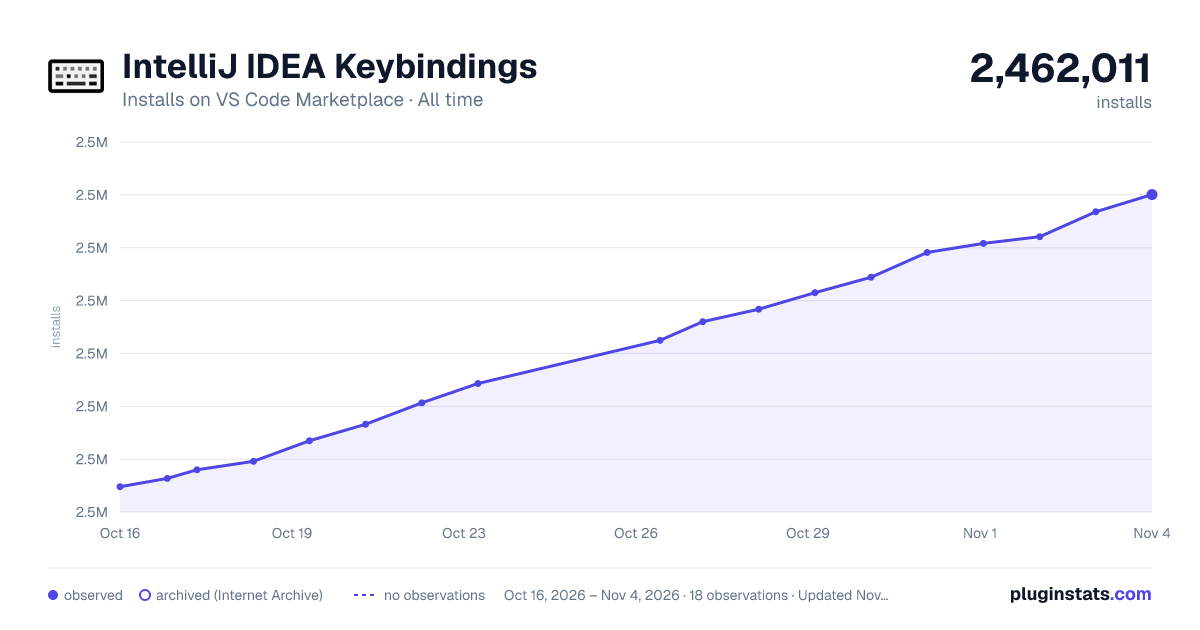

Adoption over time
7/30/90-day growth
Ranking history
Ratings over time
Listing placement
Listing placement
Filled points are observed values; hollow points come from Internet Archive snapshots of the listing page. Dashed segments span periods with no observations — values between points are not interpolated.
Each band is one page of 20. Installs on a linear scale. Placement is projected from installs, so it can differ from the marketplace's own sort order. Hover a dot to see the listing.
Recent observations
Full history (6)Similar VS Code Marketplace Keymaps plugins
All 20 IntelliJ IDEA Keybindings alternativesData source
Install counts, average rating, and rating counts come from the public Visual Studio Marketplace gallery API. Installs are cumulative and exclude updates.
Listing: https://marketplace.visualstudio.com/items?itemName=k--kato.intellij-idea-keybindings. First seen Oct 16, 2026; last successful collection Oct 21, 2026. See the methodology.