 PluginStats
Local History installs statistics
By xyz (2 listings) · VS Code Marketplace · Other
Save files into local history
Local History has 1,055,770 recorded installs on VS Code Marketplace, ranking #523 of 2,501 tracked listings.
Rating: 4.29 / 5 from 62 ratings
About Local History
Local History
A visual source code plugin for maintaining local history of files.
Every time you modify a file, a copy of the old contents is kept in the local history.
At any time, you can compare a file with any older version from the history.
It can help you out when you change or delete a file by accident.
The history can also help you out when your workspace has a catastrophic problem.
Each file revision is stored in a separate file inside the .history folder of your workspace directory
(you can also configure another location, see local-history.path).
e.g., .history/foo/bar/myFile_20151212205930.ts
You can easily navigate between history files with the local-history tree in the explorer pane.<BR>
When you click on a file, a comparaison with the current version is displayed.<BR> You can also access other commands via a context menu.<BR>

You have different views to filter:
- all
- current file (default)
- specific file (you can enter a search pattern)

The files displayed depend on setting local-history.maxDisplay to see more, use search-plus icon.
Settings
    "local-history.daysLimit":  30  // A day number to purge local history. (0: no purge)
    "local-history.maxDisplay": 10  // A max files to display with local history commands
    "local-history.saveDelay":   0  // A delay in seconds to save file in local history. {0: no delay}
    "local-history.dateLocale":     // The locale to use when displaying date (e.g.: "fr-CH" or "en-GB" or ...)

    "local-history.path":     // Specify another location for .history folder (null: use workspaceFolder)
        This settings must be an absolute path.

        You can start your path with:
        ${workspaceFolder}: current workspace folder
            e.g. ${workspaceFolder}/.vscode to save in each workspace folder .vscode/.history
        ${workspaceFolder: index}: specific workspace index
            e.g. workspace folders A, B, C. But save always in A/.history => ${workspaceFolder: 0}

        Your can also use specific variable in path:
        - %variable%: an environnement variable (e.g. %AppData%)
        - ~: the home directory (linux)

    "local-history.absolute": // Save absolute or relative path in local-history.path
        true:  (absolute) // <local-history.path>/.history/<absolutePath>
        false: (relative) // (default) <local-history.path>/.history/<workspaceFolder.basename>/<relativePath>

    "local-history.enabled":
        0: Never     // Possibillity to disabled the extension for some project
        1: Always    // (default) Save also single file with no workspaceFolder ("local-history.path" must be defined)
        2: Workspace // Save only files within workspaceFolder

    "local-history.exclude": // Files or folders to not save
        // (default) ['**/.history/**', '**/.vscode**', '**/node_modules/**', '**/typings/**', '**/out/**']

    "local-history.treeLocation": // Specify a location for tree view
        explorer (default): // Show tree in Explorer item
        localHistory:       // Show tree in a special active bar item
Commands
local-history.showAll // Show all history available to select (limited with maxDisplay settings)
local-history.showCurrent // Show current version (if history version is active)
local-history.compareToCurrent // compare current version with another version in history
local-history.compareToActive // compare active file with another version in history
local-history.compareToPrevious // compare a version in history with its previous version
Note
When .history folder is stored in workspace, you can add a "files.exclude". This hides .history folder and avoids some issues. (e.g. csproj extension)<BR> Thanks to @pabloarista (issue #13)
Description from the VS Code Marketplace listing.
- backup
- history
- local
- multi-root ready
- save
README badge
Show your rank in a README or on your website. The badge updates automatically.
Charts
Images: 30d · 1y · all time · 1600×900 dark


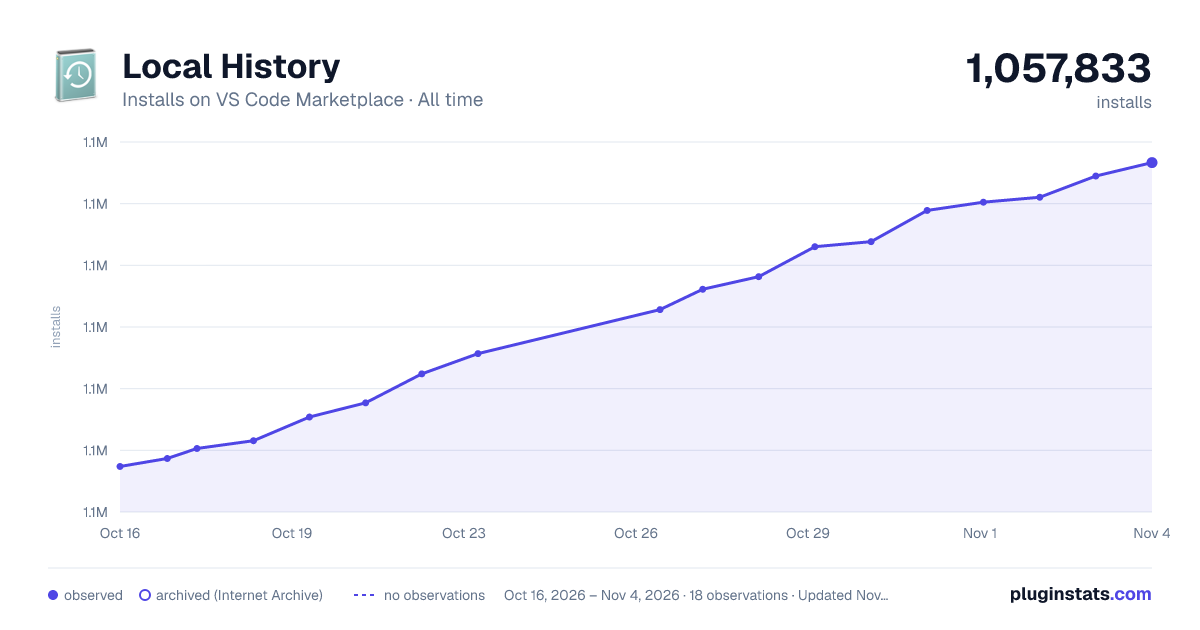

Adoption over time
7/30/90-day growth
Ranking history
Ratings over time
Listing placement
Listing placement
Filled points are observed values; hollow points come from Internet Archive snapshots of the listing page. Dashed segments span periods with no observations — values between points are not interpolated.
Each band is one page of 20. Installs on a linear scale. Placement is projected from installs, so it can differ from the marketplace's own sort order. Hover a dot to see the listing.
Recent observations
Full history (5)Similar VS Code Marketplace Other plugins
All 20 Local History alternativesData source
Install counts, average rating, and rating counts come from the public Visual Studio Marketplace gallery API. Installs are cumulative and exclude updates.
Listing: https://marketplace.visualstudio.com/items?itemName=xyz.local-history. First seen Oct 16, 2026; last successful collection Oct 20, 2026. See the methodology.