 PluginStats
Cline installs statistics
By Cline (2 listings) · VS Code Marketplace · Programming Languages
Autonomous coding agent right in your IDE, capable of creating/editing files, running commands, using the browser, and more with your permission every step of the way.
Cline has 5,661,925 recorded installs on VS Code Marketplace.
It ranks #164 of 2,501 tracked VS Code Marketplace listings by installs.
It is rated 4.0 out of 5 from 323 ratings.
PluginStats has 4 daily observations since Oct 16, 2026; the latest is from Oct 19, 2026.
Rating: 4.02 / 5 from 323 ratings
About Cline
Cline
Download on VS Marketplace Discord r/cline Feature Requests Getting Started
Meet Cline, an AI assistant that can use your CLI aNd Editor.
Thanks to Claude Sonnet's agentic coding capabilities, Cline can handle complex software development tasks step-by-step. With tools that let him create & edit files, explore large projects, use the browser, and execute terminal commands (after you grant permission), he can assist you in ways that go beyond code completion or tech support. Cline can even use the Model Context Protocol (MCP) to create new tools and extend his own capabilities. While autonomous AI scripts traditionally run in sandboxed environments, this extension provides a human-in-the-loop GUI to approve every file change and terminal command, providing a safe and accessible way to explore the potential of agentic AI.
1. Enter your task and add images to convert mockups into functional apps or fix bugs with screenshots. 2. Cline starts by analyzing your file structure & source code ASTs, running regex searches, and reading relevant files to get up to speed in existing projects. By carefully managing what information is added to context, Cline can provide valuable assistance even for large, complex projects without overwhelming the context window. 3. Once Cline has the information he needs, he can: • Create and edit files + monitor linter/compiler errors along the way, letting him proactively fix issues like missing imports and syntax errors on his own. • Execute commands directly in your terminal and monitor their output as he works, letting him e.g., react to dev server issues after editing a file. • For web development tasks, Cline can launch the site in a headless browser, click, type, scroll, and capture screenshots + console logs, allowing him to fix runtime errors and visual bugs. 4. When a task is completed, Cline will present the result to you with a terminal command like open -a "Google Chrome" index.html, which you run with a click of a button.
[!TIP] Follow this guide to open Cline on the right side of your editor. This lets you use Cline side-by-side with your file explorer, and see how he changes your workspace more clearly.
Use any API and Model
Cline supports API providers like OpenRouter, Anthropic, OpenAI, Google Gemini, AWS Bedrock, Azure, GCP Vertex, Cerebras and Groq. You can also configure any OpenAI compatible API, or use a local model through LM Studio/Ollama. If you're using OpenRouter, the extension fetches their latest model list, allowing you to use the newest models as soon as they're available.
The extension also keeps track of total tokens and API usage cost for the entire task loop and individual requests, keeping you informed of spend every step of the way.
Run Commands in Terminal
Cline can execute commands and receive their output to install packages, run build scripts, deploy applications, manage databases, and run tests, all while adapting to your dev environment & toolchain to get the job done right.
By default, commands run in a visible VS Code terminal, using the shell integration API introduced in VSCode v1.93 to stream output as commands run and let you watch or interact with them directly. You can switch to running commands in a background process instead (Settings → Terminal → Terminal Execution Mode).
Create and Edit Files
Cline can create and edit files directly in your editor, presenting you a diff view of the changes. You can edit or revert Cline's changes directly in the diff view editor, or provide feedback in chat until you're satisfied with the result. Cline also monitors linter/compiler errors (missing imports, syntax errors, etc.) so he can fix issues that come up along the way on his own.
All changes made by Cline are recorded in your file's Timeline, providing an easy way to track and revert modifications if needed.
Use the Browser
With Claude Sonnet's new Computer Use capability, Cline can launch a browser, click elements, type text, and scroll, capturing screenshots and console logs at each step. This allows for interactive debugging, end-to-end testing, and even general web use! This gives him autonomy to fixing visual bugs and runtime issues without you needing to handhold and copy-pasting error logs yourself.
Try asking Cline to "test the app", and watch as he runs a command like npm run dev, launches your locally running dev server in a browser, and performs a series of tests to confirm that everything works. See a demo here.
"add a tool that..."
Thanks to the Model Context Protocol, Cline can extend his capabilities through custom tools. While you can use community-made servers, Cline can instead create and install tools tailored to your specific workflow. Just ask Cline to "add a tool" and he will handle everything, from creating a new MCP server to installing it into the extension. These custom tools then become part of Cline's toolkit, ready to use in future tasks.
• "add a tool that fetches Jira tickets": Retrieve ticket ACs and put Cline to work • "add a tool that manages AWS EC2s": Check server metrics and scale instances up or down • "add a tool that pulls the latest PagerDuty incidents": Fetch details and ask Cline to fix bugs
Add Context
@url: Paste in a URL for the extension to fetch and convert to markdown, useful when you want to give Cline the latest docs
@problems: Add workspace errors and warnings ('Problems' panel) for Cline to fix
@file: Adds a file's contents so you don't have to waste API requests approving read file (+ type to search files)
@folder: Adds folder's files all at once to speed up your workflow even more
Checkpoints: Compare and Restore
As Cline works through a task, the extension takes a snapshot of your workspace at each step. You can use the 'Compare' button to see a diff between the snapshot and your current workspace, and the 'Restore' button to roll back to that point.…
Description from the VS Code Marketplace listing.
- agent
- AI
- autonomous
- chatgpt
- Claude
- cline
- coding
- dev
- keybindings
- llama
- mcp
- openrouter
- sonnet
Where Cline sits in the listing
Each band is one page of 20. Installs on a log scale. Placement is projected from installs, so it can differ from the marketplace's own sort order. Hover a dot to see the listing.


Charts
Images: 30d · 1y · all time · 1600×900 dark


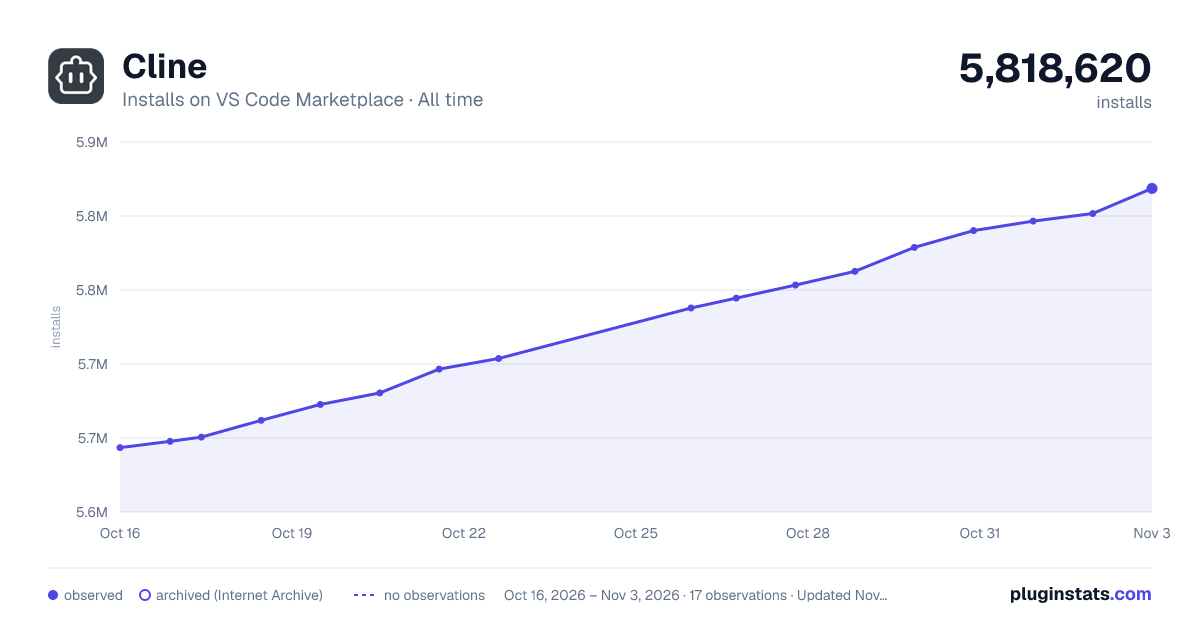

Adoption over time


7/30/90-day growth


Filled points are observed values; hollow points come from Internet Archive snapshots of the listing page. Dashed segments span periods with no observations — values between points are not interpolated.
Recent observations
Full history (4)Similar VS Code Marketplace Programming Languages plugins
Data source
Install counts, average rating, and rating counts come from the public Visual Studio Marketplace gallery API. Installs are cumulative and exclude updates.
Listing: https://marketplace.visualstudio.com/items?itemName=saoudrizwan.claude-dev. First seen Oct 16, 2026; last successful collection Oct 19, 2026. See the methodology.