 PluginStats
Split HTML Attributes (Vue, React, Angular) installs statistics
By Danny Connell · VS Code Marketplace · Formatters
Split your Vue, React & Angular directives & props (and HTML attributes) onto new lines, instantly!
Split HTML Attributes (Vue, React, Angular) has 150,195 recorded installs on VS Code Marketplace, ranking #1854 of 2,501 tracked listings.
Rating: 4.70 / 5 from 20 ratings
About Split HTML Attributes (Vue, React, Angular)
Split HTML Attributes (Vue, React, Angular) - VSCode Extension
Tired of manually splitting your HTML attributes (or / / directives & props) up onto multiple lines?
You can now do it instantly with this extension:
Theme: Make Apps Theme
Created by Danny, from Make Apps with Danny (YouTube Channel)"):
")
Contents
• Support • Features • Opening Tags • Self-Closing Tags • Multiple Selections • Closing Bracket on New Line • Ordering • Unsplit Attributes • Usage • Extension Settings • Settings • Keybindings • Don't Forget... • Known Issues • Change Log • My Other VSCode Extensions
Support
Find this extension useful? Please support it by leaving a review:
Features
Opening Tags
The extension works on opening tags:
Theme: Make Apps Theme
Self-Closing Tags
As well as self-closing tags:
Theme: Make Apps Theme
Multiple Selections
And even works with multiple selections:
Theme: Make Apps Theme
Closing Bracket on New Line
You can choose whether to place your closing bracket (> or />) on a new line or not:
Theme: Make Apps Theme
Ordering
You can set the sort order for your attributes. For example, as a Vue.js developer, you can make sure your important Vue directives & handlers come first:
Theme: Make Apps Theme
Unsplit Attributes
If you trigger the extension on an opening (or self-closing) tag that's already split, it will unsplit it back onto a single line:
Theme: Make Apps Theme
Usage
Just select your opening (or self-closing) tag - from the opening angle bracket () and either: • Open Command Pallette (CMD/CTRL + Shift + P) and choose Split HTML Attributes • Or use the keyboard shortcut (which defaults to Ctrl + Alt + Shift + A)
Extension Settings
Settings
| Setting | Default | Type | | - | - | - | | tabSize splitHTMLAttributes.tabSize
Set the indentation size for your split lines. | 2 | Number | useSpacesForTabs splitHTMLAttributes.useSpacesForTabs
Use spaces for indentation (instead of tabs). | true | Boolean | closingBracketOnNewLine splitHTMLAttributes.closingBracketOnNewLine
Place closing bracket (> or />) on a new line.| false | Boolean | sortOrder splitHTMLAttributes.sortOrder
Preferred sort order of attributes. Can be an array of strings or regex. A typical setting for Vue.js development might be: ["^v-if", "^v-else", "^v-show", "^v-model", "^v-for", "^:key", "^key", "^v-", "^:", "^@click", "^@", "^id", "^class", "^.*=""] Which would sort your attributes like so: | [] | Array
Keybindings
You can change the keyboard shorcut. This is the default:
Don't Forget...
If you find this extension useful, please support it by leaving a review:
Known Issues
No known issues yet.
Change Log
View the Change Log here
My Other VSCode Extensions
• Make Apps Theme
Description from the VS Code Marketplace listing.
- angular
- angularjs
- break
- break angular directives
- break directives
- break react directives
- break up
- break up angular directives
- break up directives
- break up react directives
- break up vue directives
- break vue directives
- danny connell
- format
- formatter
- javascript
- keybindings
- make apps with danny
- new lines
- react
README badge
Show your rank in a README or on your website. The badge updates automatically.
Charts
Images: 30d · 1y · all time · 1600×900 dark


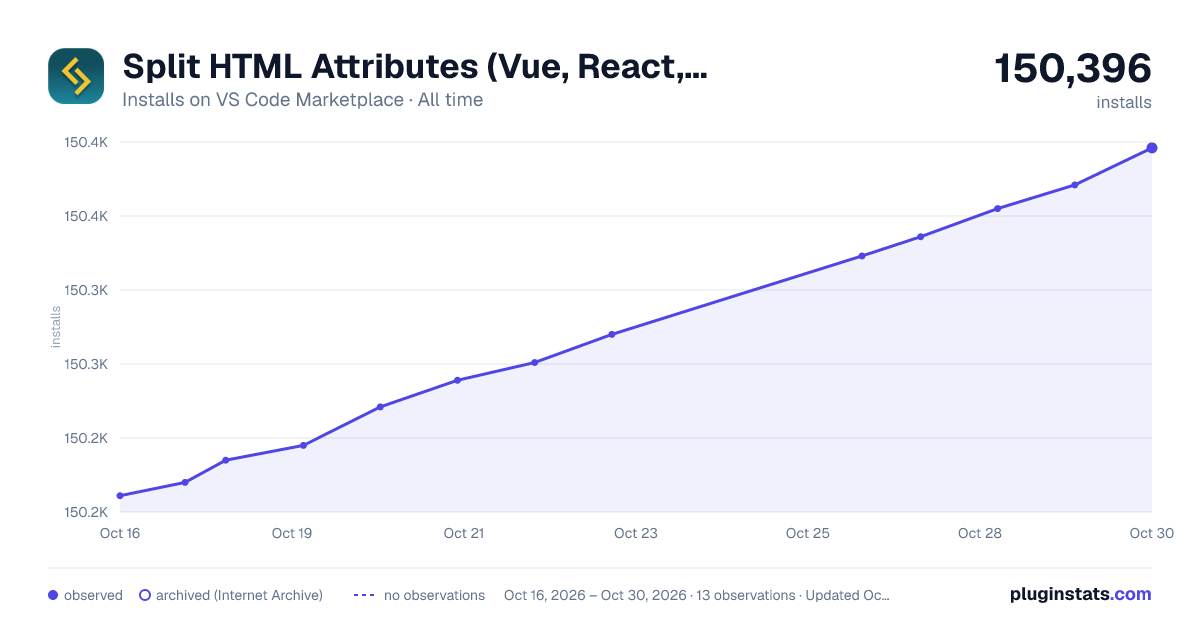

Adoption over time
7/30/90-day growth
Ranking history
Ratings over time
Listing placement
Listing placement
Filled points are observed values; hollow points come from Internet Archive snapshots of the listing page. Dashed segments span periods with no observations — values between points are not interpolated.
Each band is one page of 20. Installs on a linear scale. Placement is projected from installs, so it can differ from the marketplace's own sort order. Hover a dot to see the listing.
Recent observations
Full history (4)Similar VS Code Marketplace Formatters plugins
All 20 Split HTML Attributes (Vue, React, Angular) alternativesData source
Install counts, average rating, and rating counts come from the public Visual Studio Marketplace gallery API. Installs are cumulative and exclude updates.
Listing: https://marketplace.visualstudio.com/items?itemName=dannyconnell.split-html-attributes. First seen Oct 16, 2026; last successful collection Oct 19, 2026. See the methodology.