 PluginStats
Cobalt Next installs statistics
By David Leininger · VS Code Marketplace · Themes
If Oceanic Next and Cobalt2 made a baby in the form of a theme for VSCode.
Cobalt Next has 128,862 recorded installs on VS Code Marketplace, ranking #2037 of 2,501 tracked listings.
Rating: 4.87 / 5 from 15 ratings
About Cobalt Next
CobaltNext Theme for VS Code
Original Version - "Cobalt Next"
Dark Version - "Cobalt Next Dark"
Minimal Version - "Cobalt Next Minimal"
*This one is not super different from Cobalt Next Dark, but it has a few extra treats to clean things up a bit. Maximize your expereince by using Caleb Porzio's Make VS Code Awesome Course. Silence the noise and hide all the crap!
Installation
- Open Extensions sidebar panel in VS Code. View → Extensions 2. Search for Cobalt Next. 3. Click Install to install it. 4. Click Reload to reload the your editor 5. File > Preferences > Color Theme > Cobalt Next or change it in User Settings. • Try the dark version with Cobalt Next Dark. • Try the minimal version with Cobalt Next Minimal. Spice it up with Caleb Porzio's Make VS Code Awesome Course. 6. Optional: Use the recommended settings below for best experience
Recommended Settings
Want active and inactive window borders?
Personally, I don't like active window borders, but if you'd like it, here are two examples.Open the Command Palette with Ctrl+Shift+P (Windows) or Cmd+Shift+P (Mac) and select Preferences: Open Settings (JSON).
subtle
full color
Suggested Extensions For Theme
• Color Highlight • Subtle Match Brackets
Suggested Terminal Settings
ZSH is a great shell and it adds support for git. I would suggest using the Cobalt2 Theme for ZSH. Make sure to get Inconsolata for Powerline so that you can get all of the special characters in prompt.
VS Code Icon
Want to change up your VS Code Icon to match your theme? Done.
New Icon
Download the .icns file. (Mac)
Download the .ico file. (Win)
Old Icon - Incase you miss it
Download the .icns file. (Mac)
Download the .ico file. (Win)
Enjoy!
Description from the VS Code Marketplace listing.
- color-theme
- theme
README badge
Show your rank in a README or on your website. The badge updates automatically.
Charts
Images: 30d · 1y · all time · 1600×900 dark


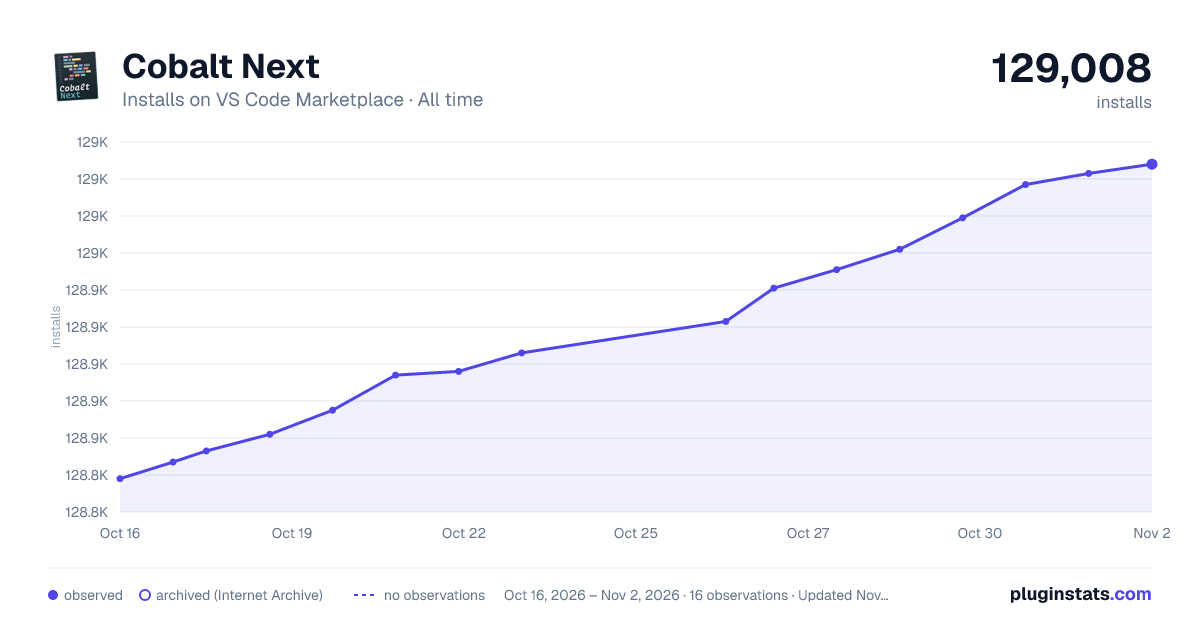

Adoption over time
7/30/90-day growth
Ranking history
Ratings over time
Listing placement
Listing placement
Filled points are observed values; hollow points come from Internet Archive snapshots of the listing page. Dashed segments span periods with no observations — values between points are not interpolated.
Each band is one page of 20. Installs on a linear scale. Placement is projected from installs, so it can differ from the marketplace's own sort order. Hover a dot to see the listing.
Recent observations
Full history (4)Similar VS Code Marketplace Themes plugins
All 20 Cobalt Next alternativesData source
Install counts, average rating, and rating counts come from the public Visual Studio Marketplace gallery API. Installs are cumulative and exclude updates.
Listing: https://marketplace.visualstudio.com/items?itemName=dline.CobaltNext. First seen Oct 16, 2026; last successful collection Oct 19, 2026. See the methodology.