 PluginStats
C/C++ Compile Run installs statistics
By danielpinto8zz6 (2 listings) · VS Code Marketplace · Programming Languages
Easily compile, run, and debug single C/C++ files in VS Code.
C/C++ Compile Run has 6,061,139 recorded installs on VS Code Marketplace.
It ranks #156 of 2,501 tracked VS Code Marketplace listings by installs.
It is rated 4.6 out of 5 from 63 ratings.
PluginStats has 4 daily observations since Oct 16, 2026; the latest is from Oct 19, 2026.
Rating: 4.60 / 5 from 63 ratings
About C/C++ Compile Run
C/C++ Compile Run Extension
A Visual Studio Code extension to compile, run, and debug single C/C++ files easily.
Features
• Compile, run, and debug C/C++ files directly from the command palette, status bar, or menu icons. • Quick access via keybindings: F6, F7, F5, and more. • Supports custom compiler paths, flags, and run arguments. • Option to run in an external terminal.
Requirements
• Linux: Install gcc (setup instructions) • Windows: Install tdm-gcc (setup instructions) • macOS: Install clang or gcc (setup instructions)
Getting Started
1. Open a .c or .cpp file in VS Code. 2. Press F6 to compile and run the file with default settings. 3. Press F7 to specify custom arguments before running. 4. Press F5 to debug (includes compilation). 5. Use the status bar or menu icons for quick access.
Tip: You can configure compiler paths, flags, and other options in the extension settings. Enable "Save Before Compile" to automatically save files before building.
Configuration
| Key | Description |
| c-cpp-compile-run.c-compiler | The C compiler path (e.g. /usr/bin/gcc or C:\TDM-GCC-64\bin\gcc.exe)| | c-cpp-compile-run.cpp-compiler | The C++ compiler path (e.g. /usr/bin/g++ or C:\TDM-GCC-64\bin\g++.exe)| | c-cpp-compile-run.save-before-compile | Save the file before compiling | | c-cpp-compile-run.c-flags | C compiler flags (default: -Wall -Wextra -g3) | | c-cpp-compile-run.c-linker-flags | C linker flags (e.g. -lm) | | c-cpp-compile-run.cpp-flags | C++ compiler flags (default: -Wall -Wextra -g3) | | c-cpp-compile-run.cpp-linker-flags | C++ linker flags (e.g. -lm) | | c-cpp-compile-run.run-args | Program arguments when running | | c-cpp-compile-run.run-in-external-terminal | Run in an external terminal | | c-cpp-compile-run.should-show-notifications | Show notifications | | c-cpp-compile-run.output-location | Custom output location for the compiled file. Supports ${workspaceFolder} and ${pwd} variables. See Output Folder Mirroring | | c-cpp-compile-run.mirror-output-location | Mirror the source folder structure under the output directory (default: false). See Output Folder Mirroring | | c-cpp-compile-run.custom-run-prefix | Prefix command before run (e.g. valgrind ./foobar) | | c-cpp-compile-run.additional-include-paths | Additional directories to add to the compiler's include path (e.g. ["${workspaceFolder}/include"]) | | c-cpp-compile-run.debugger-mimode | The MI debugger to use (gdb or lldb) | | c-cpp-compile-run.debugger-path | Path to the debugger executable (e.g. /usr/bin/gdb) | | c-cpp-compile-run.trust-single-files | Automatically trust single files opened without a workspace folder (default: true). When disabled, prompts for confirmation before compiling or running. | | c-cpp-compile-run.skip-if-compiled | Skip compilation if the executable is already up-to-date (default: true). The check compares modification times of the source file, all header files (.h, .hpp, .hxx, .hh) found in the source directory and configured include paths, against the executable. Set to false to always recompile. |
Output Folder Mirroring
The c-cpp-compile-run.output-location setting controls where compiled executables are placed. By default (mirror-output-location: false), a relative output-location is resolved relative to the source file's directory, so the output stays next to the source:
Set in your .vscode/settings.json:
When you compile proj/AA/BB/CC/a.cpp, the executable is placed at proj/AA/BB/CC/output/a.exe.
Enabling folder-structure mirroring
Set c-cpp-compile-run.mirror-output-location to true to place all outputs under a single root directory, mirroring the folder structure of your sources:
With the above settings and this project layout:
Compiling src/basics/HelloWorld.cpp produces out/basics/HelloWorld.exe, and compiling src/functions/Math.cpp produces out/functions/Math.exe.
• ${workspaceFolder} is replaced with your project's root folder. • ${pwd} is replaced with your current working directory.
Keybindings
| Linux | Windows | Mac | Description |
| F6 | F6 | Cmd+R | Compile and run the file | | Ctrl+6 | Ctrl+6 | Cmd+6 | Compile and run the file | | F8 | F8 | Cmd+Y | Compile and run the file in an external console | | F7 | F7 | Cmd+T | Compile and run the file with custom arguments and flags | | F5 | F5 | Cmd+5 | Debug the file (includes compile) |
Release Notes
See the CHANGELOG for details.
Description from the VS Code Marketplace listing.
- build
- c
- c++
- clang
- compile
- cpp
- debug
- g++
- gcc
- keybindings
- Log
- run
Charts
Images: 30d · 1y · all time · 1600×900 dark


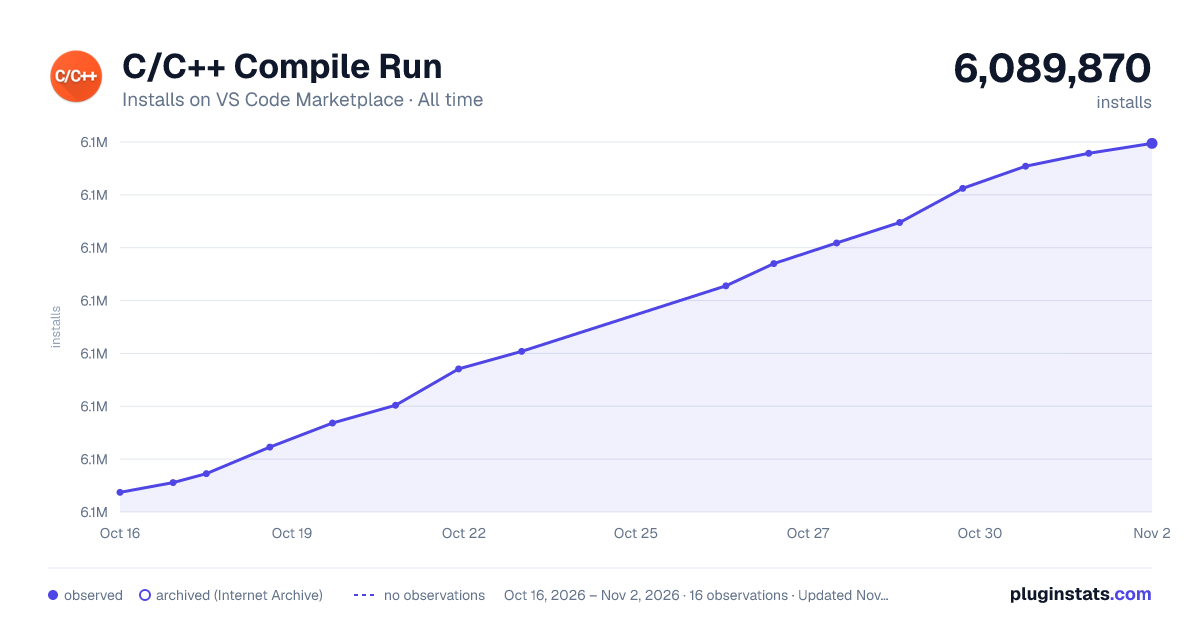

Adoption over time


7/30/90-day growth


Ranking history


Ratings over time


Listing placement


Filled points are observed values; hollow points come from Internet Archive snapshots of the listing page. Dashed segments span periods with no observations — values between points are not interpolated.
Each band is one page of 20. Installs on a log scale. Placement is projected from installs, so it can differ from the marketplace's own sort order. Hover a dot to see the listing.
Recent observations
Full history (4)Similar VS Code Marketplace Programming Languages plugins
All 20 C/C++ Compile Run alternativesData source
Install counts, average rating, and rating counts come from the public Visual Studio Marketplace gallery API. Installs are cumulative and exclude updates.
Listing: https://marketplace.visualstudio.com/items?itemName=danielpinto8zz6.c-cpp-compile-run. First seen Oct 16, 2026; last successful collection Oct 19, 2026. See the methodology.