 PluginStats
Amiga C/C++ Compile, Debug & Profile installs statistics
By Bartman^Abyss · VS Code Marketplace · Debuggers
One-stop VS Code Extension to compile, debug and profile Amiga C/C++ programs compiled by the bundled gcc 15.1 with the bundled WinUAE/FS-UAE and GDB
Amiga C/C++ Compile, Debug & Profile has 130,739 recorded installs on VS Code Marketplace.
It ranks #2020 of 2,501 tracked VS Code Marketplace listings by installs.
It is rated 4.6 out of 5 from 8 ratings.
PluginStats has 4 daily observations since Oct 16, 2026; the latest is from Oct 19, 2026.
Rating: 4.63 / 5 from 8 ratings
About Amiga C/C++ Compile, Debug & Profile
_amiga-debug_ Visual Studio Code Extension
One-stop Visual Studio Code Extention to compile, debug and profile Amiga C/C++ programs compiled by the bundled gcc 15.1 with the bundled WinUAE/FS-UAE and GDB.
Overview
This fully self-contained extension will help you to quickly develop demos, intros, games, etc. for the Amiga 500, 1200, 4000. It supports C and C++, however no standard library is available. It comes with advanced productivity features like debug overlay, frame profiler, graphics debugger and size profiler.
Video
Here's a video showing off all the new features of v1.1, including the frame profiler and graphics debugger: https://www.youtube.com/watch?v=gQ4tKisnr7Y
Quick-start
0. Install the extension from the Visual Studio Code Marketplace 1. (recommended) install the Microsoft C/C++ extension from the Extensions tab under Recommended 2. Create a new empty project folder with File > Open Folder... 3. From the command palette Ctrl+Shift+P select Amiga: Init Project 4. (optional, but recommended) • either: open settings Ctrl+, and under Extensions > Amiga C/C++ Compile, Debug & Profile point Rom-paths: A500 to your *Kickstart 1.3* ROM • or: open .vscode/launch.json and point "kickstart" to your *Kickstart 1.3* ROM 5. Hit F5 to build and run a minimal sample project 6. If you prefer C++ instead of C, just rename main.c to main.cpp
Features
• No additional tools required. Everything is included (except Kickstart ROM 😒). Ready to go make your next Amiga 500 production! • State-of-the-art code generation by GCC with Link-Time-Optimizations (LTO) for increased performance and smaller code size • IntelliSense for C, C++, and assembly (VASM or GAS) • Full source-level and assembly-level debugging with callstack, breakpoints, data breakpoints (watchpoints), watches, registers, memory view with GDB-enabled WinUAE • Fully AmigaOS compatible via included .h files • INCBIN, INCBIN_CHIP support • Output to debug console from WinUAE • WinUAE warp-launch (turbo-boot) • WinUAE warp-mode control from your Amiga project (speed up precalc during development) • WinUAE debug overlay, full control from your Amiga project • Frame Profiler: function-level + DMA cycles profiling (A500, A1200 (PAL) only) • Graphics Debugger: replay a captured frame cycle by cycle and watch your bitmaps change in real-time; Visualize all blitter operations, bitmap writes, copper list, custom registers (OCS only) • Size Profiler: profile the size of your executable by functions, data and references • Shrinkler executable cruncher with size profiling: profile the size of your compressed executable (right-click Amiga EXE files in the explorer) • Disassembly: Show disassembly of ELF file incl. 68000 cycle count and correlation with source code (right-click Amiga ELF files in the explorer) • Terminal window with access to the build tools • Extension automatically mounts executable's directory as dh1:, allowing for reading and writing files.
How-to-use
• Amiga: View Memory, Amiga: Set Force Disassembly, Amiga: View Disassembly (Function) are available from the command palette Ctrl+Shift+P • Use the command Amiga: Open Terminal to open a shell with the environment set to use the included tools like elf2hunk, gcc, gnumake etc. (e.g. gnumake clean) • Frame Profiler: function-level + DMA profiling: during a debugging session, press the Profile button on the right of the debug toolbar, and 1 frame will be profiled. Press the rightmost button to profile 50 frames. Mark your WaitVBLs etc with calls to debug_start_idle() and debug_stop_idle() to show correct CPU usage under thumbnails. • Size Profiler: profile the size of your executable: right-click an ELF file in the Explorer, and select Amiga: Profile File Size • All the profilers write (sometimes rather large) files in your temp directory. If you're low on disk space, use Amiga: Clean Temp Files • WinUAE debug overlay: see debug_* calls in template project's main.c • WinUAE: • ^ = single step, Pause = pause/resume Page-up = warp mode • all necessary options are already configured for Amiga 500, Kickstart 1.3 (for debugging), if you want to change some things (resolution, window size, etc.) just go into the Configurations tab, select default, and hit Save • some nifty coding helpers in the command palette Ctrl+Shift+P • Open Gradient Master: opens the Deadliner's The Amiga Gradient Master tool to assist you creating color gradients for Copperlists). • Open Image Tool opens the Deadliner's Image Tool to assist you converting images to different Amiga formats. • Open Color Reducer opens the Deadliner's Color Reducer tool to assist you reducing the number of colors in images in a smart manner. • Open BLTCON Cheat Sheet: opens the Deadliner's BLTCON Cheat Sheet tool that helps you designing Blitter operations. • Open Amiga Hardware Reference Manual: opens the Amiga Hardware Reference Manual TOC hosted at amigadev.elowar.com.
Supported Amiga Models
• Possible values of "config" in .vscode/launch.json: • "A500": KS 1.3, ECS Agnus, 0.5MB Chip + 0.5MB Slow; needs Kickstart 1.3 ROM in "kickstart" • "A1200": 68020, 2MB Chip; needs Kickstart 3.1 ROM in "kickstart" • "A1200-FAST": A1200 with 4MB fast memory • "A1200-030": A1200 with Blizzard 1230-IV and 32MB board memory. Requires the absolute path to the Blizzard ROM in "cpuboard". • "A3000": A3000 (no profiler support); needs Kickstart 2.0 ROM in "kickstart" • "A4000": 68030, 68882, 2MB Chip, 8MB FAST; needs Kickstart 3.1 ROM in "kickstart" • Also, you can override the memory configuration using following fields (values are case-insensitive): • "chipmem": allowed values: "256k", "512k", "1m", "1.5m" or "2m" • "fastmem": allowed values: "0", "64k", "128k", "256k", "512k", "1m", "2m", "4m", "8m" • "slowmem": allowed values: "0", "512k", "1m", "1.8m"
Credits
• Code by Bartman/Abyss • MacOS/Linux support by Peter Mackay and Graham Bates • Testing by Pink/Abyss
Already used in these productions…
Description from the VS Code Marketplace listing.
- amiga.assembly
- amiga.disassembly
- amiga.objdump
- amiga.profile
- amiga.savestate
- AmigaAssemblyGAS
- AmigaDisassembly
- c++
- debuggers
- m68k
Where Amiga C/C++ Compile, Debug & Profile sits in the listing
Each band is one page of 20. Installs on a log scale. Placement is projected from installs, so it can differ from the marketplace's own sort order. Hover a dot to see the listing.


Charts
Images: 30d · 1y · all time · 1600×900 dark


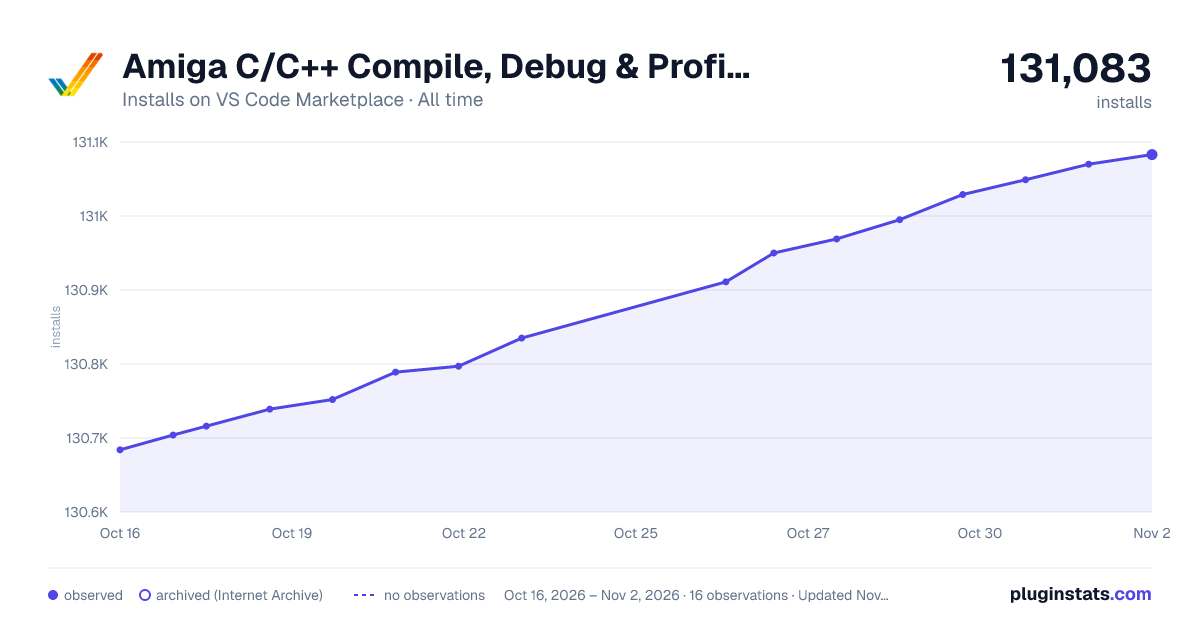

Adoption over time


7/30/90-day growth


Ranking history


Filled points are observed values; hollow points come from Internet Archive snapshots of the listing page. Dashed segments span periods with no observations — values between points are not interpolated.
Recent observations
Full history (4)Similar VS Code Marketplace Debuggers plugins
Data source
Install counts, average rating, and rating counts come from the public Visual Studio Marketplace gallery API. Installs are cumulative and exclude updates.
Listing: https://marketplace.visualstudio.com/items?itemName=BartmanAbyss.amiga-debug. First seen Oct 16, 2026; last successful collection Oct 19, 2026. See the methodology.