 PluginStats
HTTP Client installs statistics
By Marcel J. Kloubert (2 listings) · VS Code Marketplace · Other
Simple way to do HTTP requests.
HTTP Client has 177,815 recorded installs on VS Code Marketplace.
It ranks #1658 of 2,501 tracked VS Code Marketplace listings by installs.
It is rated 4.0 out of 5 from 4 ratings.
PluginStats has 4 daily observations since Oct 16, 2026; the latest is from Oct 19, 2026.
Rating: 4.00 / 5 from 4 ratings
About HTTP Client
vscode-http-client
Simple way to do HTTP requests in Visual Studio Code.
Table of contents
1. Install 2. How to use • Settings • How to execute • Execute scripts • Constants • cancel • output • progress • Functions • alert • decode_html • encode_html • from • guid • new_request • now • open_html • open_markdown • sleep • uuid • utc • Modules 3. Enhancements • Authorization • Basic Auth 4. HTTP files 5. Customizations • CSS 6. Syntaxes 7. Support and contribute 8. Related projects • node-enumerable • vscode-helpers
Install [↑]
Launch VS Code Quick Open (Ctrl + P), paste the following command, and press enter:
Or search for things like vscode-http-client in your editor.
How to use [↑]
Settings [↑]
Open (or create) your settings.json in your .vscode subfolder of your workspace or edit the global settings (File >> Preferences >> Settings).
Add a http.client section:
| Name | Description |
| open | An array of one or more paths to .http-request files, which should be opened on startup. | | openNewOnStartup | (true), if a new tab with an empty request should be opened on startup. Default: (false) | | rejectUnauthorized | (true), to reject unauthorized, self-signed SSL certificates. Default: (false) |
How to execute [↑]
Press F1 and enter one of the following commands:
| Name | Description | command |
| HTTP Client: Change style ... | Changes the CSS style for request forms. | extension.http.client.changeStyle | | HTTP Client: Create new script ... | Opens a new editor with an example script. | extension.http.client.newRequestScript | | HTTP Client: New HTTP request ... | Opens a new HTTP request form. | extension.http.client.newRequest | | HTTP Client: New HTTP request (split view) ... | Opens a new HTTP request form by splitting the current view. | extension.http.client.newRequestSplitView | | HTTP Client: Send editor content as HTTP request ... | Uses the content of a visible editor as body for a HTTP request. | extension.http.client.newRequestForEditor | | HTTP Client: Send file as HTTP request ... | Uses a (local) file as body for a HTTP request. | extension.http.client.newRequestFromFile | | HTTP Client: Show help ... | Shows a new help tab. | extension.http.client.showHelp |
There are currently no predefined key bindings for these commands, but you can setup them by your own.
Execute scripts [↑]
For things, like batch operations, you can execute scripts, using the Node.js API, which is provided by VS Code.
Constants [↑]
cancel [↑]
Provides the underlying CancellationToken object.
output [↑]
Provides the OutputChannel of the extension.
progress [↑]
Stores the underlying Progress object, provided by withProgress() function.
Functions [↑]
alert [↑]
Shows a (warning) popup.
decode_html [↑]
Decodes the entities in a HTML string.
encode_html [↑]
Encodes a string to HTML entities.
from [↑]
Creates a new LINQ style iterator for any iterable object, like arrays, generators or strings. For more information, s. node-enumerable.
guid [↑]
Generates a new unique ID, using node-uuid.
new_request [↑]
Creates a new instance of a HTTP client, by using the data of the current request form. All important data, like URL, headers or body can be overwritten.
now [↑]
Returns a new instance of a Moment.js object, by using an optional parameter for the timezone.
open_html [↑]
Opens a new HTML tab.
SECURITY HINT: The new tab is opened with the following settings:
open_markdown [↑]
Opens a new HTML tab with parsed Markdown content.
The parser uses the following settings:
SECURITY HINT: The new tab is opened with the following settings:
sleep [↑]
Waits a number of seconds before continue.
uuid [↑]
Alias for guid().
utc [↑]
Returns a new instance of a Moment.js object in UTC.
Modules [↑]
| Constant | Name | Description |
| _ | lodash | A modern JavaScript utility library delivering modularity, performance and extras. | | $fs | fs-extra | Extensions for the Node.js file system module, especially for use in async Promise context. | | $h | vscode-helpers | A lot of helpers classes and functions. | | $html | node-html-entities | HTML / XML parser. | | $linq | node-enumerable | Provides LINQ-style functions and classes. | | $md | Marked | Markdown parser. | | $moment | Moment.js | Parse, validate, manipulate, and display dates and times in JavaScript. moment-timezone is already provided. | | $vs | Visual Studio Code | VS Code API. |
You also can include any module, shipped with VS Code, Node.js, that extension or any external script, which is available on your current system, by using the require() function.
Enhancements [↑]
Authorization [↑]
Basic Auth [↑]
Instead of setting up a Basic Auth request header by using a Base64 string like
you can use the value as simple plain text, separating username and password by : character:
Keep in mind: The string right to Basic will be trimmed!
HTTP files [↑]
Requests can be imported from or to HTTP files.
Those files are encoded in ASCII and their lines are separated by CRLF (\r\n):
Customizations [↑]
CSS [↑]
You can save a custom CSS file, called custom.css, inside the extension's folder, which is the sub folder .vscode-http-client inside the current user's home directory.
Syntaxes [↑]
Syntax highlighting supports all languages, which are part of highlight.js.
Support and contribute [↑]
If you like the extension, you can support the project by sending a donation via PayPal to me.
To contribute, you can open an issue and/or fork this repository.
To work with the code:…
Description from the VS Code Marketplace listing.
- API
- Client
- HTTP
- multi-root ready
- Requests
- REST
Where HTTP Client sits in the listing
Each band is one page of 20. Installs on a log scale. Placement is projected from installs, so it can differ from the marketplace's own sort order. Hover a dot to see the listing.


Charts
Images: 30d · 1y · all time · 1600×900 dark


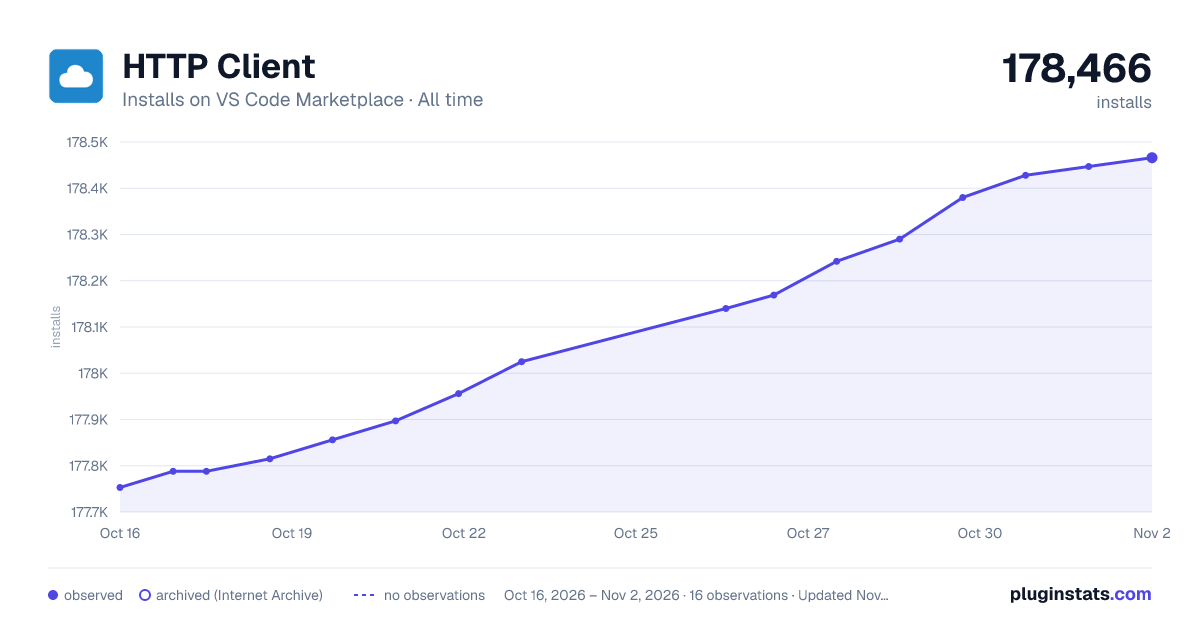

Adoption over time


7/30/90-day growth


Ranking history


Filled points are observed values; hollow points come from Internet Archive snapshots of the listing page. Dashed segments span periods with no observations — values between points are not interpolated.
Recent observations
Full history (4)Similar VS Code Marketplace Other plugins
Data source
Install counts, average rating, and rating counts come from the public Visual Studio Marketplace gallery API. Installs are cumulative and exclude updates.
Listing: https://marketplace.visualstudio.com/items?itemName=mkloubert.vscode-http-client. First seen Oct 16, 2026; last successful collection Oct 19, 2026. See the methodology.