 PluginStats
JetBrains Darcula Theme installs statistics
By Anan · VS Code Marketplace · Themes
A theme extension for Visual Studio Code based on Darcula theme from Jetbrains IDEs with some improvements
JetBrains Darcula Theme has 178,096 recorded installs on VS Code Marketplace, ranking #1655 of 2,501 tracked listings.
Rating: 4.78 / 5 from 18 ratings
About JetBrains Darcula Theme
JetBrains Darcula Theme for Visual Studio Code





A theme extension for Visual Studio Code based on Darcula theme from Jetbrains IDEs with some improvements.
SPONSORS
chat.cx | All your AI chats in one place.
Stop juggling AI tabs. ChatGPT, Claude, Gemini, Grok, every AI you use, plus your own models, side by side in one panel, right where you're working. Switch instantly, compare answers, and stay in flow.
Installation
Launch VS Code Quick Open (Ctrl+P), paste the following command, and press enter.
ext install Anan.jetbrains-darcula-theme
or: Download from VisualStudio Marketplace
JetBrains Mono Font Installation
- Downloaded and install JetBrains Mono font https://www.jetbrains.com/lp/mono
- Add this snippet in your "settings.json":
  "editor.fontFamily": "JetBrains Mono, Consolas, 'Courier New', monospace",
  "editor.fontSize": 13,
  "editor.lineHeight": 22,
  "editor.fontWeight": "300",
Screenshots

Tweaks & theming
If you want to play around with new colors, use the setting
workbench.colorCustomizations to customize the currently selected theme. For
example, you can add this snippet in your "settings.json" file:
"workbench.colorCustomizations": {
  "tab.activeBackground": "#282c34",
  "activityBar.background": "#282c34",
  "sideBar.background": "#282c34"
}
or use the setting editor.tokenColorCustomizations
"editor.tokenColorCustomizations": {
  "[JetBrains Darcula Theme]": {
    "textMateRules": [
      {
        "scope": ["source.python"],
        "settings": {
          "foreground": "#e06c75"
        }
      }
    ]
  }
}
Enablement of semantic highlighting
By default Semantic Highlighting value is false in this theme, you can add this snippet in your "settings.json" file to disable it:
"editor.semanticHighlighting.enabled": true
Please check the official documentation, Theme Color Reference and Theme Color, for more helpful information.
Syntax Support
Python, Javascript, TypeScript, React, Vue, HTML, Markdown, JSON, CSS, SCSS, Dockerfile, Go, and more...
Contribution
If you want to add more syntax support or have any idea to improve highlighting, feel free to make a pull request or open a new issue.
Inspiration
One Dark Pro, PyCharm Theme, JetBrains, PyCharm, WebStorm
Changelog
License
This project is licensed under the MIT License - see the MIT file for details.
Enjoy!
Description from the VS Code Marketplace listing.
- color-theme
- darcula
- darcula theme
- dark
- dark theme
- jetbrains
- jetbrains theme
- pycharm
- pycharm theme
- theme
- webstorm
- webstorm theme
README badge
Show your rank in a README or on your website. The badge updates automatically.
Charts
Images: 30d · 1y · all time · 1600×900 dark


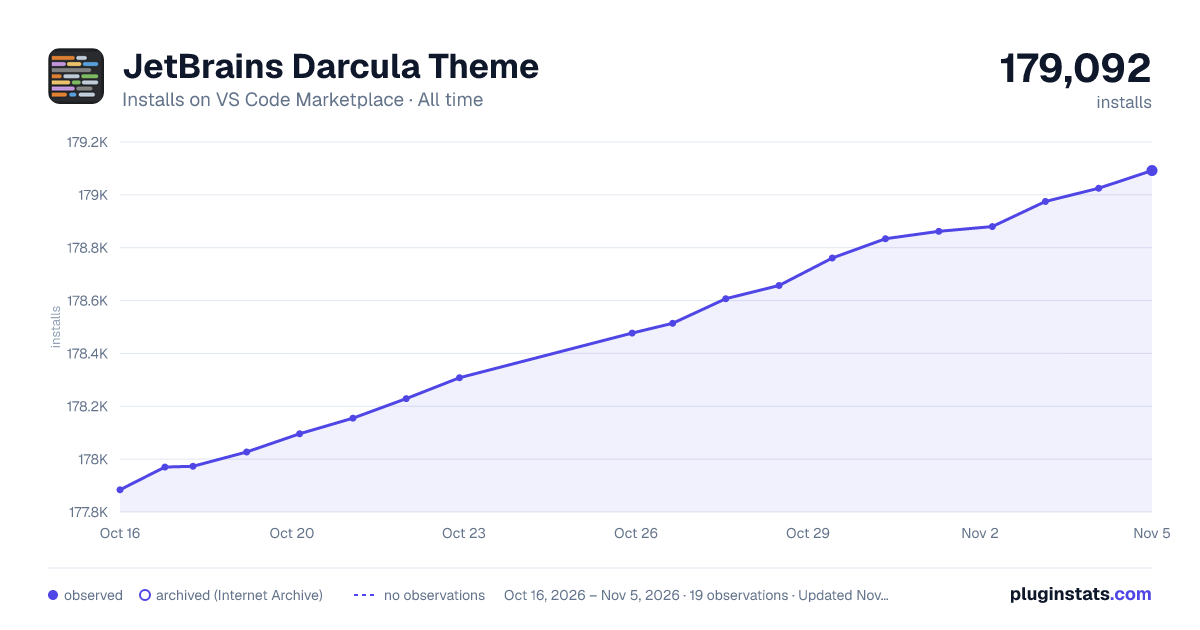

Adoption over time
7/30/90-day growth
Ranking history
Ratings over time
Listing placement
Listing placement
Filled points are observed values; hollow points come from Internet Archive snapshots of the listing page. Dashed segments span periods with no observations — values between points are not interpolated.
Each band is one page of 20. Installs on a linear scale. Placement is projected from installs, so it can differ from the marketplace's own sort order. Hover a dot to see the listing.
Recent observations
Full history (5)Similar VS Code Marketplace Themes plugins
All 20 JetBrains Darcula Theme alternativesData source
Install counts, average rating, and rating counts come from the public Visual Studio Marketplace gallery API. Installs are cumulative and exclude updates.
Listing: https://marketplace.visualstudio.com/items?itemName=Anan.jetbrains-darcula-theme. First seen Oct 16, 2026; last successful collection Oct 20, 2026. See the methodology.