 PluginStats
VSCode Neovim installs statistics
By Alexey Svetliakov · VS Code Marketplace · Keymaps
Vim mode for VSCode, powered by Neovim
VSCode Neovim has 673,222 recorded installs on VS Code Marketplace, ranking #706 of 2,501 tracked listings.
Rating: 4.53 / 5 from 147 ratings
About VSCode Neovim
VSCode Neovim
<p align="center"><img src="https://github.com/asvetliakov/vscode-neovim/raw/HEAD/images/icon.png" height="128"><br>VSCode Neovim Integration</p> <p align=center> <a href="https://marketplace.visualstudio.com/items?itemName=asvetliakov.vscode-neovim"><img src="https://img.shields.io/visual-studio-marketplace/v/asvetliakov.vscode-neovim?color=%234c1&label=Visual%20Studio%20Marketplace"></a> <a href="https://github.com/asvetliakov/vscode-neovim/actions/workflows/build_test.yml"><img src="https://github.com/asvetliakov/vscode-neovim/actions/workflows/build_test.yml/badge.svg"></a> <a href="https://gitter.im/vscode-neovim/community?utm_source=badge&utm_medium=badge&utm_campaign=pr-badge"><img src="https://badges.gitter.im/vscode-neovim/community.svg"></a> </p>Neovim is a fork of Vim to allow greater extensibility and integration. This extension uses a fully embedded Neovim instance, no more half-complete Vim emulation! VSCode's native functionality is used for insert mode and VSCode commands, making the best use of both editors.
- 🎉 Feature-complete Vim integration (except insert-mode and some Nvim UI plugins) by utilizing Nvim as a backend.
- 🔧 Supports custom
init.luaand most Nvim plugins. - 🥇 First-class and lag-free insert mode, letting VSCode do what it does best.
- 🤝 Complete integration with VSCode features (lsp/autocompletion/snippets/multi-cursor/etc).
<strong>Table of Contents</strong>
- 🧰 Getting Started
- 💡 Tips and Features
- ⚡️ API
- vscode.action(name, opts)
- vscode.call(name, opts, timeout)
- vscode.on(event, callback)
- vscode.has_config(name)
- vscode.get_config(name)
- vscode.update_config(name, value, target)
- vscode.notify(msg)
- vscode.eval(code[, opts, timeout])
- vscode.eval_async(code[, opts])
- vscode.with_insert(callback[, ms])
- Builtin module overrides
- VimScript
- ⌨️ Keybindings (shortcuts)
- 📟 Neovim Commands
- 🎨 Highlights
- 🧰 Developing
- ❤️ Credits & External Resources
🧰 Getting Started
Installation
- Install the vscode-neovim extension.
- Install Neovim 0.10.0 or newer.
- (Optional) Set the Nvim path in the extension settings. You must specify the full path to Neovim, like
C:\Neovim\bin\nvim.exeor/usr/local/bin/nvim. - Choose one of the following platform-specific settings:
vscode-neovim.neovimExecutablePaths.win32vscode-neovim.neovimExecutablePaths.linuxvscode-neovim.neovimExecutablePaths.darwin
- (Optional) Set the Nvim path in the extension settings. You must specify the full path to Neovim, like
- If you want to use Neovim from WSL, set the
useWSLconfiguration toggle and specify the Linux path to the nvim binary.wsl.exeWindows binary andwslpathLinux binary are required for this.wslpathmust be available through$PATHLinux env setting. Usewsl --listto check for the correct default Linux distribution. - Assign affinity value for performance improvement.
Snap Users: If you want to use Neovim from Snap, the Neovim path must be resolved to the snap binary location. On some systems it might be "
/snap/nvim/current/usr/bin/nvim". To check if you're running as a snap package, see ifwhich nvimresolves to/usr/bin/snap.
Neovim configuration
Since many Vim plugins can cause issues in VSCode, it is recommended to start from an empty init.vim. For a guide for
which types of plugins are supported, see troubleshooting.
Before creating an issue on Github, make sure you can reproduce the problem with an empty init.vim and no VSCode
extensions.
To detect if Nvim is running in VSCode, add to your init.vim:
if exists('g:vscode')
    " VSCode extension
else
    " ordinary Nvim
endif
In lua:
if vim.g.vscode then
    -- VSCode extension
else
    -- ordinary Nvim
end
```…
Description from the VS Code Marketplace listing.
- keybindings
- neovim
- vi
- vim
README badge
Show your rank in a README or on your website. The badge updates automatically.
Charts
Images: 30d · 1y · all time · 1600×900 dark


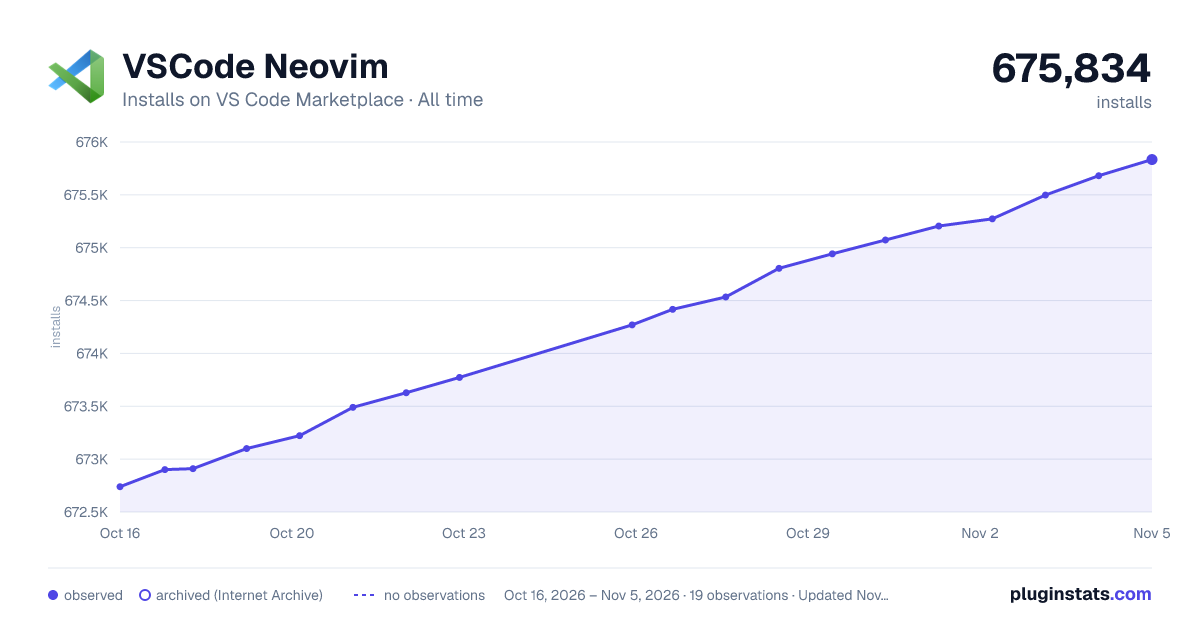

Adoption over time
7/30/90-day growth
Ranking history
Ratings over time
Listing placement
Listing placement
Filled points are observed values; hollow points come from Internet Archive snapshots of the listing page. Dashed segments span periods with no observations — values between points are not interpolated.
Each band is one page of 20. Installs on a linear scale. Placement is projected from installs, so it can differ from the marketplace's own sort order. Hover a dot to see the listing.
Recent observations
Full history (5)Similar VS Code Marketplace Keymaps plugins
All 20 VSCode Neovim alternativesData source
Install counts, average rating, and rating counts come from the public Visual Studio Marketplace gallery API. Installs are cumulative and exclude updates.
Listing: https://marketplace.visualstudio.com/items?itemName=asvetliakov.vscode-neovim. First seen Oct 16, 2026; last successful collection Oct 20, 2026. See the methodology.