 PluginStats
Buf installs statistics
By Buf (2 listings) · VS Code Marketplace · Programming Languages
Visual Studio Code support for Buf
Buf has 125,180 recorded installs on VS Code Marketplace.
It ranks #2079 of 2,501 tracked VS Code Marketplace listings by installs.
It is rated 4.6 out of 5 from 8 ratings.
PluginStats has 4 daily observations since Oct 16, 2026; the latest is from Oct 19, 2026.
Rating: 4.63 / 5 from 8 ratings
About Buf
Buf for Visual Studio Code
The [VS Code Buf extension][vs-code-marketplace] helps you work with [Protocol Buffers][protobuf] files in a much more intuitive way, adding semantic syntax highlighting, navigation, formatting, documentation and diagnostic hovers, and integrations with [Buf][buf] commands.
Features
• Code navigation and documentation hovers: Jump to or quickly glance a message or service's definition. • Autocompletion: Get code completion as you type through [IntelliSense][intellisense]. • Formatting: Formats .proto files on-save. • Syntax highlighting: Code styling that provides clarity on Protobuf keywords and identifiers. • Diagnostics: Get highlights and feedback on build and lint errors as you code.
This extension doesn't stop at editing: open the [Command Palette][command-palette] (Ctrl/Cmd+Shift+P) to quickly run common buf tasks such as buf generate. See the full list of commands for more.
Getting Started
This extension requires Visual Studio Code 1.95 or newer (or editors compatible with VS Code 1.95+ APIs).
1. [Install the latest version via the VS Code marketplace][vs-code-marketplace]. 2. Start editing .proto files!
This extension does not require you to have the Buf CLI already installed. By default, the extension uses the Buf CLI from your system $PATH. If buf isn't found on your $PATH, the extension automatically downloads and installs the latest version to its own storage directory. Use the buf.commandLine.path setting to specify a buf binary that isn't on your $PATH.
Commands
A full list of [Command Palette][command-palette] commands provided by this extension:
• Start Buf Language Server: starts the Buf Language Server. If the Buf Language Server is already running, it will stop and then start it. • Stop Buf Language Server: stops the Buf Language Server. If the Buf Language Server is not currently running, then it is a no-op. • Build: runs buf build with optional user input for the build output file. If the build output is specified by the user, it will be created at the root of each VS Code workspace. • Init: runs buf config init at the root of each VS Code workspace. This creates a buf.yaml file to help users get started with Buf modules and workspaces. • List available breaking change detection rules: runs buf config ls-breaking-rules at the root of each VS Code workspace and provides a list of available [breaking change detection rules][breaking-rules] in a VS Code editor window. • List available lint rules: runs buf config ls-lint-rules at the root of each VS Code workspace and provides a list of available [lint rules][lint-rules] in a VS Code editor window. • Prune module dependencies: runs buf dep prune at the root of each VS Code workspace and prunes unused dependencies from the buf.lock file(s). • Update module dependencies: runs buf dep update at the root of each VS Code workspace and updates the dependencies in the buf.lock file(s). • Generate: runs buf generate at the root of each VS Code workspace and generates code based on the buf.gen.yaml file(s). • Show Buf Output: shows the extension output channel.
Configuration
buf.commandLine.path
Path to a specific buf binary to use. Relative paths are resolved from the workspace root.
buf.debugLogs
Enable debug logging for the Buf language server. Logs appear in the Buf output channel (Buf: Show Buf Output). Defaults to false.
Format on save
The extension enables editor.formatOnSave for .proto files by default. To disable it, override this in your settings.json:
Community and Support
Feedback is welcome and appreciated! For feature requests, bugs, or questions, please [file an issue][issue].
If you're looking for help and/or discussion around Protobuf, best practices, etc., join us on [Slack][slack].
Legal
Offered under the [Apache 2 license][license].
Description from the VS Code Marketplace listing.
- buf
- bufbuild
- BufConfig
- buf-config
- format
- json
- lint
- proto
- proto3
- protobuf
- protocol buffers
- ProtocolBuffers
Where Buf sits in the listing
Each band is one page of 20. Installs on a log scale. Placement is projected from installs, so it can differ from the marketplace's own sort order. Hover a dot to see the listing.


Charts
Images: 30d · 1y · all time · 1600×900 dark


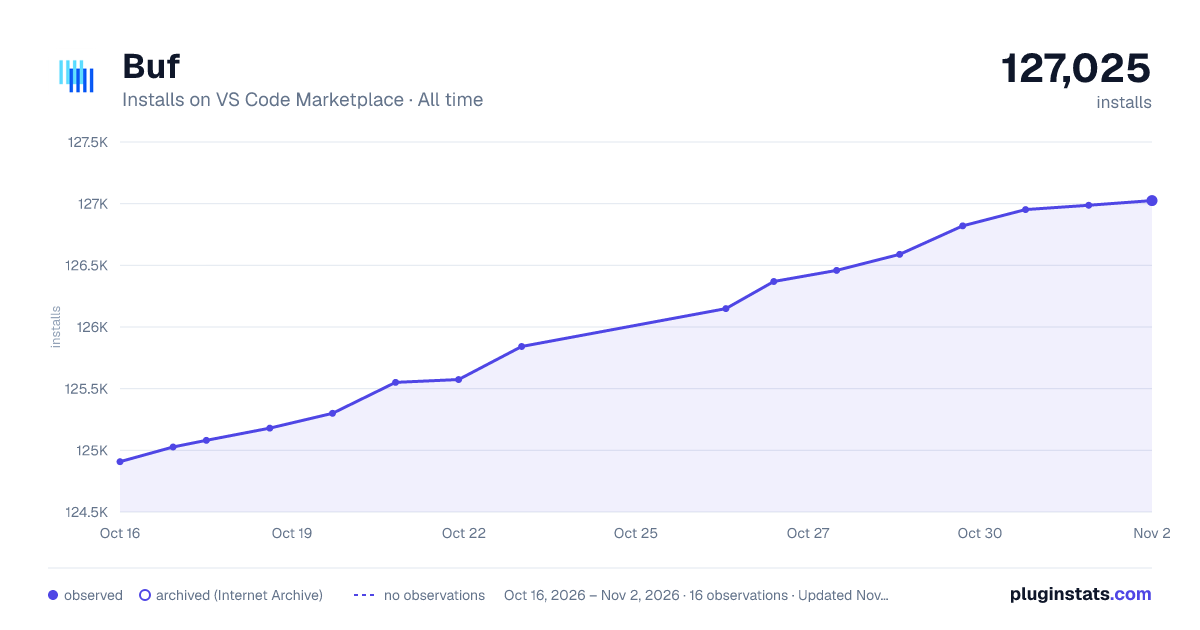

Adoption over time


7/30/90-day growth


Filled points are observed values; hollow points come from Internet Archive snapshots of the listing page. Dashed segments span periods with no observations — values between points are not interpolated.
Recent observations
Full history (4)Similar VS Code Marketplace Programming Languages plugins
Data source
Install counts, average rating, and rating counts come from the public Visual Studio Marketplace gallery API. Installs are cumulative and exclude updates.
Listing: https://marketplace.visualstudio.com/items?itemName=bufbuild.vscode-buf. First seen Oct 16, 2026; last successful collection Oct 19, 2026. See the methodology.