 PluginStats
Pretty TypeScript Errors installs statistics
By yoavbls · VS Code Marketplace · Programming Languages
Make TypeScript errors prettier and more human-readable in VSCode
Pretty TypeScript Errors has 2,296,653 recorded installs on VS Code Marketplace.
It ranks #313 of 2,501 tracked VS Code Marketplace listings by installs.
It is rated 5.0 out of 5 from 117 ratings.
PluginStats has 4 daily observations since Oct 16, 2026; the latest is from Oct 19, 2026.
Rating: 4.97 / 5 from 117 ratings
About Pretty TypeScript Errors
Pretty TypeScript Errors
Make TypeScript errors prettier and human-readable in VSCode.
TypeScript errors become messier as the complexity of types increases. At some point, TypeScript will throw on you a shitty heap of parentheses and "...". This extension will help you understand what's going on. For example, in this relatively simple error:
Watch this
and others from: Web Dev Simplified, Josh tried coding, trash dev, and more
Features
• Syntax highlighting with your theme colors for types in error messages, supporting both light and dark themes • A button that leads you to the relevant type declaration next to the type in the error message • A button that navigates you to the error at typescript.tv, where you can find a detailed explanation, sometimes with a video • A button that navigates you to ts-error-translator, where you can read the error in plain English
Supports
• Node and Deno TypeScript error reporters (in .ts files) • JSDoc type errors (in .js and .jsx files) • React, Solid and Qwik errors (in .tsx and .mdx files) • Astro, Svelte and Vue files when TypeScript is enabled (in .astro, .svelte and .vue files) • Ember and Glimmer TypeScript errors and template issues reported by Glint (in .hbs, .gjs, and .gts files)
Installation
Or simply by searching for pretty-ts-errors in the VSCode marketplace
How to hide the original errors and make the types copyable
Follow the instructions there. unfortunately, this hack is required because of VSCode limitations.
Why isn't it trivial
1. TypeScript errors contain types that are not valid in TypeScript. Yes, these types include things like ... more ..., { ... }, etc in an inconsistent manner. Some are also cutting in the middle because they're too long. 2. Types can't be syntax highlighted in code blocks because the part of type X = ... is missing, so I needed to create a new TextMate grammar, a superset of TypeScript grammar called type. 3. VSCode markdown blocks all styling options, so I had to find hacks to style the error messages. e.g., there isn't an inlined code block on VSCode markdown, so I used a code block inside a codicon icon, which is the only thing that can be inlined. That's why it can't be copied. but it isn't a problem because you can still hover on the error and copy things from the original error pane.
Hype section
Stars from stars
Kent C. Dodds Matt Pocock Alex / KATT Tanner Linsley Theo Browne
Sponsorship
Every penny will be invested in other contributors to the project, especially ones that work on things that I can't be doing myself like adding support to the extension for other IDEs 🫂
Contribution
Help by upvoting or commenting on issues we need to be resolved here Any other contribution is welcome. Feel free to open any issue / PR you think.
Description from the VS Code Marketplace listing.
- astro
- glimmer-js
- glimmer-ts
- javascript
- javascriptreact
- mdx
- svelte
- type
- typescript
- typescriptreact
- vue
Charts
Images: 30d · 1y · all time · 1600×900 dark


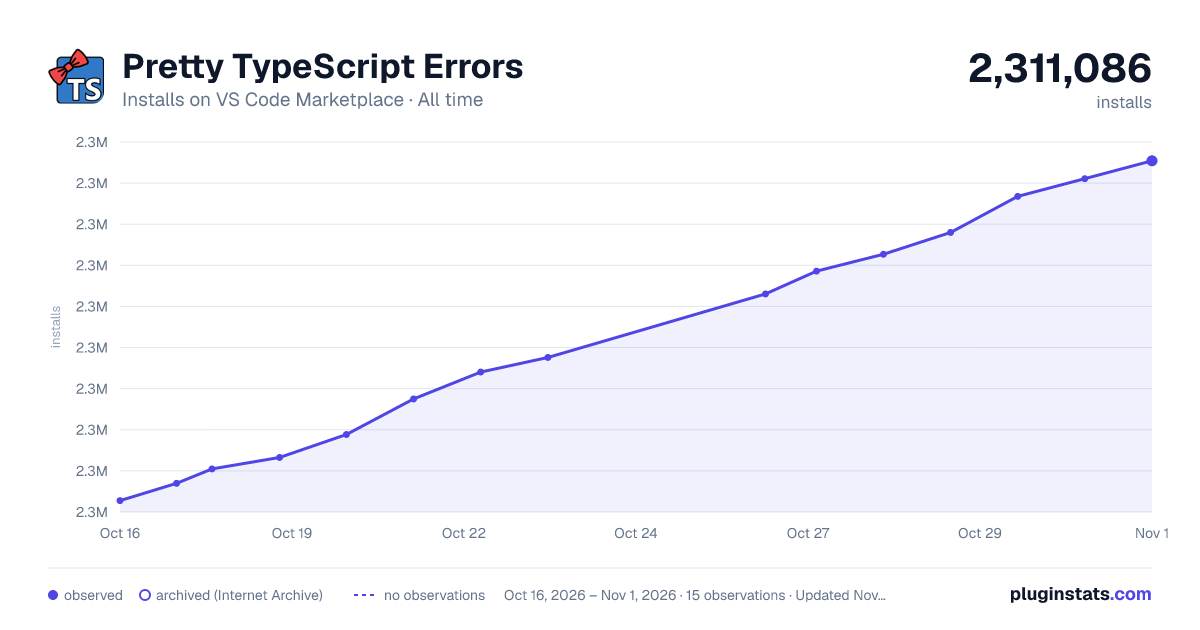

Adoption over time


7/30/90-day growth


Ranking history


Ratings over time


Listing placement


Listing placement


Listing placement


Filled points are observed values; hollow points come from Internet Archive snapshots of the listing page. Dashed segments span periods with no observations — values between points are not interpolated.
Each band is one page of 20. Installs on a log scale. Placement is projected from installs, so it can differ from the marketplace's own sort order. Hover a dot to see the listing.
Recent observations
Full history (4)Similar VS Code Marketplace Programming Languages plugins
All 20 Pretty TypeScript Errors alternativesData source
Install counts, average rating, and rating counts come from the public Visual Studio Marketplace gallery API. Installs are cumulative and exclude updates.
Listing: https://marketplace.visualstudio.com/items?itemName=yoavbls.pretty-ts-errors. First seen Oct 16, 2026; last successful collection Oct 19, 2026. See the methodology.