 PluginStats
Reactjs code snippets installs statistics
By charalampos karypidis (2 listings) · VS Code Marketplace · Snippets
Code snippets for Reactjs development in ES6 syntax
Reactjs code snippets has 2,760,040 recorded installs on VS Code Marketplace.
It ranks #265 of 2,501 tracked VS Code Marketplace listings by installs.
It is rated 5.0 out of 5 from 24 ratings.
PluginStats has 4 daily observations since Oct 16, 2026; the latest is from Oct 19, 2026.
Rating: 4.96 / 5 from 24 ratings
About Reactjs code snippets
Reactjs
VS Code Reactjs snippets
This extension contains code snippets for [Reactjs][react] and is based on the awesome [babel-sublime-snippets][babelsublime] package.
Installation
In order to install an extension you need to launch the Command Palette (Ctrl + Shift + P or Cmd + Shift + P) and type Extensions. There you have either the option to show the already installed snippets or install new ones.
Supported languages (file extensions)
• JavaScript (.js) • TypeScript (.ts) • JavaScript React (.jsx) • TypeScript React (.tsx)
Breaking change in version 2.0.0
Removed support for jsx language as it was giving errors in developer tools #39
Breaking change in version 1.0.0
Up until verion 1.0.0 all the [JavaScript snippets][javacript] where part of the extension. In order to avoid duplication the snippets are now included only to this extension and if you want to use them you have to install it explicitly.
Usage
When installing the extension React development could be really fun
As VS Code from version 0.10.10 supports React components syntax inside js files the snippets are available for JavaScript language as well. In the following example you can see the usage of a React stateless component with prop types snippets inside a js and not jsx file.
Snippets
Below is a list of all available snippets and the triggers of each one. The ⇥ means the TAB key.
| Trigger | Content |
| rcc→ | class component skeleton | | rrc→ | class component skeleton with react-redux connect | | rrdc→ | class component skeleton with react-redux connect and dispatch | | rccp→ | class component skeleton with prop types after the class | | rcjc→ | class component skeleton without import and default export lines | | rcfc→ | class component skeleton that contains all the lifecycle methods | | rwwd→ | class component without import statements | | rpc→ | class pure component skeleton with prop types after the class | | rsc→ | stateless component skeleton | | rscp→ | stateless component with prop types skeleton | | rscm→ | memoize stateless component skeleton | | rscpm→ | memoize stateless component with prop types skeleton | | rsf→ | stateless named function skeleton | | rsfp→ | stateless named function with prop types skeleton | | rsi→ | stateless component with prop types and implicit return | | fcc→ | class component with flow types skeleton | | fsf→ | stateless named function skeleton with flow types skeleton | | fsc→ | stateless component with flow types skeleton | | rpt→ | empty propTypes declaration | | rdp→ | empty defaultProps declaration | | con→ | class default constructor with props | | conc→ | class default constructor with props and context | | est→ | empty state object | | cwm→ | componentWillMount method | | cdm→ | componentDidMount method | | cwr→ | componentWillReceiveProps method | | scu→ | shouldComponentUpdate method | | cwup→ | componentWillUpdate method | | cdup→ | componentDidUpdate method | | cwun→ | componentWillUnmount method | | gsbu→ | getSnapshotBeforeUpdate method | | gdsfp→ | static getDerivedStateFromProps method | | cdc→ | componentDidCatch method | | ren→ | render method | | sst→ | this.setState with object as parameter | | ssf→ | this.setState with function as parameter | | props→ | this.props | | state→ | this.state | | bnd→ | binds the this of method inside the constructor | | disp→ | MapDispatchToProps redux function |
The following table lists all the snippets that can be used for prop types. Every snippet regarding prop types begins with pt so it's easy to group it all together and explore all the available options. On top of that each prop type snippets has one equivalent when we need to declare that this property is also required.
For example creates the and creates the
| Trigger | Content |
| pta→ | PropTypes.array, | | ptar→ | PropTypes.array.isRequired, | | ptb→ | PropTypes.bool, | | ptbr→ | PropTypes.bool.isRequired, | | ptf→ | PropTypes.func, | | ptfr→ | PropTypes.func.isRequired, | | ptn→ | PropTypes.number, | | ptnr→ | PropTypes.number.isRequired, | | pto→ | PropTypes.object, | | ptor→ | PropTypes.object.isRequired, | | pts→ | PropTypes.string, | | ptsr→ | PropTypes.string.isRequired, | | ptsm→ | PropTypes.symbol, | | ptsmr→ | PropTypes.symbol.isRequired, | | ptan→ | PropTypes.any, | | ptanr→ | PropTypes.any.isRequired, | | ptnd→ | PropTypes.node, | | ptndr→ | PropTypes.node.isRequired, | | ptel→ | PropTypes.element, | | ptelr→ | PropTypes.element.isRequired, | | pti→ | PropTypes.instanceOf(ClassName), | | ptir→ | PropTypes.instanceOf(ClassName).isRequired, | | pte→ | PropTypes.oneOf(['News', 'Photos']), | | pter→ | PropTypes.oneOf(['News', 'Photos']).isRequired, | | ptet→ | PropTypes.oneOfType([PropTypes.string, PropTypes.number]), | | ptetr→ | PropTypes.oneOfType([PropTypes.string, PropTypes.number]).isRequired, | | ptao→ | PropTypes.arrayOf(PropTypes.number), | | ptaor→ | PropTypes.arrayOf(PropTypes.number).isRequired, | | ptoo→ | PropTypes.objectOf(PropTypes.number), | | ptoor→ | PropTypes.objectOf(PropTypes.number).isRequired, | | ptoos→ | PropTypes.objectOf(PropTypes.shape()), | | ptoosr→| PropTypes.objectOf(PropTypes.shape()).isRequired, | | ptsh→ | PropTypes.shape({color: PropTypes.string, fontSize: PropTypes.number}), | | ptshr→ | PropTypes.shape({color: PropTypes.string, fontSize: PropTypes.number}).isRequired, |
Description from the VS Code Marketplace listing.
- snippet
Charts
Images: 30d · 1y · all time · 1600×900 dark


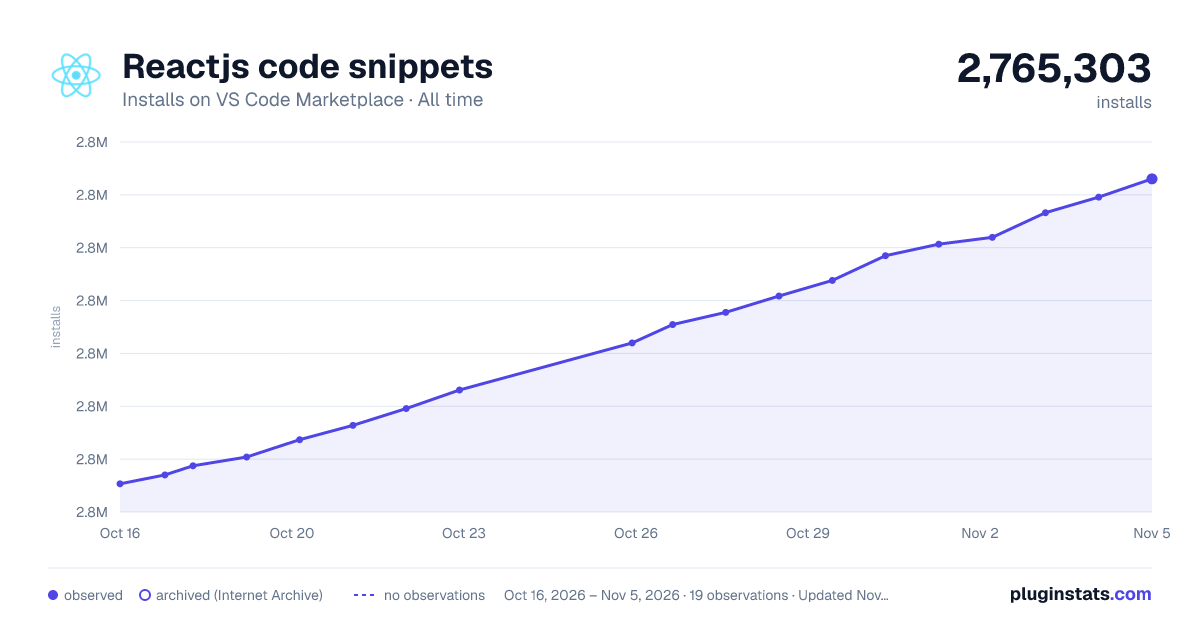

Adoption over time


7/30/90-day growth


Ranking history


Ratings over time


Listing placement


Filled points are observed values; hollow points come from Internet Archive snapshots of the listing page. Dashed segments span periods with no observations — values between points are not interpolated.
Each band is one page of 20. Installs on a log scale. Placement is projected from installs, so it can differ from the marketplace's own sort order. Hover a dot to see the listing.
Recent observations
Full history (4)Similar VS Code Marketplace Snippets plugins
All 20 Reactjs code snippets alternativesData source
Install counts, average rating, and rating counts come from the public Visual Studio Marketplace gallery API. Installs are cumulative and exclude updates.
Listing: https://marketplace.visualstudio.com/items?itemName=xabikos.ReactSnippets. First seen Oct 16, 2026; last successful collection Oct 19, 2026. See the methodology.