 PluginStats
git-commit-plugin installs statistics
By redjue · VS Code Marketplace · Other
Automatically generate git commit
git-commit-plugin has 163,801 recorded installs on VS Code Marketplace, ranking #1763 of 2,501 tracked listings.
Rating: 4.70 / 5 from 10 ratings
About git-commit-plugin
Git Commit Plugin For VS Code
<!-- ALL-CONTRIBUTORS-BADGE:START - Do not remove or modify this section -->
Automatically generate git commit messages








Requirements
- VS Code
1.42.0or higher. - VS Code's built-in Git plugin
Format
This extension follows the Angular Team Commit Specification, as follows:
<type>(<scope>): <subject>
<BLANK LINE>
<body>
<BLANK LINE>
<footer>
See info on the fields below.
Type
Must be one of the following:
| Type | Description |
|---|---|
| feat | A new feature |
| fix | A bug fix |
| docs | Documentation only changes |
| style: | Changes that do not affect the meaning of the code (white-space, formatting, missing semi-colons, etc) |
| refactor | A code change that neither fixes a bug nor adds a feature |
| perf | A code change that improves performance |
| test | Adding missing or correcting existing tests |
| chore | Changes to the build process or auxiliary tools and libraries such as documentation generation |
Scope
The scope could be anything specifying place of the commit change. For example $location, $browser, $compile, $rootScope, ngHref, ngClick, ngView, etc...
You can use * when the change affects more than a single scope.
Subject
The subject contains succinct description of the change:
- use the imperative, present tense: "change" not "changed" nor "changes"
- don't capitalize first letter
- no dot (
.) at the end
Body
Just as in the subject, use the imperative, present tense: "change" not "changed" nor "changes". The body should include the motivation for the change and contrast this with previous behavior.
Footer
The footer should contain any information about Breaking Changes and is also the place to reference GitHub issues that this commit closes.
Breaking Changes should start with the word BREAKING CHANGE: with a space or two newlines. The rest of the commit message is then used for this.
A detailed explanation can be found in this document.
Quick Start
- Install the plugin
- Use the command shortcut
showGitCommitto open the command window or Click the icon on the git plugin navigation bar
- Enter the commit information, which automatically generates a commit message that conforms to the specification

Locale Support
The plugin will automatically switch the language description based on the vscode language environment.
Support Language
- en-US as default
- zh-CN
- zh-HK
- zh-TW
- ja-JP
Settings Options
GitCommitPlugin.ShowEmoji: whether to show emoji, defaulttrue.{ "GitCommitPlugin.ShowEmoji": true }GitCommitPlugin.CustomCommitType: customize the commit type, defaultnull.
or{ "GitCommitPlugin.CustomCommitType": [ "customTypeName" ] }[ { // If there are duplicate keys, rewrite the config,otherwise add As a new configuration addition "key": "customTypeKey", "label": "customTypeName", "detail": "customTypeDetail", "icon":"customIcon" } ]GitCommitPlugin.MaxSubjectCharacters: customize the maximum number of words on the subject, default20.{ "GitCommitPlugin.MaxSubjectCharacters": 20 }GitCommitPlugin.FillSubjectWithCurrent: whether to fill the subject with the current commit message, defaultfalse.{ "GitCommitPlugin.FillSubjectWithCurrent": false }GitCommitPlugin.Template: customize the git commit template.{ "GitCommitPlugin.Templates": [ { "templateName": "Angular", "templateContent": "<icon><space><type>(<scope>):<space><subject><enter><body><enter><footer>" }, { "templateName": "git-cz", "templateContent": "<type>(<scope>):<space><icon><space><subject><enter><body><enter><footer>", // Set as default commit template "default":true } ] }
License
Released under MIT by @RedJue.
Contributors ✨
Thanks goes to these wonderful people (emoji key):…
Description from the VS Code Marketplace listing.
- commit
- git
- vscode
README badge
Show your rank in a README or on your website. The badge updates automatically.
Charts
Images: 30d · 1y · all time · 1600×900 dark


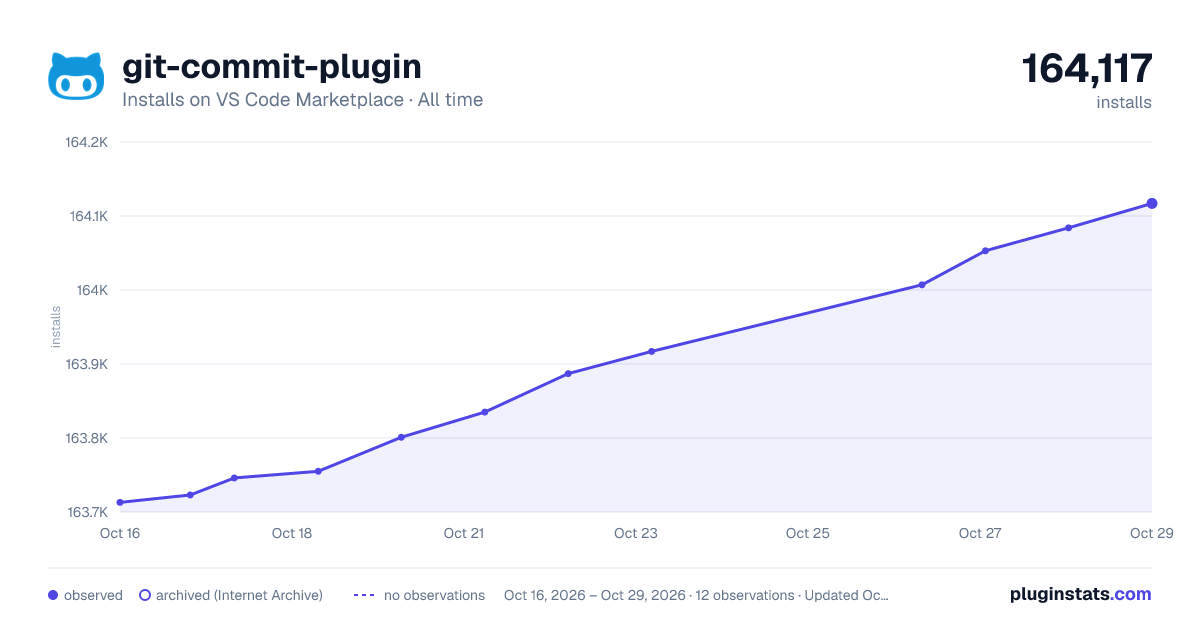

Adoption over time
7/30/90-day growth
Ranking history
Ratings over time
Listing placement
Listing placement
Filled points are observed values; hollow points come from Internet Archive snapshots of the listing page. Dashed segments span periods with no observations — values between points are not interpolated.
Each band is one page of 20. Installs on a linear scale. Placement is projected from installs, so it can differ from the marketplace's own sort order. Hover a dot to see the listing.
Recent observations
Full history (5)Similar VS Code Marketplace Other plugins
All 20 git-commit-plugin alternativesData source
Install counts, average rating, and rating counts come from the public Visual Studio Marketplace gallery API. Installs are cumulative and exclude updates.
Listing: https://marketplace.visualstudio.com/items?itemName=redjue.git-commit-plugin. First seen Oct 16, 2026; last successful collection Oct 20, 2026. See the methodology.