 PluginStats
Symbols installs statistics
By Miguel Solorio (3 listings) · VS Code Marketplace · Themes
A simple file icon theme for VS Code
Symbols has 937,127 recorded installs on VS Code Marketplace, ranking #560 of 2,501 tracked listings.
Rating: 4.91 / 5 from 43 ratings
About Symbols
Symbols
A file icon for VS Code

Contributing
If you'd like to contribute to this extension, please take a look at the issues or create a new one. If you'd like to create a new icon, please reference the Symbols - File Icon Figma file, you can make a copy or reference the styles used (tailwind). Please try to limit your colors to the ones used in existing icons before choosing a different color style.
When submitting a PR, please ensure you've tested the extension locally and ensure that your new icons appear correctly in the file tree view with your new file extension. Include a screenshot of your proposed icon in your PR.
Generating Icon Previews
Before submitting a PR, please run the preview generation script to update the icon previews:
npm run generate-previews
This script will update the preview markdown files with your new icons. Make sure to commit these changes along with your PR.
Configuration
You can configure which folders and files icons are displayed by using the following settings:
Folders
"symbols.folders.associations": {
    "{folder name}": "{icon name}"
}
Example:
"symbols.folders.associations": {
    "entities": "folder-assets",
    "infra": "folder-app",
    "schemas": "folder-purple"
}
Files
"symbols.files.associations": {
    "{file name}": "{icon name}"
}
Example:
"symbols.files.associations": {
    "app.module.ts": "nest",
    "*.service.ts": "nest"
}
Note: For file names, you can use * to match all files with a specific file extension.
Subfolder Files
"symbols.subfolder.file.associations": {
    "{subfolder}": {
        "{filename}": "{icon name}"
    }
}
Example:
"symbols.subfolder.file.associations": {
    "annotation": {
        "*.java": "at",
        "LogAPICall.java": "at-blue"
    }
}
Note: For file names, you can use * to match all files with a specific file extension.
Icon Preview
You can preview the icons by reading the the preview.md file.
React Symbols
Pablo Hdez has graciously created React-Symbols (pheralb/react-symbols) to allow you to embed Symbol icons for your React projects.
<img src="https://raw.githubusercontent.com/pheralb/react-symbols/main/website/public/images/og.png">Open VSX
If you're using editors like Cursor, Antigravity, or VSCodium, you can find the extension on Open VSX.
Zed Editor
If you're using the Zed editor, you can find its maintained version here: Symbols for Zed.
JetBrains IDEs
If you're using a JetBrains IDE (including Android Studio), you can find its maintained version here: Symbols for JetBrains.
Description from the VS Code Marketplace listing.
- file icons
- file-icon-theme
- icons
- icon-theme
- theme
README badge
Show your rank in a README or on your website. The badge updates automatically.
Charts
Images: 30d · 1y · all time · 1600×900 dark


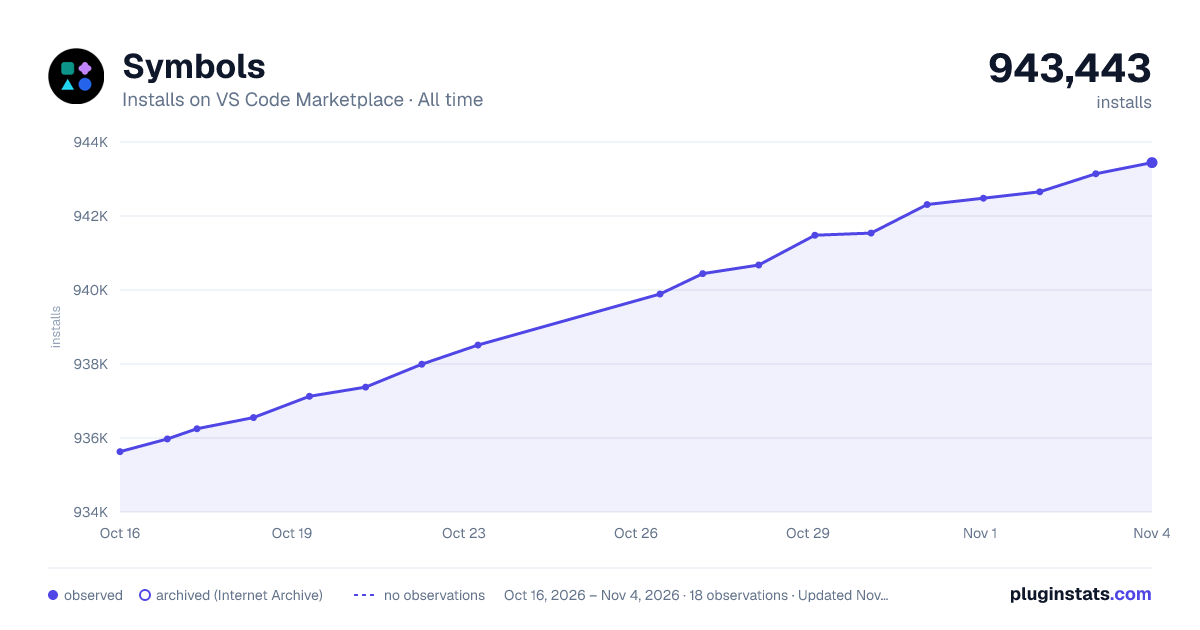

Adoption over time
7/30/90-day growth
Ranking history
Ratings over time
Listing placement
Listing placement
Filled points are observed values; hollow points come from Internet Archive snapshots of the listing page. Dashed segments span periods with no observations — values between points are not interpolated.
Each band is one page of 20. Installs on a linear scale. Placement is projected from installs, so it can differ from the marketplace's own sort order. Hover a dot to see the listing.
Recent observations
Full history (5)Similar VS Code Marketplace Themes plugins
All 20 Symbols alternativesData source
Install counts, average rating, and rating counts come from the public Visual Studio Marketplace gallery API. Installs are cumulative and exclude updates.
Listing: https://marketplace.visualstudio.com/items?itemName=miguelsolorio.symbols. First seen Oct 16, 2026; last successful collection Oct 20, 2026. See the methodology.