 PluginStats
Hack installs statistics
By Pranay Agarwal · VS Code Marketplace · Programming Languages
Hack language & HHVM debugger support for Visual Studio Code
Hack has 245,200 recorded installs on VS Code Marketplace.
It ranks #1320 of 2,501 tracked VS Code Marketplace listings by installs.
It is rated 5.0 out of 5 from 5 ratings.
PluginStats has 4 daily observations since Oct 16, 2026; the latest is from Oct 19, 2026.
Rating: 5.00 / 5 from 5 ratings
About Hack
Hack for Visual Studio Code
This extension adds rich Hack language & HHVM support to Visual Studio Code. Visit http://hacklang.org to get started with Hack.
It is published in the Visual Studio Marketplace here. To install, search for "Hack" in the VS Code extensions tab or run the following command (⌘+P): ext install vscode-hack.
See the full list of releases and features added on the Github releases page as well as the project changelog.
Features
• Type Checking • Autocomplete • Hover Hints • Document Symbol Outline • Workspace Symbol Search • Document Formatting • Go To/Peek Definition • Find All References • Hack Coverage Check • Linting and Autofixing • Local and Remote Debugging
Requirements
This extension is supported on Linux and Mac OS X 10.10 onwards (see HHVM compatibility). The latest versions of Hack typechecking tools (hh_client and hh_server) are required on the local machine or via a remote connection. The workspace should have a .hhconfig file at its root.
Configuration
This extension adds the following Visual Studio Code settings. These can be set in user preferences (⌘+,) or workspace settings (.vscode/settings.json).
• hack.clientPath: Absolute path to the hh_client executable. This can be left empty if hh_client is already in your environment \$PATH. • hack.enableCoverageCheck: Enable calculation of Hack type coverage percentage for every file and display in status bar (default: true). • hack.useLanguageServer: Start hh_client in Language Server mode. Only works for HHVM version 3.23 and above (default: true). • hack.useHhast: Enable linting (needs HHAST library set up and configured in project) (default: true). • hack.hhastPath: Use an alternate hhast-lint path. Can be abolute or relative to workspace root (default: vendor/bin/hhast-lint). • hack.hhastArgs: Optional list of arguments passed to hhast-lint executable. • hack.hhastLintMode: Whether to lint the entire project (whole-project) or just the open files (open-files).
Remote Development
The extension supports connecting to an external HHVM development environment for local typechecking, linting and all other intellisense features. The current supported connection methods are SSH into a remote host or exec in a local Docker container.
To enable this, set the following config values:
• hack.remote.enabled: Run the Hack language tools on an external host (deafult: false). • hack.remote.type: The remote connection method (ssh or docker). • hack.remote.workspacePath: Absolute location of workspace root in the remote file system. If empty, this defaults to the local workspace path.
For SSH:
• hack.remote.ssh.host: Address for the remote development server to connect to (in the format [user@]hostname). • hack.remote.ssh.flags: Additional command line options to pass when establishing the SSH connection (_Optional_).
Make sure to test SSH connectivity and credentials beforehand. You should also ensure that the source stays in sync between the local and remote machines (the extension doesn't currently handle this).
For Docker:
• hack.remote.docker.containerName: Name of the local Docker container to run the language tools in.
Make sure the container is already running on your local machine, and has the required HHVM setup. You can pull an official HHVM image from Docker hub and even run multiple versions simultaneously.
Issues
Please file all bugs, issues, feature requests etc. at the GitHub issues page.
Contributing
There are lots of ways to help! You can file new bugs and feature requests, or fix a pending one. To contribute to the source code, fork the repository on GitHub and create a pull request. Please read our Contributors Guide and check out the VS Code extension development guide to get started.
License
The source code for this extension is hosted at https://github.com/slackhq/vscode-hack and is available under the MIT license.
Description from the VS Code Marketplace listing.
- debuggers
- hack
- HackConfiguration
- hacklang
- hhvm
- ini
- php
- snippet
Where Hack sits in the listing
Each band is one page of 20. Installs on a log scale. Placement is projected from installs, so it can differ from the marketplace's own sort order. Hover a dot to see the listing.


Charts
Images: 30d · 1y · all time · 1600×900 dark


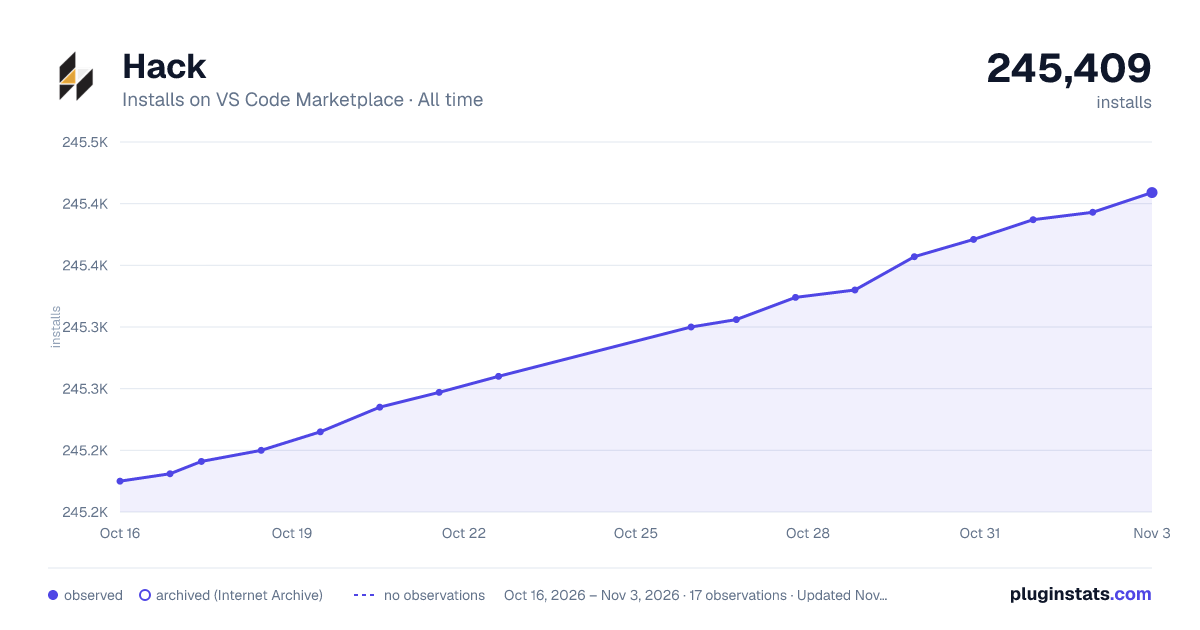

Adoption over time


7/30/90-day growth


Filled points are observed values; hollow points come from Internet Archive snapshots of the listing page. Dashed segments span periods with no observations — values between points are not interpolated.
Recent observations
Full history (4)Similar VS Code Marketplace Programming Languages plugins
Data source
Install counts, average rating, and rating counts come from the public Visual Studio Marketplace gallery API. Installs are cumulative and exclude updates.
Listing: https://marketplace.visualstudio.com/items?itemName=pranayagarwal.vscode-hack. First seen Oct 16, 2026; last successful collection Oct 19, 2026. See the methodology.