 PluginStats
.NET Core Extension Pack installs statistics
By Will 保哥 (6 listings) · VS Code Marketplace · Extension Packs
Popular Visual Studio Code extensions for .NET Core Development
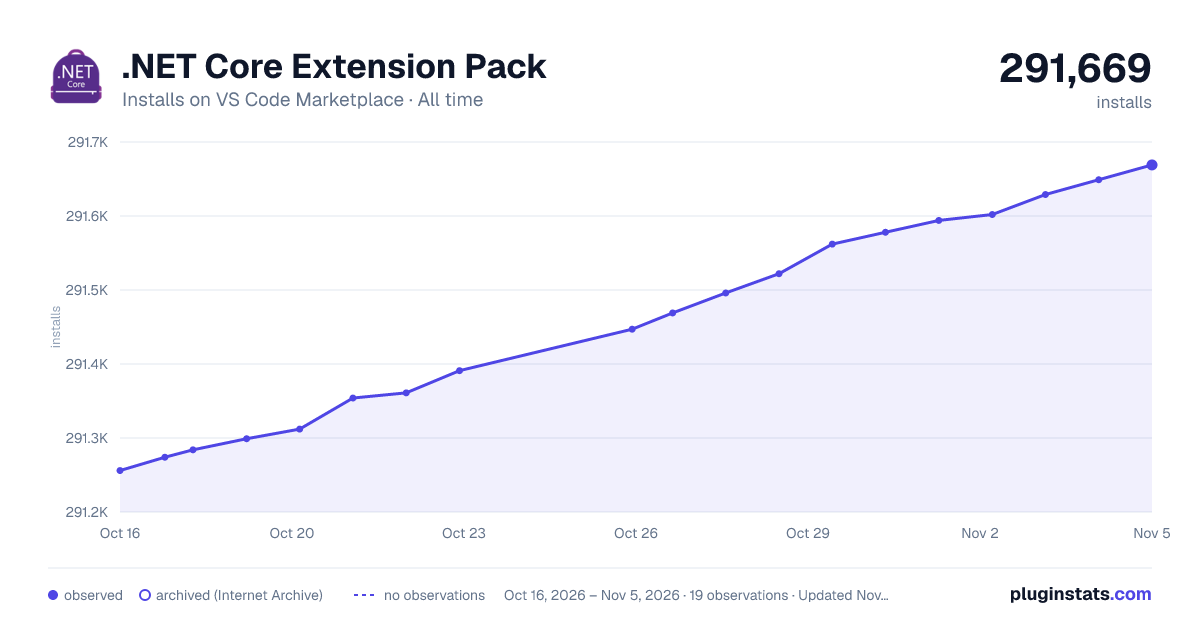
.NET Core Extension Pack has 291,312 recorded installs on VS Code Marketplace, ranking #1182 of 2,501 tracked listings.
Rating: 5.00 / 5 from 76 ratings
About .NET Core Extension Pack
.NET Core Extension Pack
This extension pack packages some of the most popular (and some of my favorite) .NET Core related extensions. If you like it, please leave your Rating & Review and share with your friends. If you have any idea on how to improve this extension pack, I'm looking forwarded to hear from you. Just let me know your awesome ideas! 😊
Extensions Included
C# Productivity
- C#
- It provides rich language support for C# and is shipped along with C# Dev Kit. Powered by a Language Server Protocol (LSP) server, this extension integrates with open source components like Roslyn and Razor to provide rich type information and a faster, more reliable C# experience.
- Learn more about the rich features of the C# extension:
- Refactoring: Edit your code with code fixes and refactorings
- Navigation: Explore and navigate your code with features like Go To Definition and *d All References
- IntelliSense: Write code with auto-completion
- Formatting and Linting: Format and lint your code
- C# Dev Kit
- C# Dev Kit helps you manage your code with a solution explorer and test your code with integrated unit test discovery and execution, elevating your C# development experience wherever you like to develop (Windows, macOS, Linux, and even in a Codespace).
- IntelliCode for C# Dev Kit
- AI-assisted development for C# Dev Kit
- .NET Runtime Install Tool
- This extension installs and manages different versions of the .NET Runtime.
- C# Namespace Autocompletion
- Use the
namespace-fillsnippet to insert full namespace autocompletion for C#
- Use the
- C# Extensions
- The Quick Actions is really a productivity saver.
- Explorer
- New C# Class
- New C# Interface
- New C# Enum
- New C# Controller
- New C# Api Controller
- New C# Razor Page
- C# XML Documentation Comments
- Type "///", it auto-generates an XML doucumentation comment.
- Better Comments
- It will highlight important comments in your code.
// *hightlight information// !hightlight important stuff// ?hightlight some questions// TODO:highlight TODOs// @param PARAMhighlight parameter info
- Paste JSON as Code (Refresh)
quicktypeinfers types from sample JSON data, then outputs strongly typed models and serializers for working with that data in your desired programming language. For more explanation, read A first look at quicktype.- It supports
C#,Go,C++,Java,TypeScript,Swift,Elm, andJSON Schema. I have to say THIS IS AWESOME! Just try it.
- C# to TypeScript
- Convert C# Models, ViewModels and DTOs into their TypeScript equivalents.
- Useful keyboard shortcuts:
Alt + /- Run C# to TypeScript (To Clipboard) commandAlt + .- Run C# to TypeScript (Paste As) command
- TODO Highlight
- This can let you list all the
// TODO:comments in the project. Neats!
- This can let you list all the
Testing Tools
- REST Client
- REST Client allows you to send HTTP request and view the response in Visual Studio Code directly.
NuGet & Build Tools
- NuGet Package Manager
- It lets you easily add or remove NuGet package references to/from your project's
.csprojor.fsprojfiles using Code's Command Palette.
- It lets you easily add or remove NuGet package references to/from your project's
- MSBuild project tools
- It provides MSBuild language service which contains intellisense for MSBuild project files, including auto-complete for
<PackageReference>elements.
- It provides MSBuild language service which contains intellisense for MSBuild project files, including auto-complete for
- .NET Core Tools
- Right click on a
.csproj,.fsprojor.slnfile in the explorer, then you can run .NET Core commands (Build/Run/Test) from context menu.
- Right click on a
- Path Intellisense
- This provide you IntelliSense when entering
<ProjectReference Inlcude="..." />path.
- This provide you IntelliSense when entering
- Version Lens
- Shows the latest version for each package using code lens.
.NET Core Productivity…
Description from the VS Code Marketplace listing.
- dot-net
- net-core
README badge
Show your rank in a README or on your website. The badge updates automatically.
Charts
Images: 30d · 1y · all time · 1600×900 dark



Adoption over time
7/30/90-day growth
Ranking history
Ratings over time
Listing placement
Listing placement
Filled points are observed values; hollow points come from Internet Archive snapshots of the listing page. Dashed segments span periods with no observations — values between points are not interpolated.
Each band is one page of 20. Installs on a linear scale. Placement is projected from installs, so it can differ from the marketplace's own sort order. Hover a dot to see the listing.
Recent observations
Full history (5)Similar VS Code Marketplace Extension Packs plugins
All 20 .NET Core Extension Pack alternativesData source
Install counts, average rating, and rating counts come from the public Visual Studio Marketplace gallery API. Installs are cumulative and exclude updates.
Listing: https://marketplace.visualstudio.com/items?itemName=doggy8088.netcore-extension-pack. First seen Oct 16, 2026; last successful collection Oct 20, 2026. See the methodology.