 PluginStats
Code Coverage installs statistics
By Markis Taylor · VS Code Marketplace · Testing
Boost test coverage and reliability with this easy-to-use code coverage analysis tool
Code Coverage has 434,387 recorded installs on VS Code Marketplace, ranking #919 of 2,502 tracked listings.
Rating: 3.92 / 5 from 12 ratings
About Code Coverage
Code Coverage
Code Coverage is a powerful Visual Studio Code extension that helps you analyze and improve the test coverage of your codebase. It highlights lines of code that are not covered by tests, providing valuable insights into areas that require additional testing. With Code Coverage, you can easily identify and track the coverage status of your project, improving its overall quality and reliability.

Features
-
Comprehensive Coverage Analysis: Code Coverage identifies and highlights lines of code that are not covered by tests, allowing you to focus on improving the areas with low coverage.
-
Efficient Resource Usage: With a small memory and processor footprint, Code Coverage seamlessly integrates into your development workflow without impacting your productivity.
-
Support for Multiple lcov File Formats: Code Coverage supports multiple lcov file formats, enabling you to use your language's code coverage tools and seamlessly integrate them with the extension.
Getting Started
To start using Code Coverage, follow these simple steps:
-
Generate
.lcovcoverage files using your preferred code coverage tools for your programming language. -
In Visual Studio Code, navigate to the extension settings by clicking on the gear icon in the sidebar and selecting "Settings" (or by using the shortcut
Ctrl+,on Windows orCmd+,on Mac). -
Locate the "Coverage Location" setting (
markiscodecoverage.searchCriteria) and set it to the path where your coverage files are located. The default value iscoverage/lcov*.info, but you can customize it to match your project's setup. -
Optionally, you can modify the default behavior of Code Coverage by changing the "Enable on Startup" setting (
markiscodecoverage.enableOnStartup). By default, Code Coverage is enabled when Visual Studio Code starts, but you can disable this behavior if desired. -
Open your project in Visual Studio Code and navigate to the file you want to analyze. Code Coverage will automatically highlight the uncovered lines under the Problems window, providing you with a clear overview of your project's coverage status.
Commands
Code Coverage provides the following commands that you can use to control the display of coverage information. You can also map these commands to custom key bindings in Visual Studio Code to further streamline your workflow.
-
code-coverage.hide: Hides the code coverage overlay, allowing you to focus on your code without the distraction of coverage highlighting. -
code-coverage.show: Shows the code coverage overlay, highlighting the lines of code that are not covered by tests.
To map these commands to key bindings, refer to the official Visual Studio Code documentation.
Feedback and Contributions
We welcome your feedback and contributions to make Code Coverage even better. If you encounter any issues, have suggestions for improvements, or would like to contribute to the project, please visit our GitHub repository and open an issue or pull request.
License
Code Coverage is released under the MIT License.
About the Author
This extension is developed and maintained by Markis Taylor. Feel free to reach out to me with any questions or feedback you may have.
Description from the VS Code Marketplace listing.
- analysis
- c
- clojure
- code coverage
- coffeescript
- cpp
- csharp
- dart
- elixir
- fsharp
- go
- haxe
- java
- javascript
- javascriptreact
- lcov
- objective-c
- objective-cpp
- perl
- perl6
README badge
Show your rank in a README or on your website. The badge updates automatically.
Charts
Images: 30d · 1y · all time · 1600×900 dark


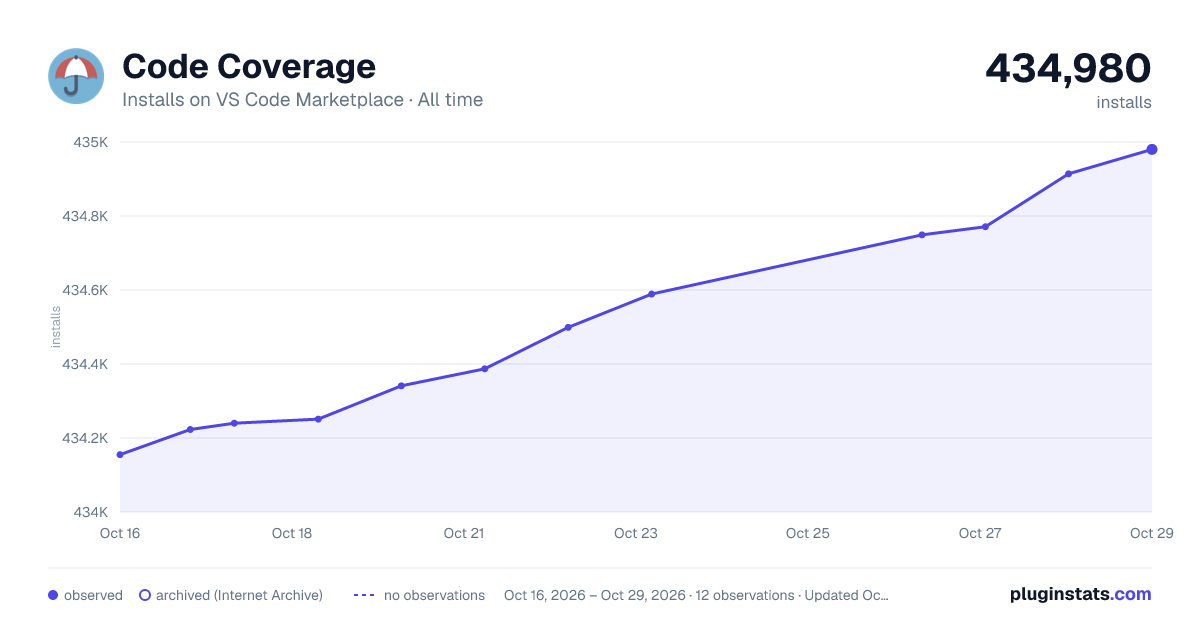

Adoption over time
7/30/90-day growth
Ranking history
Ratings over time
Listing placement
Listing placement
Filled points are observed values; hollow points come from Internet Archive snapshots of the listing page. Dashed segments span periods with no observations — values between points are not interpolated.
Each band is one page of 20. Installs on a linear scale. Placement is projected from installs, so it can differ from the marketplace's own sort order. Hover a dot to see the listing.
Recent observations
Full history (6)Similar VS Code Marketplace Testing plugins
All 20 Code Coverage alternativesData source
Install counts, average rating, and rating counts come from the public Visual Studio Marketplace gallery API. Installs are cumulative and exclude updates.
Listing: https://marketplace.visualstudio.com/items?itemName=markis.code-coverage. First seen Oct 16, 2026; last successful collection Oct 21, 2026. See the methodology.