 PluginStats
ftp-simple has 1,203,467 recorded installs on VS Code Marketplace, ranking #486 of 2,501 tracked listings.
Rating: 3.00 / 5 from 235 ratings
About ftp-simple
Functions
- Directly Open, Edit and Save on server files.
- Save the local file or directory to server(upload and backup option)
- Download the file or directory from ftp server.
- Create a directory on the remote server directly.
- Delete directory(recursive) and files directly from the server.
- Rename Change the file name on the FTP server.
- Compare a local file server file.
- Remote directory open to workspace (Beta version)
Available commands
- config - Set the ftp connection information.
- create directory - Create a directory on ftp server.
- open - Open the file directly from ftp server and when you save upload it to the ftp server.
- save - File or directory upload to ftp server.(Available from the context menu)
- download - Download the file or directory from ftp server to the workspace.
- delete - Delete the file or directory directly from ftp server.
- rename - Change the file name on the FTP server.
- diff - Compare a local file server file.
- Remote directory open to workspace - (Beta version) Open the directory directly on workspace from the ftp server. Similar to remote synchronization. (Caution : So remote delete a files is only possible using 'Delete' in the context menu)
Caution
Be sure to check the console(Ctrl + Shift + U)("OUTPUT -> ftp-simple") for a response to the all action.
Startup Settings
- Press 'F1'
- Enter 'ftp-simple'
- Pick 'CONFIG'
- Enter ftp connection information and save
Config setting example
See the easy-ftp details.
- name - string - Display name.
- host - string - server domain or ip.
- port - number - (option) port (Default: : 21)
- type - string - (option) ftp type. 'ftp' or 'sftp' (Default: : 'ftp'). If 'ftp' does not work, try 'ftp2'.
- username - string - username for authentication.
- password - string - (option) password for authentication.
- privateKey - string - (option) (only sftp) String that contains a private key for either key-based or hostbased user authentication (OpenSSH format) Default: none
- passphrase - string - (option) Use sftp 'privateKey' only. For an encrypted private key, this is the passphrase used to decrypt it. Default: none
- agent - string - (option) (only sftp) Path to ssh-agent's UNIX socket for ssh-agent-based user authentication. Important: Windows users: set to 'pageant' for authenticating with Pageant or (actual) path to a cygwin "UNIX socket." Default: none
- agentForward - boolean - (option) (only sftp) Set to
trueto use OpenSSH agent forwarding (auth-agent@openssh.com) for the life of the connection. agent must also be set to use this feature. Default: false - secure - boolean - (only ftp) Explicit FTPS over TLS, default: false
- secureOptions - object - (only ftp) Options for TLS, same as for
tls.connect()in Node.js. - path - string - (option) remote root path. Default: '/'
- autosave - boolean - (option) To determine whether the automatically uploaded when you open a file directly and modify and save. Default: true
- backup - string - (option) The local path you want to back up before file saving on the server.
- confirm - boolean - (option) Only save option. When you save the file, ask if you want to overwrite the file if it already exists.. Default: true
- project - object - (option) Only save option. Pre-specify local workspace path and server root path to save directly without selecting a path. Overwrite unconditionally.
- ignore - array - (option) Only 'Remote directory open to workspace' option. Path to be ignore. Use glog pattern. (Caution : server path (ex:
/home) + ignore pattern (ex:/**/node_modules) =>/home/**/node_modules)
Example
[
	{
		"name": "my server1",
		"host": "127.0.0.1",
		"port": 21,
		"type": "ftp",
		"username": "id",
		"password": "pw",
		"path" : "/"
	},
	{
		"name": "my server1 with tls",
		"host": "127.0.0.1",
		"port": 21,
		"type": "ftp",
		"username": "id",
		"password": "pw",
		"secure" : true,
		//"secureOptions" : {"rejectUnauthorized": false, "secureProtocol" :"TLSv1_2_method"},
		"path" : "/"
	},
	{
		"name": "my server2",
		"host": "127.0.0.1",
		"port": 22,
		"type": "sftp",
		"username": "id",
		"password": "pw",
		"path" : "/",
		"autosave" : false
	},
	{
		"name": "my server3",
		"host": "127.0.0.1",
		"port": 21,
		"type": "sftp",
		"username": "id",
		"password": "pw",
		"path" : "/home",
		"confirm" : false,
		"backup" : "C:/backup",
		"project" :  {
			"c:/projects/project1" : "/home/user/project",
			"c:/projects/project2" : {"path":"/home/user/project2", "save":true}  //When the "save" value is "true", save immediately without confirm
		},
		"ignore" : ["/**/node_modules", "/**/*.class"]
	},
	{
		"name": "my server4",
		"host": "127.0.0.1",
		"port": 22,
		"type": "sftp",
		"username": "id",
		"password": "x",
		"agent": "/run/user/1111/keyring/ssh",
		"path": "/",
		"autosave": true,
		"confirm": false
	},
	....
]
Remote Config(option)
"File - Preferences - Settings" and type in the format shown below.
- ftp-simple.remote-workspace - string - (option) You can modify the local workspace path when you open a remote file. Modify this option if remote file encoding is not UTF-8.(VSCode appears to have encoding recognition bugs if the workspace path is longer.)
- ftp-simple.remote-workspace-load-all - boolean - (option) Indicates whether all files are loaded during initial run. If false, the sub folder ([DIR]) will load when it is clicked. Default: true
Example
"ftp-simple.remote-workspace" : "c:/remote-workspace",
"ftp-simple.remote-workspace-load-all" : true
Description from the VS Code Marketplace listing.
- download
- ftp
- ftps
- keybindings
- remote
- sftp
- tls
- upload
README badge
Show your rank in a README or on your website. The badge updates automatically.
Charts
Images: 30d · 1y · all time · 1600×900 dark


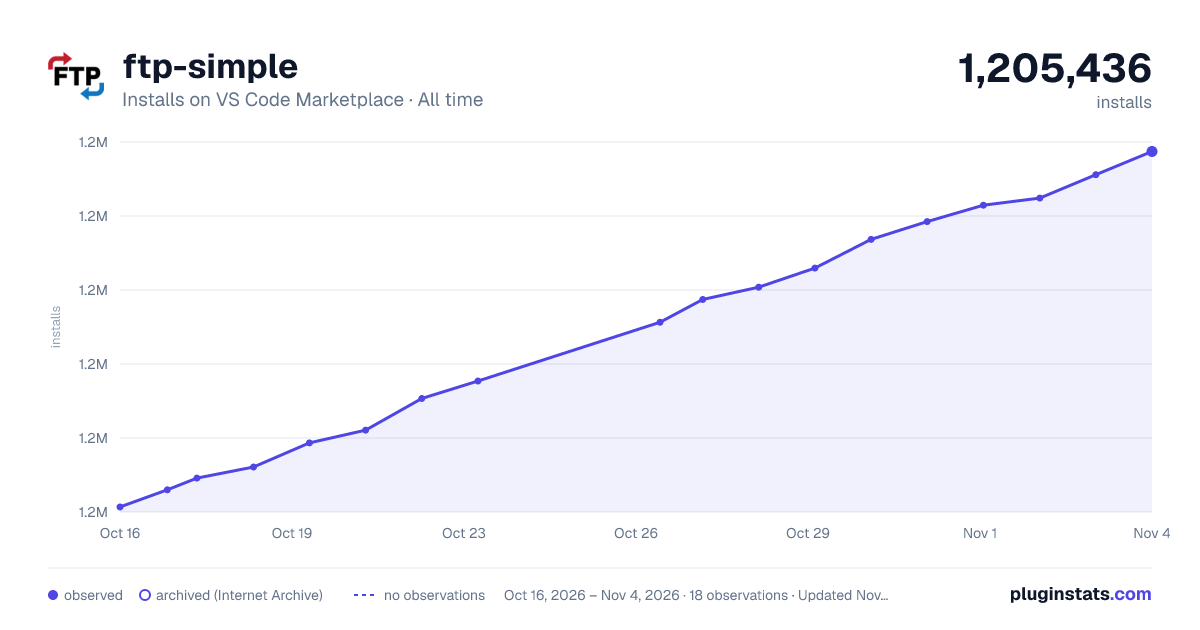

Adoption over time
7/30/90-day growth
Ranking history
Ratings over time
Listing placement
Listing placement
Filled points are observed values; hollow points come from Internet Archive snapshots of the listing page. Dashed segments span periods with no observations — values between points are not interpolated.
Each band is one page of 20. Installs on a linear scale. Placement is projected from installs, so it can differ from the marketplace's own sort order. Hover a dot to see the listing.
Recent observations
Full history (5)Similar VS Code Marketplace Other plugins
All 20 ftp-simple alternativesData source
Install counts, average rating, and rating counts come from the public Visual Studio Marketplace gallery API. Installs are cumulative and exclude updates.
Listing: https://marketplace.visualstudio.com/items?itemName=humy2833.ftp-simple. First seen Oct 16, 2026; last successful collection Oct 20, 2026. See the methodology.