 PluginStats
RobotCode - Robot Framework Support installs statistics
By Daniel Biehl · VS Code Marketplace · Programming Languages
Robot Framework IntelliSense, linting, test execution and debugging, code formatting, refactoring, and many more
RobotCode - Robot Framework Support has 404,225 recorded installs on VS Code Marketplace.
It ranks #958 of 2,500 tracked VS Code Marketplace listings by installs.
It is rated 4.8 out of 5 from 52 ratings.
PluginStats has 3 daily observations since Oct 16, 2026; the latest is from Oct 18, 2026.
Rating: 4.75 / 5 from 52 ratings
About RobotCode - Robot Framework Support
RobotCode - The Ultimate Robot Framework Toolset
What is RobotCode?
RobotCode is a complete Robot Framework toolkit: a language server, IDE extensions for VS Code and the JetBrains platform, a powerful command-line interface, and a unified robot.toml-based configuration model. It is designed for everyday Robot Framework work — from your first keyword to scaling multi-team test suites in CI.
Built on Robot Framework Core, RobotCode is developed in close collaboration with the Robot Framework Core team and supported by the Robot Framework Foundation.
Key Features
Editor / IDE
• Code intelligence — completion for keywords, variables, libraries, and resources; hover documentation; go-to-definition; find references; signature help. • Keywords explorer — browse, navigate, and insert keywords from imported libraries and resources via a dedicated sidebar view. • Refactoring — project-wide rename of keywords, variables, and arguments. • Live diagnostics — errors and warnings as you type, out of the box. Optional Robocop integration adds further linting and formatting checks on top. • Debugging — Robot Framework debugging via the Debug Adapter Protocol, with breakpoints in keywords and step-through control. • Syntax highlighting — full Robot Framework grammar including embedded arguments, Python expressions, and environment variables with defaults. • Snippets — quick insertion of common Robot Framework patterns. • Test view — discover, run, debug, and inspect Robot Framework tests in the editor's test panel. • Interactive REPL & .robotbook notebooks — try keywords live in a REPL or work in a Jupyter Notebook-style notebook format. • Multi-root workspaces — manage multiple projects with different Python environments side by side.
Configuration
One configuration model that follows your project from the editor into CI — no scattered command-line flags, no duplicated setups.
• A single source of truth — paths, variables, Python paths, listeners, modifiers, and every Robot Framework option live in robot.toml (or pyproject.toml). Editor, CLI, and CI all read the same setup; personal tweaks stay out of git via .robot.toml. • Profiles for every scenario — keep dev, staging, CI, OS-specific, or browser-specific settings as named overlays. Activate with a single flag, layer them, inherit between them. • Total transparency — see exactly what Robot Framework will receive after all files, profile overlays, and CLI flags are merged. • Schema-guided editing — autocomplete and validation while you write your config catches typos and unsupported keys before you run.
Command line
A complete command-line toolkit that knows your project as well as the editor does — same robot.toml, same profiles, same Python environment — so what runs in the IDE runs the same way on the CLI and in CI.
• Run with everything wired up — execute Robot Framework with your profiles, paths, variables, listeners, and modifiers automatically applied. • Find tests by anything — search and filter suites, tasks, tags, sources, documentation, or even keyword calls inside test bodies, and narrow the run accordingly. • Drill into failures fast — explore logs, stats, and diffs across runs, and compare today's run against yesterday's in a single command — without ever parsing output.xml by hand. • CI gates with editor-quality diagnostics — project-wide static analysis that matches what you see while typing; reclassify, mask, or ignore categories per project. • Docs that actually find your project — library and keyword documentation that resolves your project's resources, custom libraries, and Python paths the way Robot itself does. • Live experimentation — try keywords interactively inside your project's environment before they land in a test. • Built for automation — every command can speak JSON, so CI pipelines, dashboards, AI agents, and other tools consume the output without screen-scraping.
For the complete feature reference, see the official documentation.
Requirements
Runtime (always required): • Python 3.10 or newer • Robot Framework 5.0 or newer
Editor / IDE — any LSP-capable editor works. For the dedicated extensions you need one of: • Visual Studio Code 1.108.0 or newer • PyCharm / IntelliJ IDEA 2025.3 or newer
Other editors (Neovim, Sublime Text, Helix, Emacs, …) connect to the language server via the languageserver extra from PyPI — see Command Line and Other Editors below.
Getting Started
Visual Studio Code
1. Install the RobotCode Extension from the Visual Studio Marketplace. 2. Continue with the Getting Started Guide for setup, your first robot.toml, and running your first test.
Extensions: RobotCode declares dependencies on the Python and Python Debugger extensions so VS Code installs them when required. Additional extensions may be needed depending on your project.
IntelliJ IDEA or PyCharm
1. Install the RobotCode Plugin — choose one of:
• Built-in Plugin Marketplace: Settings/Preferences > Plugins > Marketplace > search for "RobotCode" > Install. • JetBrains Marketplace: click Install to ... if your IDE is running. • Manual: download the latest release and use Settings/Preferences > Plugins > ⚙️ > Install plugin from disk....
2. Continue with the Getting Started Guide for setup, your first robot.toml, and running your first test.
Plugins: RobotCode declares a dependency on LSP4IJ so your IDE installs it automatically. Additional plugins may be required depending on your project needs.
Command Line and Other Editors
For CI pipelines, the command line, or LSP-compatible editors like Neovim, Sublime Text, or Helix, install RobotCode from PyPI. The base robotcode package is only the CLI core; the actual commands live in extras such as runner, analyze, debugger, languageserver, and repl:
Pick the extras that match your use case — see the CLI reference for the available packages and how to install them.
Documentation
For detailed instructions, visit our official documentation. Additional resources:…
Description from the VS Code Marketplace listing.
- Acceptance Test Driven Development
- Acceptance Testing
- BDD
- BDT
- Behavior Driven Development
- Behavior Driven Testing
- Data Driven
- debuggers
- keybindings
- Keyword Driven
- language-model-tools
- linters
- notebookKernelRobotframeworkRepl
- Robot
- Robot Framework
- RobotFramework
- robotframework-injection
- RobotFrameworkNotebook
- robotframework-notebook
- RobotFrameworkREPL
Where RobotCode - Robot Framework Support sits in the listing
Each band is one page of 20. Installs on a log scale. Placement is projected from installs, so it can differ from the marketplace's own sort order. Hover a dot to see the listing.


Charts
Images: 30d · 1y · all time · 1600×900 dark


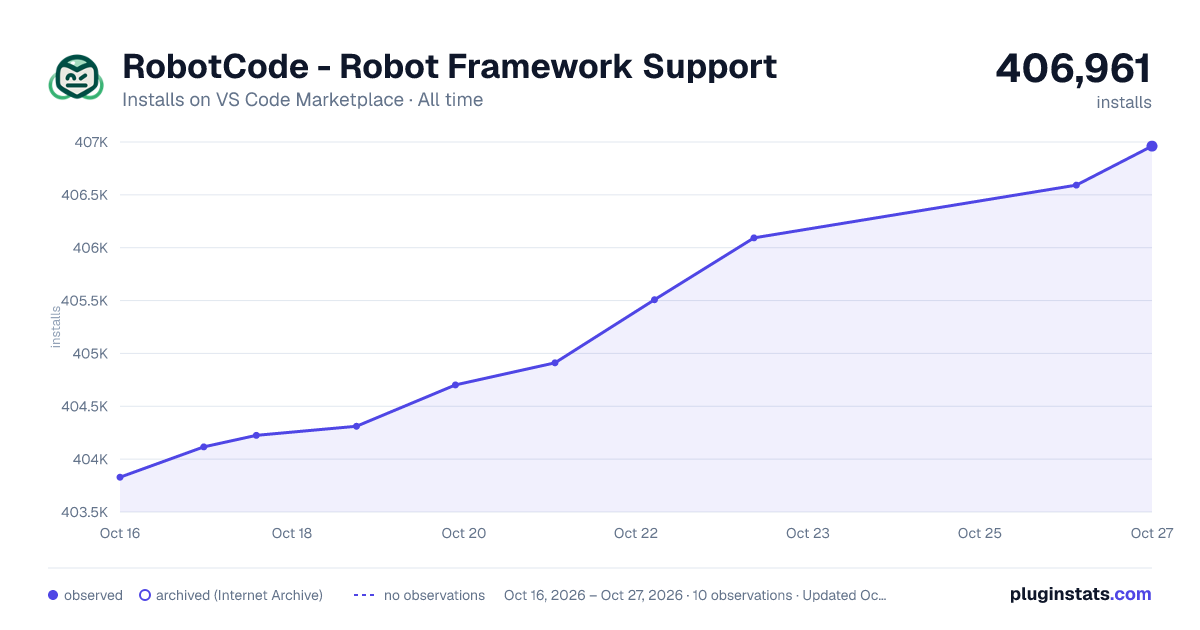

Adoption over time


7/30/90-day growth


Ranking history


Filled points are observed values; hollow points come from Internet Archive snapshots of the listing page. Dashed segments span periods with no observations — values between points are not interpolated.
Recent observations
Full history (3)Similar VS Code Marketplace Programming Languages plugins
Data source
Install counts, average rating, and rating counts come from the public Visual Studio Marketplace gallery API. Installs are cumulative and exclude updates.
Listing: https://marketplace.visualstudio.com/items?itemName=d-biehl.robotcode. First seen Oct 16, 2026; last successful collection Oct 18, 2026. See the methodology.