 PluginStats
Shades of Purple installs statistics
By Ahmad Awais ⚡ · VS Code Marketplace · Themes
🦄 A professional theme suite with hand-picked & bold shades of purple for your VS Code editor and terminal apps. One of the excellent, most downloaded, and top-rated VSCode Themes on the marketplace. Part of VSCode.pro course.
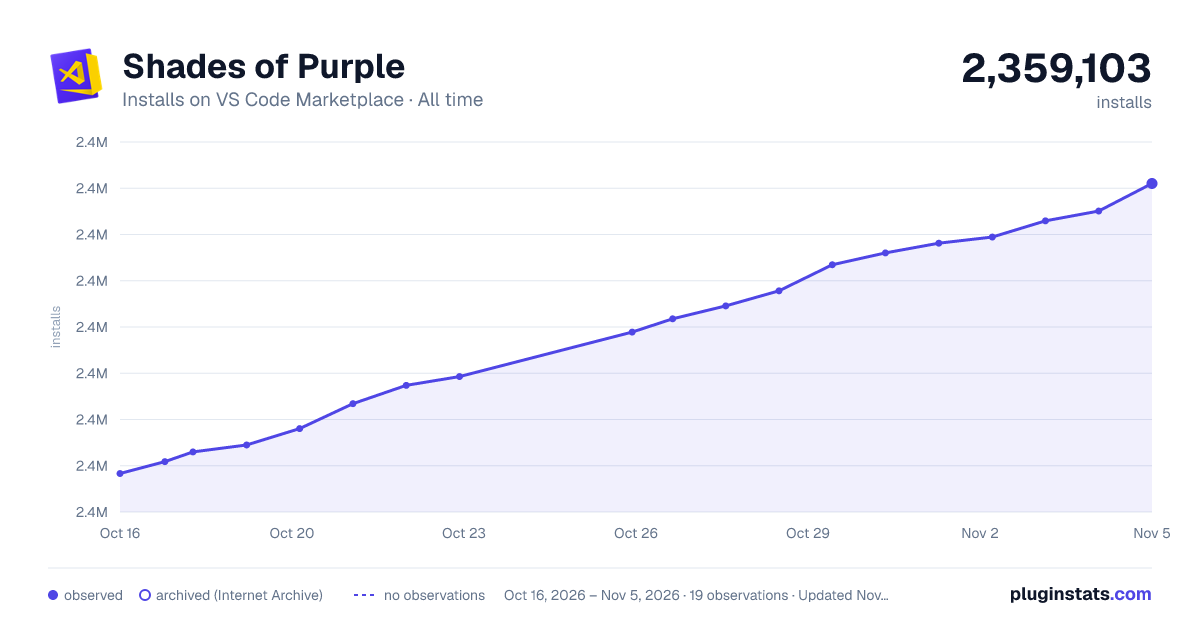
Shades of Purple has 2,356,782 recorded installs on VS Code Marketplace, a change of +0.1% over the past 7 days, ranking #311 of 2,505 tracked listings.
Rating: 4.93 / 5 from 179 ratings
About Shades of Purple
[


 ][course]
About
Shades of Purple is a professional color theme carefully designed to reduce eye strain and improve code readability. With over 5 million developers using it worldwide, it has become one of the most loved themes in the VS Code marketplace.
What makes it special:
- Hand-picked color palette optimized for readability
- Comprehensive support for 50+ programming languages
- Perfect for presentations, teaching, and daily coding
- Regular updates for the latest VS Code features
- Free and open source
<br />
Table of Contents
- About
- What Developers Say
- Installation
- Video Tutorial
- Recommended Settings
- Screenshots
- Put Shades of Purple in Other Places
- Color Palette Reference
- FAQs
- Master VS Code Course
- License & Attribution
<br /> <div > <img src="https://raw.githubusercontent.com/ahmadawais/shades-of-purple-vscode/master/images/2_video_demo.png" alt="Video Demo & Installation" /> </div> <br />
Video Demo & Installation
Watch this comprehensive video guide to see Shades of Purple in action. Learn the installation process and discover features like enhanced markdown editing, syntax highlighting, and customization options.
<br /> <div > <a href="https://www.youtube.com/watch?v=wZ1nzNCD-iM" target="_blank"> <img src="https://raw.githubusercontent.com/ahmadawais/shades-of-purple-vscode/master/images/3_sop_vdo.jpeg" alt="Watch the video tutorial" /> <br /> <br /> <strong>📺 Watch the Video Tutorial →</strong> </a> </div> <br /> <br /> <br /> <div > <img src="https://raw.githubusercontent.com/ahmadawais/shades-of-purple-vscode/master/images/4_install.png" alt="Easy Installation" /> </div> <br />This video is part of the [VSCode.pro course][course] — a complete guide to mastering Visual Studio Code.
Easy Installation
Get started with Shades of Purple in under a minute:
- Open the extensions sidebar in Visual Studio Code
- Search for
Shades of Purple Theme - Click Install to install it
- Click Reload to reload your editor
- Select the theme — Code/File > Preferences > Color Theme > Shades of Purple
- Enjoy! And consider leaving a review ⭐⭐⭐⭐⭐
<br /> <br /> <br /> <div > <img src="https://raw.githubusercontent.com/ahmadawais/shades-of-purple-vscode/master/images/5_alternate_installation.png" alt="Alternate Installation" /> </div> <br />Love the theme? Over 110+ developers have already rated it five stars. Join them →
Alternate Installation
Prefer the command palette? Here's the quick way:
- Launch Quick Open — Press <kbd>Cmd</kbd>+<kbd>P</kbd> on macOS or <kbd>Ctrl</kbd>+<kbd>P</kbd> on Windows/Linux
- Paste the command —
ext install shades-of-purple - Hit Enter and click Install
- Click Reload to reload your editor
- Select the theme — Code/File > Preferences > Color Theme > Shades of Purple
Recommended Settings
Shades of Purple works great out of the box. But for the ultimate experience, especially if you use Operator Mono or a similar font, try these custom settings:
<br />Note: These settings are completely optional. The theme works beautifully with your existing configuration.
{
  // Theme Setup
  "workbench.colorTheme": "Shades of Purple",
  "workbench.iconTheme": "vscode-icons",…
Description from the VS Code Marketplace listing.
- Cobalt
- color-theme
- Dark Theme
- Shade of Purple
- Shades of Purple
- terminal
- theme
- VSCode Power User
README badge
Show your rank in a README or on your website. The badge updates automatically.
Charts
Images: 30d · 1y · all time · 1600×900 dark



Adoption over time
7/30/90-day growth
Ranking history
Ratings over time
Listing placement
Listing placement
Filled points are observed values; hollow points come from Internet Archive snapshots of the listing page. Dashed segments span periods with no observations — values between points are not interpolated.
Each band is one page of 20. Installs on a linear scale. Placement is projected from installs, so it can differ from the marketplace's own sort order. Hover a dot to see the listing.
Recent observations
Full history (12)Similar VS Code Marketplace Themes plugins
All 20 Shades of Purple alternativesData source
Install counts, average rating, and rating counts come from the public Visual Studio Marketplace gallery API. Installs are cumulative and exclude updates.
Listing: https://marketplace.visualstudio.com/items?itemName=ahmadawais.shades-of-purple. First seen Oct 16, 2026; last successful collection Oct 29, 2026. See the methodology.