 PluginStats
Azure IoT Hub installs statistics
By Microsoft (224 listings) · VS Code Marketplace · Programming Languages
This extension is now a part of Azure IoT Tools extension pack. We highly recommend installing Azure IoT Tools to get full capabilities for Azure IoT development. Interact with Azure IoT Hub, IoT Device Management, IoT Edge Management, IoT Hub Device Simulation, IoT Hub Code Generation and IoT Hub D
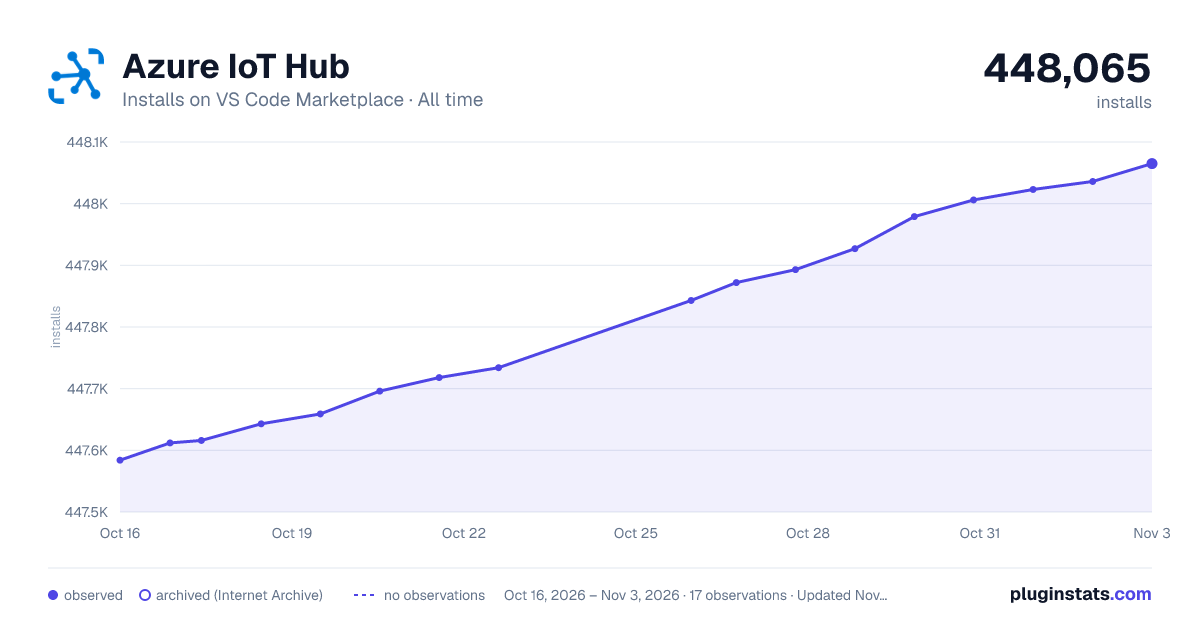
Azure IoT Hub has 447,696 recorded installs on VS Code Marketplace, ranking #897 of 2,502 tracked listings.
Rating: 4.63 / 5 from 8 ratings
About Azure IoT Hub
Azure IoT Hub


Overview
Interact with Azure IoT Hub, IoT Device Management, IoT Edge Management, IoT Hub Device Simulation, IoT Hub Code Generation and IoT Hub Device Provisioning Service.
Device Explorer
The Wiki page includes a comprehensive getting started guide as well as detailed usage instructions of the following features:
- IoT Hub management
- Create IoT Hub
- Select IoT Hub
- Copy IoT Hub Connection String
- Generate SAS Token for IoT Hub
- Device management
- List devices
- Get device info
- Create IoT device
- Create Edge device
- Delete device
- Copy Device Connection String
- Generate SAS Token for Device
- Module management
- List Modules
- Get Module Info
- Create Module
- Edit Module Twin
- Invoke Module Direct Method
- Copy Module Connection String
- Delete Module
- Interact with Azure IoT Hub
- Generate Code for C#, F#, Go, Java, Node.js, PHP, Python, Ruby or REST API
- Send D2C message to IoT Hub
- Monitor Built-in Event Endpoint
- Send C2D message to device
- Receive C2D message from IoT Hub
- Invoke Device Direct Method
- Edit Device Twin
- Manage Azure IoT distributed tracing
- Interact with Azure IoT Edge (Install Azure IoT Edge for more IoT Edge support)
- List Modules
- Edit Module Twin
- Create deployment for Single Device
- Create Deployment at Scale
- Endpoints management
- List Built-in and Custom Endpoints
- Monitor Custom Event Hub Endpoint
Prerequisites
- In Explorer of VS Code, click "Azure IoT Hub" in the bottom left corner.

- Click "Set IoT Hub Connection String" in context menu.

- An input box will pop up, then enter your IoT Hub Connection String (It is one-time configuration, and please make sure it is IoT Hub Connection String not Device Connection String. The format is
HostName=<my-hub>.azure-devices.net;SharedAccessKeyName=<my-policy>;SharedAccessKey=<my-policy-key>).

- The devices list will be shown.

Sign in to Azure
Instead of copying and pasting to set IoT Hub Connection String, you could sign in to Azure to select IoT Hub from your Azure Subscription.
- Click "Select IoT Hub" in context menu.

- If you have not signed in to Azure, a pop-up will show to let you sign in to Azure.
- After you sign in, your Azure Subscription list will be shown, then select an Azure Subscription.
- Your IoT Hub list will be shown, then select an IoT Hub.
- The devices and endpoints list will be shown.

Device Provisioning Service Explorer
- Open "Azure" view on the Activity Bar, and expand "IOT HUB DEVICE PROVISIONING SERVICE".

-
If you're not signed in, click "Sign in to Azure..." to sign in.
-
Expand one subscription to start exploring your device provisioning services.
Code Generation

Code Snippets
| Trigger | Content |
|---|---|
| iotSendD2CMessage | Send D2C message to IoT Hub |
| iotMonitorD2CMessage | Monitor D2C message for IoT Hub |
| iotSendC2DMessage | Send C2D message to device |
| iotMonitorC2DMessage | Monitor C2D message from IoT Hub |
| iotCallDirectMethods | Send direct methods to device |
| iotReceiveDirectMethods | Receive direct methods from IoT Hub |

After code snippet is created, you need to install corresponding npm package (e.g. azure-iot-device-mqtt) to run the code snippet. If you want to 'Run Code' directly, you need to install Code Runner.
Configuration
IoT Hub Consumer Group (default is "$Default"):
{
    "azure-iot-toolkit.iotHubConsumerGroup": "$Default"
}
The time span (in minutes) of monitoring D2C message before current time (default is 0):
{
    "azure-iot-toolkit.monitorD2CBeforeNowInMinutes": 0
}
Whether to show verbose info when monitoring messages (default is false):
{
    "azure-iot-toolkit.showVerboseMessage": false
}
Whether to stringify device-to-cloud messages (default is false):
{
    "azure-iot-toolkit.iotHubD2CMessageStringify": false
}
Whether to show IoT Hub info when IoT Hub Connection String is not set (default is true):
{
    "azure-iot-toolkit.showIoTHubInfo": true
}
```…
Description from the VS Code Marketplace listing.
- azure
- dps
- iot
- IoT Edge
- snippet
- toolkit
README badge
Show your rank in a README or on your website. The badge updates automatically.
Charts
Images: 30d · 1y · all time · 1600×900 dark



Adoption over time
7/30/90-day growth
Ranking history
Ratings over time
Listing placement
Listing placement
Listing placement
Listing placement
Filled points are observed values; hollow points come from Internet Archive snapshots of the listing page. Dashed segments span periods with no observations — values between points are not interpolated.
Each band is one page of 20. Installs on a linear scale. Placement is projected from installs, so it can differ from the marketplace's own sort order. Hover a dot to see the listing.
Recent observations
Full history (6)Similar VS Code Marketplace Programming Languages plugins
All 20 Azure IoT Hub alternativesData source
Install counts, average rating, and rating counts come from the public Visual Studio Marketplace gallery API. Installs are cumulative and exclude updates.
Listing: https://marketplace.visualstudio.com/items?itemName=vsciot-vscode.azure-iot-toolkit. First seen Oct 16, 2026; last successful collection Oct 21, 2026. See the methodology.