 PluginStats
City Lights theme installs statistics
By Yummygum (2 listings) · VS Code Marketplace · Themes
The City Lights Color Theme is a gorgeous dark color theme designed with focus in mind.
City Lights theme has 314,545 recorded installs on VS Code Marketplace, ranking #1114 of 2,502 tracked listings.
Rating: 4.95 / 5 from 20 ratings
About City Lights theme
City Lights Color Theme
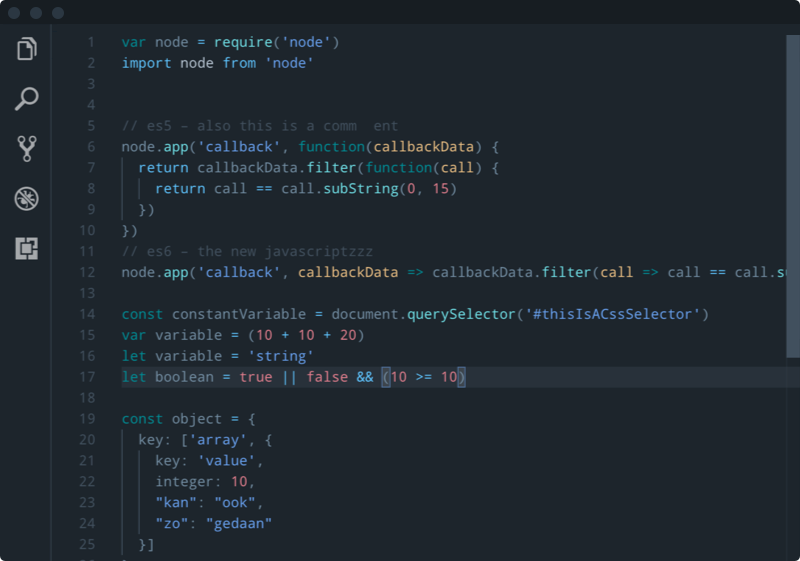
If you encounter bugs with the colors.
Add "editor.semanticHighlighting.enabled": false, to your settings.json.
The City Lights Color Theme is a gorgeous dark syntax theme designed with focus in mind. City Lights Color Theme has many custom made visual aids to help you code faster and more accurate. Over eight of the most popular coding languages are currently supported.
This City Lights Color Theme is a part of City Lights; suite of beautiful matte dark themed goodies for Atom & Visual Studio Code. For more information, please go to http://citylights.xyz.
Install
- Open Extensions sidebar panel in VS Code.
View → Extensions - Search for
City Lights theme - Click Install
- Click Reload
- File > Preferences > Color Theme > City Lights
GitHub Repository Clone
Change to your .vscode/extensions VS Code extensions directory.
Depending on your platform it is located in the following folders:
- <img src="https://www.kernel.org/theme/images/logos/favicon.png" width=16 height=16/> Linux
~/.vscode/extensions - <img src="https://developer.apple.com/favicon.ico" width=16 height=16/> macOs
~/.vscode/extensions - <img src="https://www.microsoft.com/favicon.ico" width=16 height=16/> Windows
%USERPROFILE%\.vscode\extensions
Clone the theme repository as city-lights-theme:
git clone https://github.com/Yummygum/city-lights-syntax-vsc.git city-lights-theme
Afterwards, you will need to activate the theme via
File > Preferences > Color Theme > City Lights
Feedback/Issues
Are you enjoying the City Lights Color Theme? Don't hesitate to share your excitement. Also let us know if you'd like to see any specific syntax added by creating a Github issue.
License
The following licensing applies to City Lights Syntax Theme: Attribution-NonCommercial-NoDerivatives 4.0 International (CC BY-NC-ND 4.0). For more information go to https://creativecommons.org/licenses/by-nc-nd/4.0/
Donate
The City Lights Color Theme is available for free. If you're enjoying the City Lights Syntax Theme, feel free to help us crank out updates even faster by donating a coffee to us via PayPal.
Built with ♥ by Yummygum <br/>
yummygum.com <br/>
twitter.com/yummygum <br/>
instagram.com/yummygum <br/>
Description from the VS Code Marketplace listing.
- color-theme
- theme
README badge
Show your rank in a README or on your website. The badge updates automatically.
Charts
Images: 30d · 1y · all time · 1600×900 dark


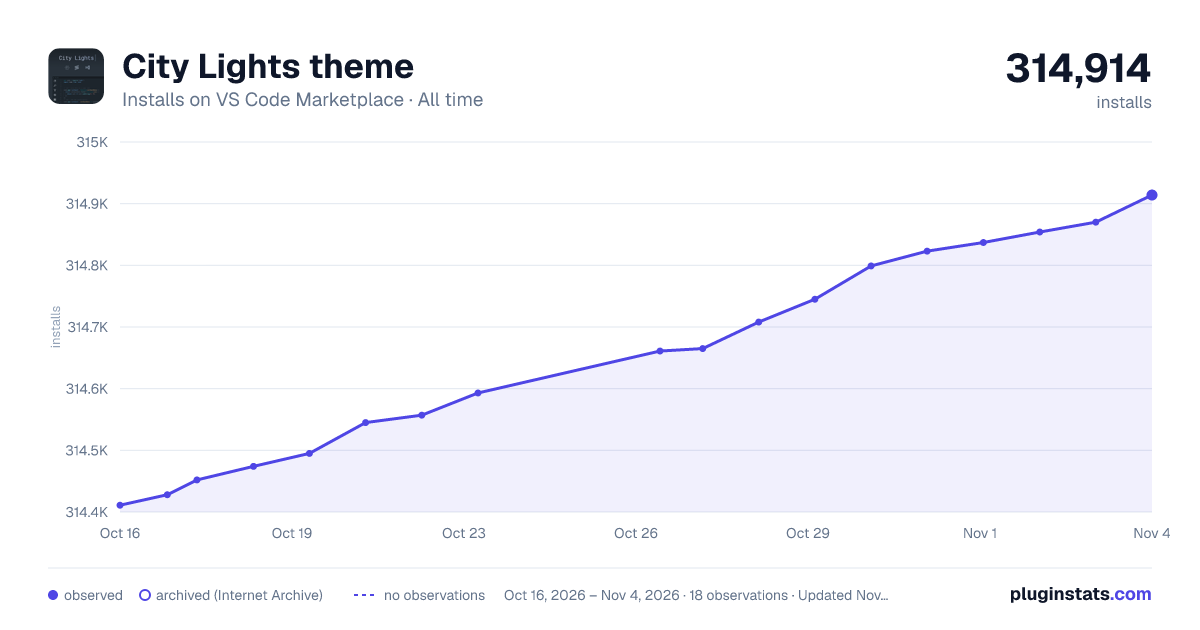

Adoption over time
7/30/90-day growth
Ranking history
Ratings over time
Listing placement
Listing placement
Filled points are observed values; hollow points come from Internet Archive snapshots of the listing page. Dashed segments span periods with no observations — values between points are not interpolated.
Each band is one page of 20. Installs on a linear scale. Placement is projected from installs, so it can differ from the marketplace's own sort order. Hover a dot to see the listing.
Recent observations
Full history (6)Similar VS Code Marketplace Themes plugins
All 20 City Lights theme alternativesData source
Install counts, average rating, and rating counts come from the public Visual Studio Marketplace gallery API. Installs are cumulative and exclude updates.
Listing: https://marketplace.visualstudio.com/items?itemName=Yummygum.city-lights-theme. First seen Oct 16, 2026; last successful collection Oct 21, 2026. See the methodology.