 PluginStats
Manim Sideview installs statistics
By Rickaym · VS Code Marketplace · Visualization
Video/Image live previews and code snippets for manim.
Manim Sideview has 127,070 recorded installs on VS Code Marketplace, ranking #2059 of 2,501 tracked listings.
Rating: 5.00 / 5 from 8 ratings
About Manim Sideview
Manim Sideview
<img src="https://repository-images.githubusercontent.com/429329947/d3f3cf71-a491-47e0-a629-34e0a4b9051f" height="100%" width="300px">





A Visual Studio Code extension that enhances your experience with manim, providing powerful features including gallery-based code snippet catalogs and live preview of videos and images with flexible configuration options.
Prerequisites
- Manim Installation: Ensure you have manim installed on your
PATH. Check out the official installation guide. - Python Environment: The extension works with your active Python environment.
- Custom Executable Path: If manim isn't on your PATH, you can set a custom executable path.
Table Of Contents
- Getting Started
- Rendering Scenes
- Configuring
- Mobject Gallery
- Frequently Asked Questions
- Keyboard Shortcuts
- Credits
- Changelog
Getting Started
After the extension is installed, open the source file with the scene classes and press the <image src="https://raw.githubusercontent.com/Rickaym/Manim-Sideview/master/assets/images/rotation.png" height="100%" width= "15px"> icon from the menu bar or use Ctrl+' r to immediately start rendering with a live preview!
That's it, folks!
If you have any questions or find any issues, create a GitHub issue here, seek support through the extension development discord server or you can ping @rick.aym with a question on the official manim community discord server.
Rendering Scenes
<image src="https://raw.githubusercontent.com/Rickaym/Manim-Sideview/master/assets/images/dark_logo.png" height="100%" width= "20px"></image> Working with multiple scenes
After rendering a scene for the first time, the extension creates a persistent job tied to the source file to maintain your scene names and configurations.
Changing the Scene Name
Manim Sideview renders one scene at a time. To switch between scenes, you can:
- Use the
Manim: Set A New SceneNamecommand through the command palette (Shift + Command + Pon Mac /Ctrl + Shift + Pon Windows/Linux) - Use the default hotkey
Ctrl + 'followed byc - Click the render-change icon in the sideview:<br> <image src="https://raw.githubusercontent.com/Rickaym/Manim-Sideview/master/images/render-change.png"></image>
Scene Auto-Detection
When you first render a file, the extension will scan for any class that inherits from a Scene class and present them as options for easy selection.
Configuring
<image src="https://raw.githubusercontent.com/Rickaym/Manim-Sideview/master/assets/images/dark_logo.png" height="100%" width= "20px"></image> You can configure your renders in two primary ways:
1. VS Code Settings
Set manim-sideview.commandLineArgs in your VS Code settings (File -> Preferences -> Settings) to pass CLI arguments to manim.
[!WARNING] Avoid using quality args like 'ql' that change the output file path. For output path configuration, use the manim.cfg file instead.
2. Configuration File
Create a manim.cfg file in your working directory following the Manim configuration guidelines.
Note: When a manim.cfg file is detected, all command line arguments from manim-sideview.commandLineArgs are ignored.
Mobject Gallery
The Mobject gallery is a web view that allows users to insert code snippets for commonly used manim objects, like squares, text, and also complex graphs.

How do I open the gallery?
- Open the command palette using
Shift + Command + P (Mac)/Ctrl + Shift + P - Use the command
Manim: Open Mobject Gallery
You can place the cursor at the desired location and click the image of the manim object to insert the code into a Python file or Jupyter Notebook!
Frequently Asked Questions…
Description from the VS Code Marketplace listing.
- animations
- keybindings
- manim
- manim sideview
README badge
Show your rank in a README or on your website. The badge updates automatically.
Charts
Images: 30d · 1y · all time · 1600×900 dark


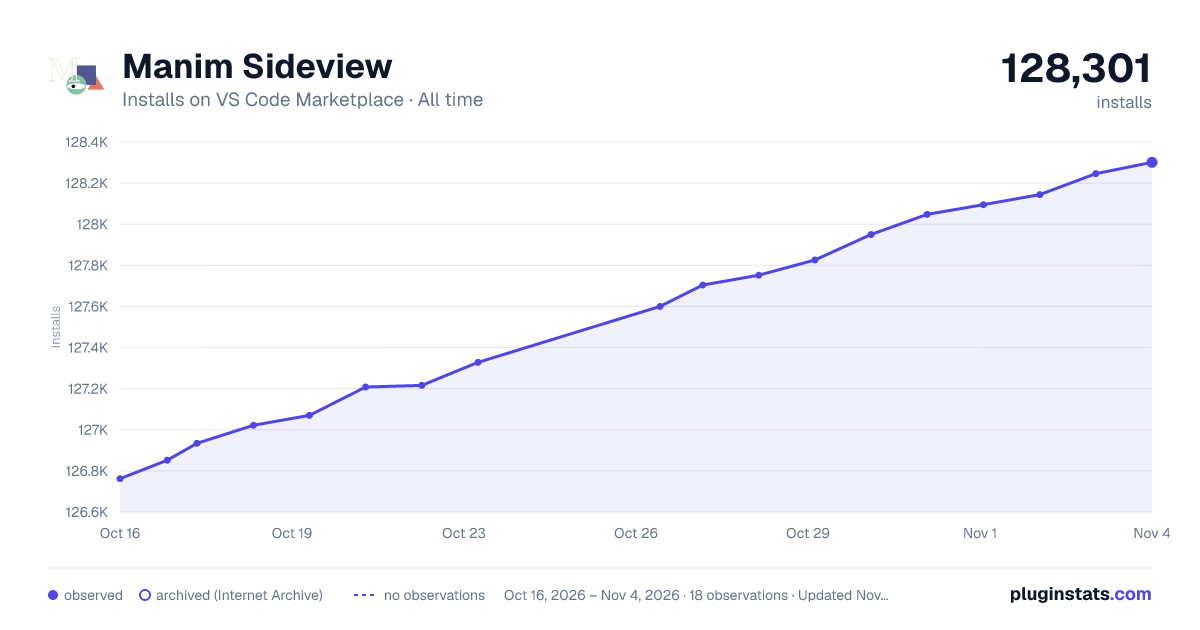

Adoption over time
7/30/90-day growth
Ranking history
Ratings over time
Listing placement
Listing placement
Filled points are observed values; hollow points come from Internet Archive snapshots of the listing page. Dashed segments span periods with no observations — values between points are not interpolated.
Each band is one page of 20. Installs on a linear scale. Placement is projected from installs, so it can differ from the marketplace's own sort order. Hover a dot to see the listing.
Recent observations
Full history (5)Similar VS Code Marketplace Visualization plugins
All 20 Manim Sideview alternativesData source
Install counts, average rating, and rating counts come from the public Visual Studio Marketplace gallery API. Installs are cumulative and exclude updates.
Listing: https://marketplace.visualstudio.com/items?itemName=Rickaym.manim-sideview. First seen Oct 16, 2026; last successful collection Oct 20, 2026. See the methodology.