 PluginStats
Power BI Studio installs statistics
By Gerhard Brueckl · VS Code Marketplace · Extension Packs
An extension to manage your Power BI resources from within VSCode
Power BI Studio has 94,005 recorded installs on VS Code Marketplace, ranking #2461 of 2,501 tracked listings.
Rating: 5.00 / 5 from 9 ratings
About Power BI Studio
Power BI Studio









A VSCode extension for managing your Power BI tenant using the Power BI REST API and modify Power BI datasets using TMDL (Tabular Model Definition Language) from within VSCode.
Installation
The extensions can be installed directly from within VSCode by searching for this extension (GerhardBrueckl.powerbi-vscode) or downloaded from the official Visual Studio Code extension gallery at PowerBI VSCode and installed manually as VSIX.
Features
- GUI to browse your workspace and run operations like rebind, clone, ...
- Modify Power BI datasets using TMDL - see TMDL
- Supports VSCode and vscode.dev
- Connect to remote tenants where you are invited as a guest user - see Configuration
- Run DAX queries in a notebook against your Power BI Datasets using
%daxmagic - Run arbitrary REST API calls in a notebook using
%apimagic - see Notebooks - Drag & Drop to run certain commands (e.g. drop a report on a dataset to rebind it)
- GUI to manage Capacities, Gatways and Pipelines
Configuration
The extension supports the following VSCode settings:
| Setting | Description | Example value |
|---|---|---|
powerbi.tenantId | (Optional) The tenant ID of the remote tenant that you want to connect to. | A GUID, abcd1234-1234-5678-9abcd-9d1963e4b9f5 |
powerbi.clientId | (Optional) A custom ClientID/Application of an AAD application to use when connecting to Power BI. | A GUID, 99887766-1234-5678-9abcd-e4b9f59d1963 |
powerbi.cloud | (Optional) Only use when you want to connect to a sovereign or governmental cloud! | GlobalCloud |
powerbi.TMDL.clientId | (Optional) To use TMDL features, a custom ClientID/Application can be used. You can use 058487e5-bde7-4aba-a5dc-2f9ac58cb668 and make sure its permitted in your tenant or you can create your own AAD application in your AAD tenant (see README) for details. If this is configured, VSCode will manage the authentication and also remember it! | A GUID, 058487e5-bde7-4aba-a5dc-2f9ac58cb668 |
powerbi.TMDL.enabled | Set to true (default) to allow editing Power BI datasets using TMDL. | true(default)/false |
powerbi.workspaceFilter | (Optional) A regex to filter workspaces by name. Only workspaces matching this regex will be shown in the Power BI Workspaces view. | Project A|Sales to see only workspaces that have "Project A" or (|) "Sales" in the name |
powerbi.datasetRefreshCheckInterval | (Optional) The number of seconds to wait between checking for completed dataset refreshes in the background. Set to 0 to disable automatic refresh checks. | 60 |
Notebooks
You can open a new Power BI notebook via the UI from the header of each treeview or by running the command Open new PowerBI Notebook (command PowerBI.openNewNotebook). Power BI notebooks have the file extension .pbinb and will automatically open in the notebook editor.
The following features are supported by notebooks and can be used using magic tags in the first line of the cell:
- running arbitrary REST API calls (magic
%api) - executing DAX queries against a dataset (magic
%dax) - executing TMSL statements against a dataset (requires TMDL) (magic
%tmsl) - setting variables to be used in subsequent cells (magic
%cmd)
Next to the magic itself you can also specify a custom API endpoint for every cell right after the magic tag:
%dax /groups/ccce57d1-10af-1234-1234-665f8bbd8458/datasets/51ba6d4b-1234-1234-8635-a7d743a5ea89
EVALUATE INFO.TABLES()
This overwrites the API_PATH set for the notebook to run DAX queries. You can now run multiple DAX statements against different datasets from within the same notebook without changing the API_PATH every time. For example if you want to run the same query against TEST and PROD to compare results etc.…
Description from the VS Code Marketplace listing.
- api
- DAX
- Fabric
- pbinb-cmd
- power bi
- PowerBI
- powerbi-api
- powerbi-desktop
- rest
- TMDL
- TMSL
- TOM
- XMLA
README badge
Show your rank in a README or on your website. The badge updates automatically.
Charts
Images: 30d · 1y · all time · 1600×900 dark


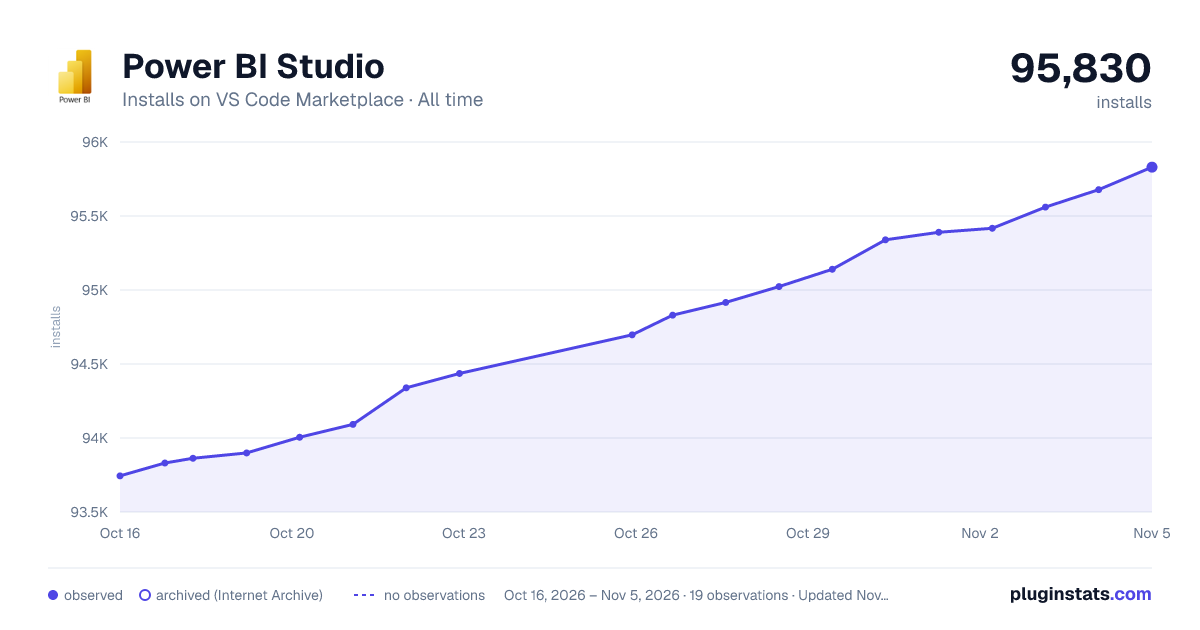

Adoption over time
7/30/90-day growth
Ranking history
Ratings over time
Listing placement
Listing placement
Listing placement
Filled points are observed values; hollow points come from Internet Archive snapshots of the listing page. Dashed segments span periods with no observations — values between points are not interpolated.
Each band is one page of 20. Installs on a linear scale. Placement is projected from installs, so it can differ from the marketplace's own sort order. Hover a dot to see the listing.
Recent observations
Full history (5)Similar VS Code Marketplace Extension Packs plugins
All 20 Power BI Studio alternativesData source
Install counts, average rating, and rating counts come from the public Visual Studio Marketplace gallery API. Installs are cumulative and exclude updates.
Listing: https://marketplace.visualstudio.com/items?itemName=GerhardBrueckl.powerbi-vscode. First seen Oct 16, 2026; last successful collection Oct 20, 2026. See the methodology.