 PluginStats
NEXTJS Snippets tsx and jsx installs statistics
By willstakayama · VS Code Marketplace · Snippets
Snippets to improve your performance while working with NextJS using tsx or jsx
NEXTJS Snippets tsx and jsx has 113,502 recorded installs on VS Code Marketplace, ranking #2199 of 2,501 tracked listings.
Rating: 4.00 / 5 from 2 ratings
About NEXTJS Snippets tsx and jsx


VSCode NextJS React snippets for TSX and JSX
JavaScript and Typescript NextJS snippets for VS Code
Summary
- Installation
- Search Command
- Supported languages
- NextJS Snippets List
- Core NextJS - SNIPPETS
- NextJS Components - SNIPPETS
- Imports - SNIPPETS
Installation <a name="install"></a>
Visual Studio Marketplace
Here is direct link to marketplace VSCode NextJS React snippets for TSX and JSX
Launch Quick Open:
Paste the following command and press Enter:
ext install vscode-nextjs-snippets
Search command <a name="search-cmd"></a>
You can search through snippets with snippet search command which can be run:
- [Windows] and [Linux]
CMD + SHIFT + ALT + S - [maxOS]
CMD + Shift + ALT + S
Supported languages (file extensions) <a name="languages"></a>
- JavaScript React (.jsx)
- TypeScript React (.tsx)
NextJS Snippets List <a name="snippets-list"></a>
| Prefix | Method |
|---|---|
nextpage→ | Next JS Page Component and SSR |
nextdocument→ | Custom document component Next JS |
nextapp→ | Custom app component Next JS |
nexterrordefault→ | If you want to render the built-in error page you can by importing the Errorcomponent. <b>IMPORTANT:</b> if you have a customError component be sure to import that one instead. <br/>next/error exports the default component used by Next.js. |
nexterrorcustom→ | Custom error component Next JS. You must create a file "_error.js" inside your "pages" folder |
next404→ | Custom 404 page NotFound. You must create a 404.jsx file inside "page" folder |
next500→ | Custom 500 page for server-side error. You must create a 500.jsx file inside "page" folder |
nextgetSSRProps→ | Async function getServerSideProps - (Server-side Rendering): Fetch data on each request. |
nextgetStaticProps→ | Async function getStaticProps - (Static Generation): Fetch data at build time. |
nextgetStaticPaths→ | Async function getStaticPaths - (Static Generation): Specify dynamic routes to pre-render pages based on data. |
nextapi→ | Next JS simple api routes |
nextdynamic→ | A dynamic imports is a good way to split your code into manageable chunks.… |
Description from the VS Code Marketplace listing.
- javascript
- keybindings
- nextjs
- react
- snippet
- snippets
- typescript
README badge
Show your rank in a README or on your website. The badge updates automatically.
Charts
Images: 30d · 1y · all time · 1600×900 dark


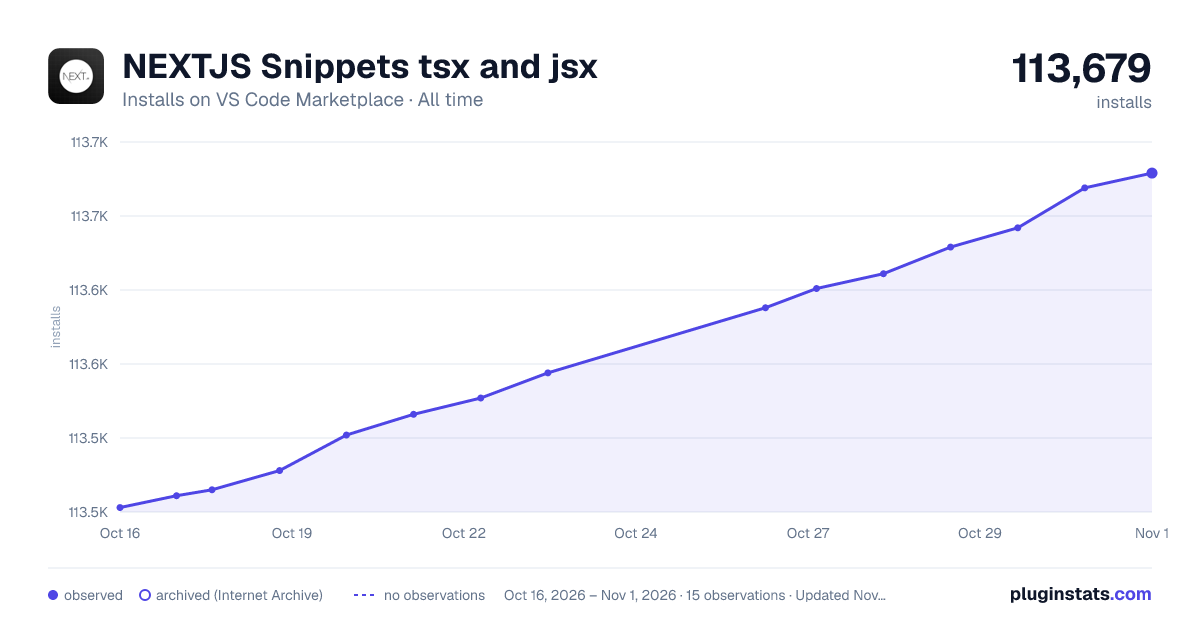

Adoption over time
7/30/90-day growth
Ranking history
Ratings over time
Listing placement
Listing placement
Filled points are observed values; hollow points come from Internet Archive snapshots of the listing page. Dashed segments span periods with no observations — values between points are not interpolated.
Each band is one page of 20. Installs on a linear scale. Placement is projected from installs, so it can differ from the marketplace's own sort order. Hover a dot to see the listing.
Recent observations
Full history (5)Similar VS Code Marketplace Snippets plugins
All 20 NEXTJS Snippets tsx and jsx alternativesData source
Install counts, average rating, and rating counts come from the public Visual Studio Marketplace gallery API. Installs are cumulative and exclude updates.
Listing: https://marketplace.visualstudio.com/items?itemName=willstakayama.vscode-nextjs-snippets. First seen Oct 16, 2026; last successful collection Oct 20, 2026. See the methodology.