 PluginStats
Transparent Color Theme installs statistics
By Alex Owl · VS Code Marketplace · Themes
Experience the ultimate coding environment with the Transparent Color theme. Designed exclusively for macOS, this theme brings the stunning vibrancy background blur of macOS to Visual Studio Code. Enjoy a sleek and modern coding experience with translucent backgrounds that seamlessly blend with the
Transparent Color Theme has 108,176 recorded installs on VS Code Marketplace, ranking #2260 of 2,501 tracked listings.
Rating: 4.50 / 5 from 2 ratings
About Transparent Color Theme
Transparent Color Theme
<img src="https://github.com/AlexOwl/vscode-transparent-color-theme/raw/HEAD/images/icon.png" style="height:100px;float:right"></img>
Experience the ultimate coding environment with the Transparent Color theme. Designed exclusively for macOS, this theme brings the stunning vibrancy background blur of macOS to Visual Studio Code. Enjoy a sleek and modern coding experience with translucent backgrounds that seamlessly blend with the rest of your macOS interface.
Screenshots

Installation
- Launch Visual Studio Code
- Go to the Extensions view by clicking on the square icon on the left side
toolbar or by pressing
Ctrl+Shift+X - Search for "Transparent Color Theme" and click on the "Install" button
- Once the theme is installed, click on the "Reload" button to activate it
Blur effect
To achieve the transparent effect with Visual Studio Code, you can use the Apc Customize UI++ extension. It allows you to configure the transparency settings by adding the following settings to your VS Code settings.json:
"apc.electron": {
    "opacity": 0.95,
    "transparent": true,
    "backgroundColor": "#00000000",
    "vibrancy": "ultra-dark"
},
Additional
Cursor Blinking Effect
"apc.stylesheet": {
        ".monaco-editor .cursor": "background: #ffffffaa !important; box-shadow: 0 0 70px 5px #ffffff, #ffffff 0px 0px 34px 1px; color: [#161616](https://github.com/AlexOwl/vscode-transparent-color-theme/issues/161616) !important",
},
"editor.cursorBlinking": "phase",
"editor.cursorSmoothCaretAnimation": "on",
Font with ligatures
You can download FiraCode Font on this link
"editor.fontFamily": "'FiraCode Nerd Font Mono', 'FiraCode Nerd Font', FiraCode, Menlo, Monaco, 'Courier New', monospace",
"editor.fontLigatures": true,
UI Animations
There is great extension VSCode Animations
"animations.Enabled": true,
"animations.CursorAnimation": true,
"animations.Command-Palette": "None",
"animations.CursorAnimationOptions": {
    "TrailLength": 10
},
"animations.Tabs": "Slide",
"animations.Active": "Indent",
Theme Details
- Name: Transparent Color Theme
- Version: 1.0.0
- VS Code Version: 1.81.0 and above
- Keywords: theme, transparent, macOS, vibrancy, ultra-dark, glass
- Categories: Themes
- Extension Pack: drcika.apc-extension
Contributing
If you have any suggestions, bug reports, or feature requests, please open an issue.
License
This theme is licensed under the MIT License.
Description from the VS Code Marketplace listing.
- color-theme
- glass
- macos
- theme
- transparent
- ultra-dark
- vibrancy
README badge
Show your rank in a README or on your website. The badge updates automatically.
Charts
Images: 30d · 1y · all time · 1600×900 dark


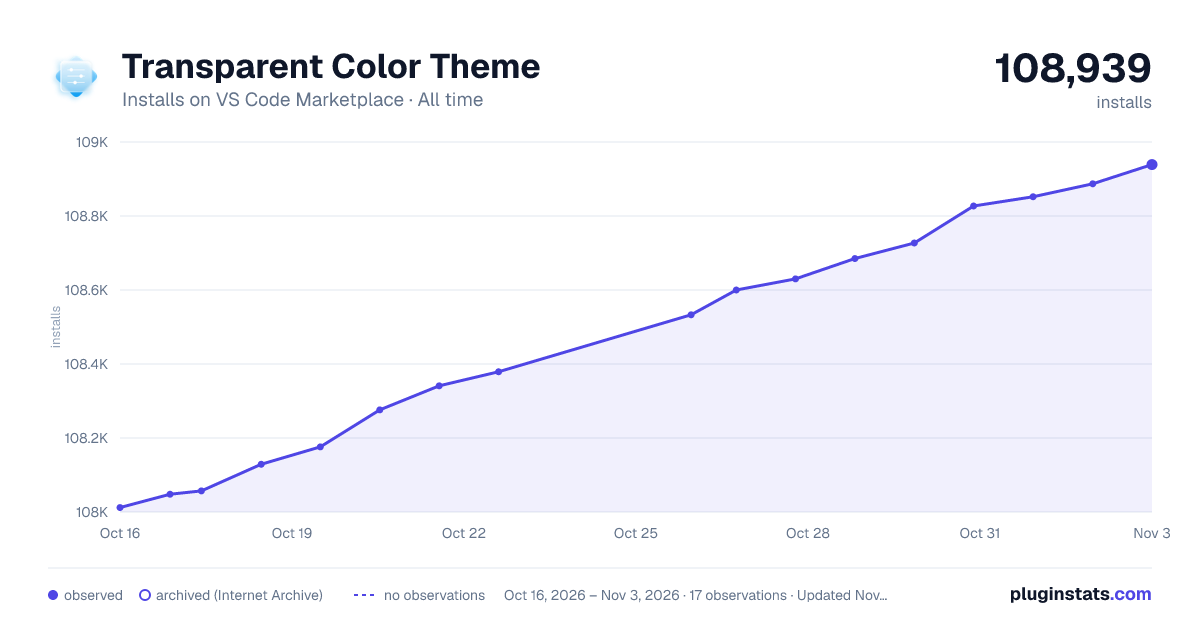

Adoption over time
7/30/90-day growth
Ranking history
Ratings over time
Listing placement
Listing placement
Filled points are observed values; hollow points come from Internet Archive snapshots of the listing page. Dashed segments span periods with no observations — values between points are not interpolated.
Each band is one page of 20. Installs on a linear scale. Placement is projected from installs, so it can differ from the marketplace's own sort order. Hover a dot to see the listing.
Recent observations
Full history (5)Similar VS Code Marketplace Themes plugins
All 20 Transparent Color Theme alternativesData source
Install counts, average rating, and rating counts come from the public Visual Studio Marketplace gallery API. Installs are cumulative and exclude updates.
Listing: https://marketplace.visualstudio.com/items?itemName=alexowl.transparent-color-theme. First seen Oct 16, 2026; last successful collection Oct 20, 2026. See the methodology.