 PluginStats
pgFormatter installs statistics
By Brady Holt · VS Code Marketplace · Programming Languages
A PostgreSQL SQL formatter
pgFormatter has 146,267 recorded installs on VS Code Marketplace, ranking #1885 of 2,501 tracked listings.
Rating: 4.00 / 5 from 9 ratings
About pgFormatter
pgFormatter
Would you take a quick second and ⭐️ my repo?
A Visual Studio Code extension that formats PostgreSQL SQL, using the Perl based pgFormatter tool developed by Gilles Darold. pgFormatter supports keywords from SQL-92, SQL-99, SQL-2003, SQL-2008, SQL-2011, and PostgreSQL specific keywords.
Features
• Supports keywords from SQL-92, SQL-99, SQL-2003, SQL-2008, SQL-2011 and PostgreSQL specifics keywords • Provides configuration to control formatting style
Installation
pgFormatter requires Perl to be installed and available. You can either add it to your PATH or set the pgFormatter.perlBinPath configuration setting.
To install this extension:
- Press Ctrl + Shift + X (Cmd + Shift + X on macOS), wait a moment while the list of available extensions is populated 2. Type pgFormatter and Click "Install"
Usage
This extension is made available to files recognized as "SQL" language files in VS Code. Generally, files with the .sql extension will be recognized as SQL files. You can use the files.associations setting to customize which files are recognized as SQL files.
To use pgFormatter, you simply need to run the editor.action.formatDocument command which is, by default, mapped to the Ctrl + K, Ctrl + D (Cmd + K, Cmd + D on macOS) keyboard shortcut.
pgFormatter also works with the "editor.formatOnSave": true setting so that when when saving your file, formatting will be automatically performed.
Configuration
This extension has the following configuration settings:
• pgFormatter.spaces - Number of spaces to indent the code (Default: 2 or from editor.tabSize option) • pgFormatter.tabs - Use tabs to indent code instead of spaces (Default: false or from editor.insertSpaces configuration) • pgFormatter.commaStart - Use preceding comma in parameter list (Default: false) • pgFormatter.commaBreak - In insert statement, add a newline after each comma (Default: false) • pgFormatter.commaEnd - Use trailing comma in parameter list (Default: true) • pgFormatter.noComment - Remove any comments (Default: false) • pgFormatter.noGrouping - Add a newline between statements in transaction regroupement (Default: false) • pgFormatter.noExtraLine - Do not add an extra empty line at end of the output (Default: false) • pgFormatter.keepNewline - Preserve empty lines (Default: false) • pgFormatter.functionCase - Case of the function names (Options: ["unchanged", "lowercase", "uppercase", "capitalize"]; Default: "unchanged") • pgFormatter.keywordCase - Case used for reserved keywords (Options: ["unchanged", "lowercase", "uppercase", "capitalize"]; Default: "uppercase") • pgFormatter.typeCase - Case used for data types (Options: ["unchanged", "lowercase", "uppercase", "capitalize"]; Default: "lowercase") • pgFormatter.formatType - Use another formatting type for some statements (Default: false) • pgFormatter.wrapLimit - Wrap queries at a certain length • pgFormatter.wrapComment - When wrapLimit is specified, comments will be wrapped too (Default: false) • pgFormatter.placeholder - Regex to find code that must not be changed • pgFormatter.extraFunction - Path to file containing a list of function names to use the same formatting as PostgreSQL internal functions • pgFormatter.noSpaceFunction - Remove the space character between a function call and the open parenthesis that follows (Default: true) • pgFormatter.pgFormatterPath - Path to custom pg_format version • pgFormatter.perlBinPath - The path to the perl executable (Default: "perl") • pgFormatter.configFile - The absolute path to a pg_format config file. You can use a VS Code path variable to help resolve the absolute path (example: ${workspaceFolder}/pg_format.conf). Note: The default settings for this extension may override some config in this file but you can specify a setting value to null to avoid this. For example, if you want to use no-space-function config in a pg_format.conf file and do not want the extension default to override it, you can specify "pgFormatter.noSpaceFunction": null in your VS Code settings.
Ignoring Files
To ignore a file and prevent it from being formatted, you can simply add a comment on the first line of the file with the contents: "pgFormatter-ignore". For example:
Description from the VS Code Marketplace listing.
- Formatting
- pgsql
- postgres
- PostgreSQL
- sql
README badge
Show your rank in a README or on your website. The badge updates automatically.
Charts
Images: 30d · 1y · all time · 1600×900 dark


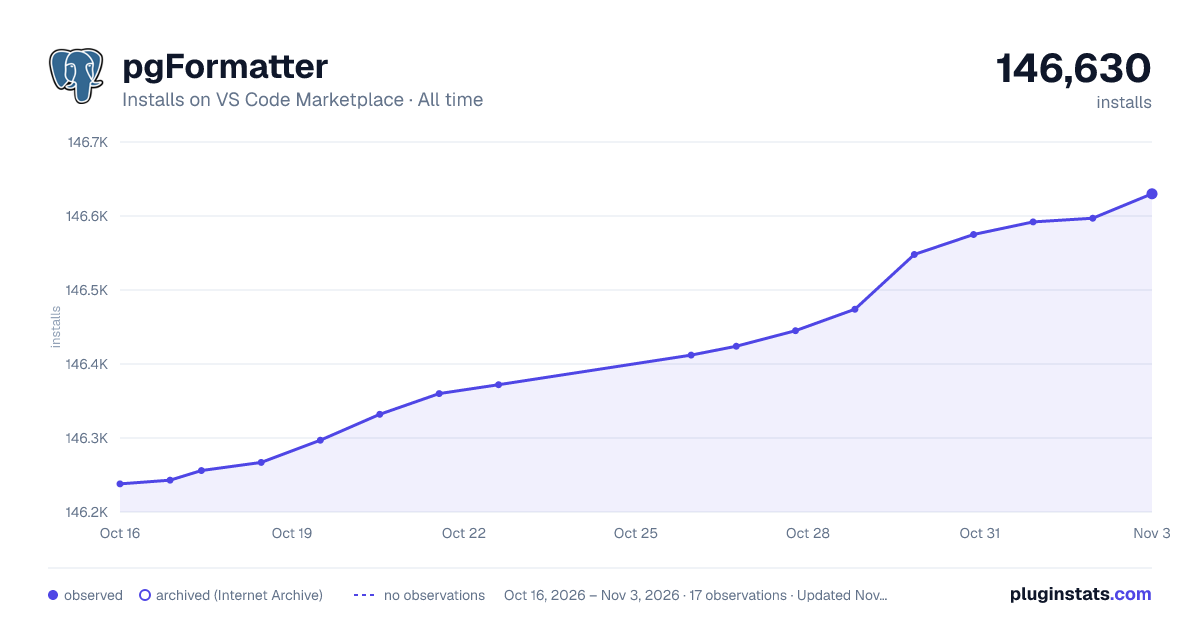

Adoption over time
7/30/90-day growth
Ranking history
Ratings over time
Listing placement
Listing placement
Listing placement
Filled points are observed values; hollow points come from Internet Archive snapshots of the listing page. Dashed segments span periods with no observations — values between points are not interpolated.
Each band is one page of 20. Installs on a linear scale. Placement is projected from installs, so it can differ from the marketplace's own sort order. Hover a dot to see the listing.
Recent observations
Full history (4)Similar VS Code Marketplace Programming Languages plugins
All 20 pgFormatter alternativesData source
Install counts, average rating, and rating counts come from the public Visual Studio Marketplace gallery API. Installs are cumulative and exclude updates.
Listing: https://marketplace.visualstudio.com/items?itemName=bradymholt.pgformatter. First seen Oct 16, 2026; last successful collection Oct 19, 2026. See the methodology.