 PluginStats
Embedded IDE installs statistics
By CL (2 listings) · VS Code Marketplace · Programming Languages
A mcu development environment for 8051/AVR/STM8/Cortex-M/MIPS/RISC-V
Embedded IDE has 313,110 recorded installs on VS Code Marketplace.
It ranks #1119 of 2,500 tracked VS Code Marketplace listings by installs.
It is rated 5.0 out of 5 from 161 ratings.
PluginStats has 3 daily observations since Oct 16, 2026; the latest is from Oct 18, 2026.
Rating: 4.95 / 5 from 161 ratings
About Embedded IDE
Embedded IDE
中文
Summary 📑
A mcu development environment for 8051/STM8/Cortex-M/MIPS/RISC-V on VsCode.
Provide 8051/STM8/Cortex-M/MIPS/RISC-V project development, compilation, program flash and other functions.
Supported Platforms: • Windows x64 (>= Windows 10) • Linux x64 • macOS(Only tested in 'macOS 10.15 x64')
Features 🎉
• Support 8051, STM8, Cortex-M, MIPS MTI, RISC-V, GCC projects. • Support to import KEIL5/IAR/Eclipse projects, support to import 'IAR-STM8, IAR-ARM, Segger Embedded Studio' project source file resource tree. • Support for installing standard KEIL chip support packs (only for Cortex-M projects). • Provides many project templates for quick start a project. • Build, rebuild, support many toolchains (armcc, gcc-arm-none-eabi, llvm-for-arm, riscv-gcc, xxx-gcc, keil_c51, sdcc ...). • Program flash, support: jlink, stlink, openocd, pyocd ... • ~~Built-in serial port monitor~~ (recommended to use Serial Monitor plug-in). • Supports static checking projects by using Cppcheck. • Automatically generates default debug configurations for debugger plug-in cortex-debug, STM8-Debug. • Built-in many utility tools, 'CMSIS Config Wizard UI', 'Disassembly view', 'Program resource view'... • Built-in implement C/C++ IntelliSense Provider for ms-vscode.cpptools, Not Need to configurate c_cpp_properties.json file. • Built-in Msys Unix Shell environment. • Built-in Callgraph gui tool for gcc toolchain. • Support the basic functions of the built-in plugins when calling MCP Tools (this needs to be enabled in the settings; MCP server is disabled by default). Skills
Quick Start 🏃♀️
1. Install any of the above compilers
2. Open the Operations bar of the extension to set the compiler installation path
3. Click on the New or Import function in the Operations bar to start your project
Getting Start 📖
https://em-ide.com
Example
• Create A Project By Internal Template • Build Project • Flash Project (It failed because there was no connection to the development board, for demonstration purposes only) • Show Source File Disassembly Code • Program Resource View
ChangeLog 📌
ChangeLog
Community 🌈
• Github • Forum https://discuss.em-ide.com
How to build ?
You can build this project by your self.
[!IMPORTANT] The required version of NodeJS is 18 because of some historical reasons for this extension.
1. Install NodeJS 18 (recommanded v18.18.2). You can use nvm to manage your NodeJS. Install vsce by npm install -g cheerio@1.0.0-rc.9 @vscode/vsce@2.15.0
2. Clone this repo, Open folder by vscode and then run command:
3. Press ctrl+shift+b to show vscode task
• Use npm: webpack to build this extension, and then you can press F5 to debug it. • Use build vsix to build as a vsix package.
[!NOTE] There may be syntax errors when opening project source code using VSCode, this is because the project uses an older Version of TypeScript, please press Ctrl+Shift+P to execute TypeScript: Select TypeScript Version... and select version: v5.8.2.
Contribution Guidelines
If you have any good ideas, you can first put forward your suggestions in the issue section. If they are feasible, we will implement them later. If you want to add features by yourself, please also share your ideas at the very beginning (otherwise, we cannot guarantee that your PR will be merged). If you are ready and have completed the debugging and testing, then you can submit a pull request request to the dev branch. Thanks.
Sponsor 👍
Sponsor The Author
Thanks:
Description from the VS Code Marketplace listing.
- 8051
- 8051 Assembly
- a51
- ARM Scatter File
- armcc
- Armcc Axf Info
- axf.info
- c51
- clang
- cortex
- cortex-m
- cosmic
- COSMIC LKF
- eclipse
- edasm
- eide
- EIDE GCC Disassembly
- elf.info
- gcc
- Gnu Elf Info
Where Embedded IDE sits in the listing
Each band is one page of 20. Installs on a log scale. Placement is projected from installs, so it can differ from the marketplace's own sort order. Hover a dot to see the listing.


Charts
Images: 30d · 1y · all time · 1600×900 dark


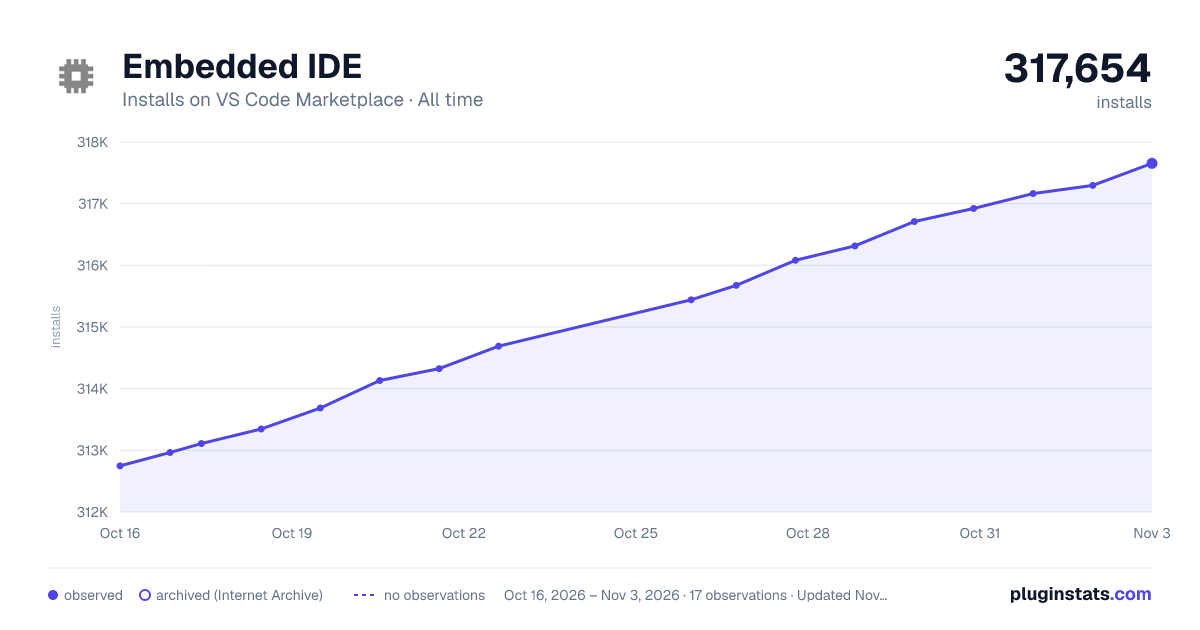

Adoption over time


7/30/90-day growth


Ranking history


Filled points are observed values; hollow points come from Internet Archive snapshots of the listing page. Dashed segments span periods with no observations — values between points are not interpolated.
Recent observations
Full history (3)Similar VS Code Marketplace Programming Languages plugins
Data source
Install counts, average rating, and rating counts come from the public Visual Studio Marketplace gallery API. Installs are cumulative and exclude updates.
Listing: https://marketplace.visualstudio.com/items?itemName=CL.eide. First seen Oct 16, 2026; last successful collection Oct 18, 2026. See the methodology.