 PluginStats
Extension Pack for Java Auto Config installs statistics
By Pleiades · VS Code Marketplace · Programming Languages
JDK Auto-Configuration + Extension Pack for Java + Spring Boot Extension Pack
Extension Pack for Java Auto Config has 778,271 recorded installs on VS Code Marketplace, ranking #635 of 2,501 tracked listings.
Rating: 4.45 / 5 from 22 ratings
About Extension Pack for Java Auto Config
Extension Pack for Java Auto Config




Overview
Just install this extension and start Java development right out of the box with zero configuration.
- No need to install JDKs, Gradle, or Maven, and no need to set
JAVA_HOMEorPATHenvironment variables. - Automatically configures, updates, and fixes multiple Java versions (at least 3 LTS versions and the latest).
- Includes extensions for de facto standard Java development from Microsoft, Red Hat, and others.
<br><br>
GitHub Issues
- Microsoft: Extension Pack for Java | Maven | Gradle | Debug | Test | Project Manager
- Red Hat: Language Support for Java | XML
- Broadcom: Spring Boot Extension Pack | Initializr | Dashboard
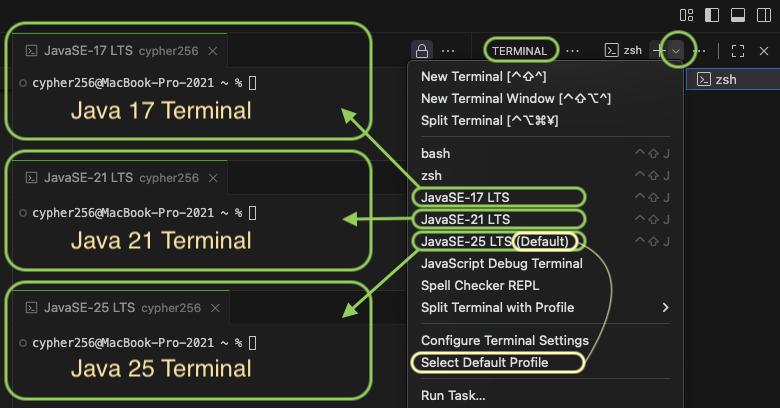
Open Terminals by Java Version
This extension adds the Java versions available in your current environment to the VS Code terminal profiles dropdown. Select the Java version you want to use, open a new terminal, and you can check the version with the following commands. Although the latest versions of Gradle and Maven are bundled, it is generally recommended to use project-specific wrappers (gradlew, mvnw).
java -version
gradle -v
mvn -v
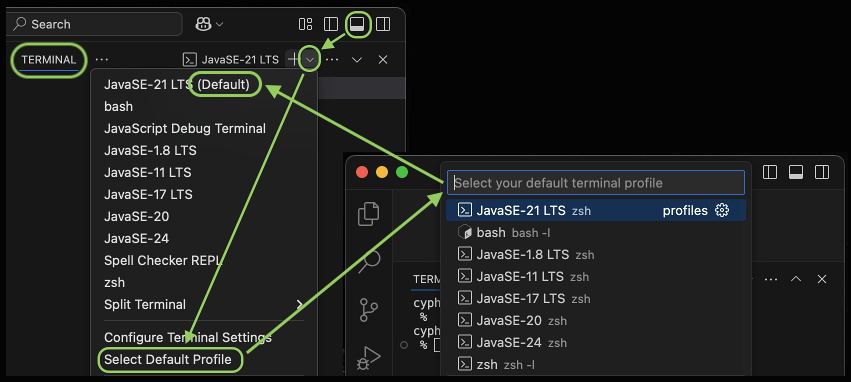
Set Default Java Version
The built-in Select Default Profile in VS Code only changes the default terminal profile. However, this extension applies the selected profile's Java version to all Java-related settings (⭐) within the user (global) settings.json.
To specify a different Java version for individual settings, edit the following files: <br> <br>
-
General (vscode-java)<br> (*1) User
settings.json(Java runtimes common settings)"java.configuration.runtimes": [ { "name": "JavaSE-1.8", "path": "C:\\Program Files\\java\\jdk-1.8.0_402", }, { "name": "JavaSE-11", "path": "C:\\Program Files\\java\\jdk-11.0.21", }, { "name": "JavaSE-17", "path": "C:\\Program Files\\java\\jdk-17.0.12" }, { "name": "JavaSE-21", "path": "C:\\Program Files\\java\\jdk-21.0.8", "default": true //⭐ default when creating "No build tools" project } ]
-
Gradle (vscode-gradle) <br> (*1) User
settings.json(Gradle execution runtime)"java.import.gradle.java.home": "C:\\Program Files\\java\\jdk-21.0.8" //⭐(*2) Project
build.gradle(options.release)def javaVersion = 17 java.sourceCompatibility = javaVersion // Makes it recognizable by VS Code compileJava.options.release = javaVersion // JEP 247: API validationThe Gradle Toolchain allows you to specify the exact JDK version to use for building projects.
java.toolchain.languageVersion = JavaLanguageVersion.of(17)
-
Maven (vscode-maven) <br> (*1) User
settings.json(Maven execution runtime)"maven.terminal.customEnv": [ { "environmentVariable": "JAVA_HOME", "value": "C:\\Program Files\\java\\jdk-21.0.8" //⭐ } ](*2) Project
pom.xml(maven.compiler.release)<properties> <!-- <maven.compiler.source>17</maven.compiler.source> --> <!-- <maven.compiler.target>17</maven.compiler.target> --> <maven.compiler.release>17</maven.compiler.release><!-- JEP 247: API validation --> </properties>The Maven Toolchain allows you to specify the exact JDK version to use for building projects. <br><br>…
Description from the VS Code Marketplace listing.
- asdf
- auto
- bash
- boot
- chinese
- chocolatey
- cmd
- command
- config
- configuration
- debug
- eclipse
- encoding
- gradle
- highlight
- homebrew
- ide
- intellij
- jabba
- jakarta
README badge
Show your rank in a README or on your website. The badge updates automatically.
Charts
Images: 30d · 1y · all time · 1600×900 dark


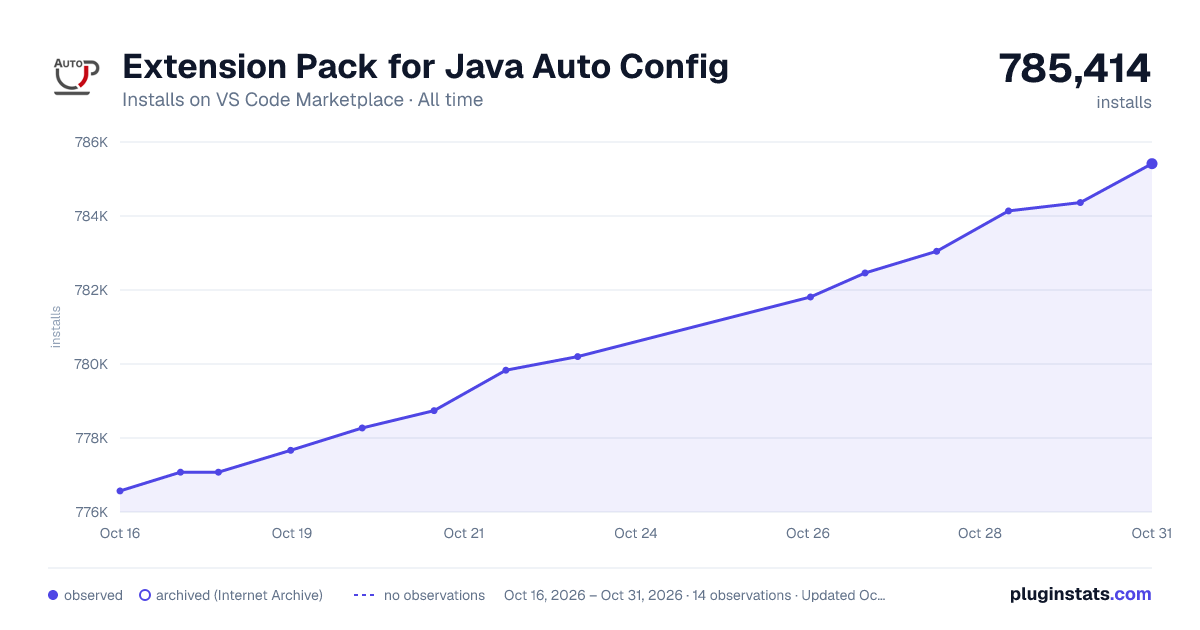

Adoption over time
7/30/90-day growth
Ranking history
Ratings over time
Listing placement
Listing placement
Listing placement
Listing placement
Filled points are observed values; hollow points come from Internet Archive snapshots of the listing page. Dashed segments span periods with no observations — values between points are not interpolated.
Each band is one page of 20. Installs on a linear scale. Placement is projected from installs, so it can differ from the marketplace's own sort order. Hover a dot to see the listing.
Recent observations
Full history (5)Similar VS Code Marketplace Programming Languages plugins
All 20 Extension Pack for Java Auto Config alternativesData source
Install counts, average rating, and rating counts come from the public Visual Studio Marketplace gallery API. Installs are cumulative and exclude updates.
Listing: https://marketplace.visualstudio.com/items?itemName=Pleiades.java-extension-pack-jdk. First seen Oct 16, 2026; last successful collection Oct 20, 2026. See the methodology.