 PluginStats
OAI Compatible Provider for Copilot installs statistics
By Johnny Zhao · VS Code Marketplace · AI
An extension that integrates OpenAI/Ollama/Anthropic/Gemini API Providers into GitHub Copilot Chat
OAI Compatible Provider for Copilot has 120,035 recorded installs on VS Code Marketplace, ranking #2140 of 2,501 tracked listings.
Rating: 5.00 / 5 from 39 ratings
About OAI Compatible Provider for Copilot
OAI Compatible Provider for Copilot
A VSCode extension to use OpenAI/Ollama/Anthropic/Gemini API Providers in GitHub Copilot Chat 🔥
English | 简体中文
</div>

✨ Features
- Multi-API support: OpenAI/Ollama/Anthropic/Gemini APIs (ModelScope, SiliconFlow, DeepSeek...)
- Vision models: Full support for image understanding capabilities
- Advanced configuration: Flexible chat request options with thinking/reasoning control
- Multi-provider management: Configure models from multiple providers simultaneously with automatic API key management
- Multi-config per model: Define different settings for the same model (e.g., GLM-4.6 with/without thinking)
- Visual configuration UI: Intuitive interface for managing providers and models
- Auto-retry: Handles API errors (429, 500, 502, 503, 504) with exponential backoff
- Token usage: Real-time token counting and provider API key management from status bar
- Git integration: Generate commit messages directly from source control
- Import/export: Easily share and backup configurations
- Tools optimization: Optimize agent
read_filetool handling, avoid to read small chunks for large file.
Requirements
- VS Code 1.104.0 or higher.
- OpenAI-compatible provider API key.
⚡ Quick Start
- Install the OAI Compatible Provider for Copilot extension here.
- Open VS Code Settings and configure
oaicopilot.baseUrlandoaicopilot.models. - Open GitHub Copilot Chat interface.
- Click the model picker and select "Manage Models...".
- Choose "OAI Compatible" provider.
- Enter your API key — it will be saved locally.
- Select the models you want to add to the model picker.
Settings Example
"oaicopilot.baseUrl": "https://api-inference.modelscope.cn/v1",
"oaicopilot.models": [
    {
        "id": "Qwen/Qwen3-Coder-480B-A35B-Instruct",
        "owned_by": "modelscope",
        "context_length": 256000,
        "max_tokens": 8192,
        "temperature": 0,
        "top_p": 1
    }
]
✨ Configuration UI
The extension provides a visual configuration interface that makes it easy to manage global settings, providers, and models without editing JSON files manually.
Opening the Configuration UI
There are two ways to open the configuration interface:
-
From the Command Palette:
- Press
Ctrl+Shift+P(orCmd+Shift+Pon macOS) - Search for "OAICopilot: Open Configuration UI"
- Select the command to open the configuration panel
- Press
-
From the Status Bar:
- Click on the "OAICopilot" status bar item in the bottom-right corner of VS Code
Workflow Example
-
Add a Provider:
- Click "Add Provider" in the Provider Management section
- Enter Provider ID: "modelscope"
- Enter Base URL: "https://api-inference.modelscope.cn/v1"
- Enter API Key: Your ModelScope API key
- Select API Mode: "openai"
- Click "Save"
-
Add a Model:
- Click "Add Model" in the Model Management section
- Select Provider: "modelscope"
- Enter Model ID: "Qwen/Qwen3-Coder-480B-A35B-Instruct"
- Configure basic parameters (context length, max tokens, etc.)
- Click "Save Model"
-
Use the Model in VS Code:
- Open GitHub Copilot Chat (
Ctrl+Shift+IorCmd+Shift+I) - Click the model picker in the chat input
- Select "Manage Models..."
- Choose "OAI Compatible" provider
- Select your configured models
- Start chatting with the model!
- Open GitHub Copilot Chat (
Tips & Best Practices
- Important: If you use the configuration UI, the global baseURL and API key become invalid.
- Provider IDs: Use descriptive names that match the service (e.g., "modelscope", "iflow", "anthropic")
- Model IDs: Use the exact model identifier from the provider's documentation
- Config IDs: Use meaningful names like "thinking", "no-thinking", "fast", "accurate" for multiple configurations
- Base URL Overrides: Set model-specific base URLs when using models from different endpoints of the same provider
- Save Frequently: Changes are saved to VS Code settings immediately
- Refresh: Use the "Refresh" buttons to reload current configuration from VS Code settings
Model family & System Prompts
VS Code Copilot has optimized system prompts for specific models. Detailed introduction
Below are the model family settings supported by Copilot:
| Model Family | General family | Specific Model family | Notes |
|---|---|---|---|
| Anthropic | 'claude', 'Anthropic' | 'claude-sonnet-4-5', 'claude-haiku-4-5' | |
| Gemini | 'gemini' | 'gemini-3-flash' | "github.copilot.chat.alternateGeminiModelFPrompt.enabled": true |
| xAI | 'grok-code' | ||
| OpenAI | 'gpt', 'o4-mini', 'o3-mini', 'OpenAI' | 'gpt-4.1', 'gpt-5-codex', 'gpt-5', 'gpt-5-mini', !!family.startsWith('gpt-') && family.includes('-codex'), !!family.match(/^gpt-5\.\d+/i) | "github.copilot.chat.alternateGptPrompt.enabled": true |
✨ Multi-API Mode
The extension supports five different API protocols to work with various model providers. You can specify which API mode to use for each model via the apiMode parameter.
Supported API Modes…
Description from the VS Code Marketplace listing.
- ai
- anthropic
- chat
- claude
- copilot
- gemini
- git-commit
- github-copilot
- language-model
- language-models
- llm
- ollama
- openai
- openai-compatible
- openai-responses
- thinking
README badge
Show your rank in a README or on your website. The badge updates automatically.
Charts
Images: 30d · 1y · all time · 1600×900 dark


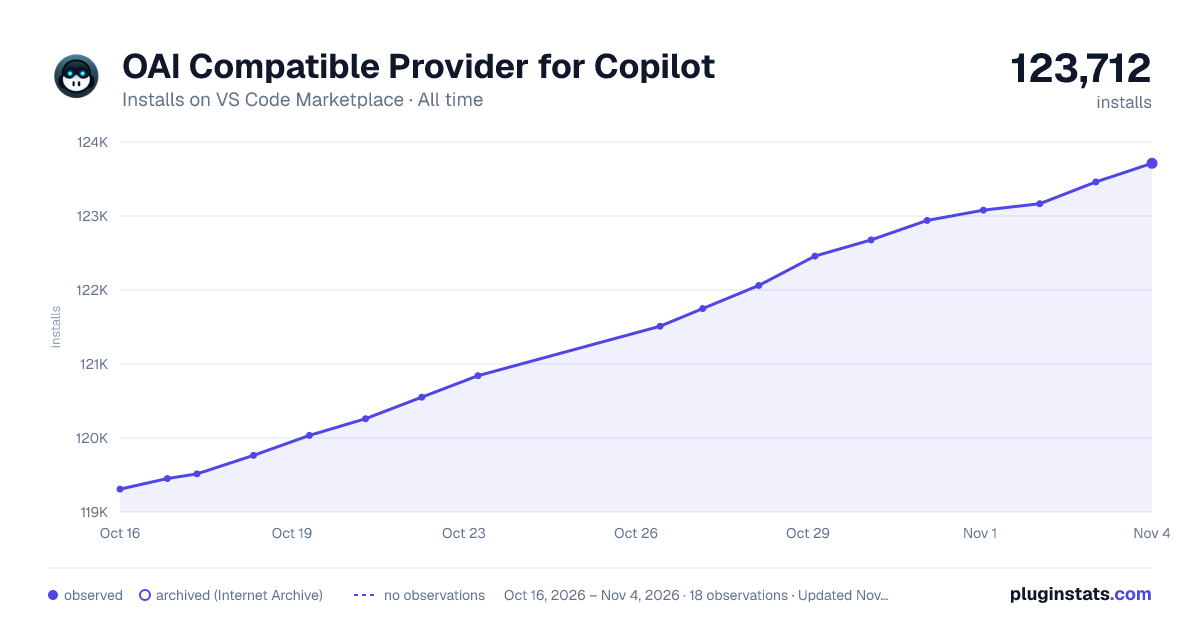

Adoption over time
7/30/90-day growth
Ranking history
Ratings over time
Listing placement
Listing placement
Listing placement
Filled points are observed values; hollow points come from Internet Archive snapshots of the listing page. Dashed segments span periods with no observations — values between points are not interpolated.
Each band is one page of 20. Installs on a linear scale. Placement is projected from installs, so it can differ from the marketplace's own sort order. Hover a dot to see the listing.
Recent observations
Full history (5)Similar VS Code Marketplace AI plugins
All 20 OAI Compatible Provider for Copilot alternativesData source
Install counts, average rating, and rating counts come from the public Visual Studio Marketplace gallery API. Installs are cumulative and exclude updates.
Listing: https://marketplace.visualstudio.com/items?itemName=johnny-zhao.oai-compatible-copilot. First seen Oct 16, 2026; last successful collection Oct 20, 2026. See the methodology.