 PluginStats
VSCode Essentials installs statistics
By jabacchetta · VS Code Marketplace · Extension Packs
Turn VSCode into a supercharged IDE.
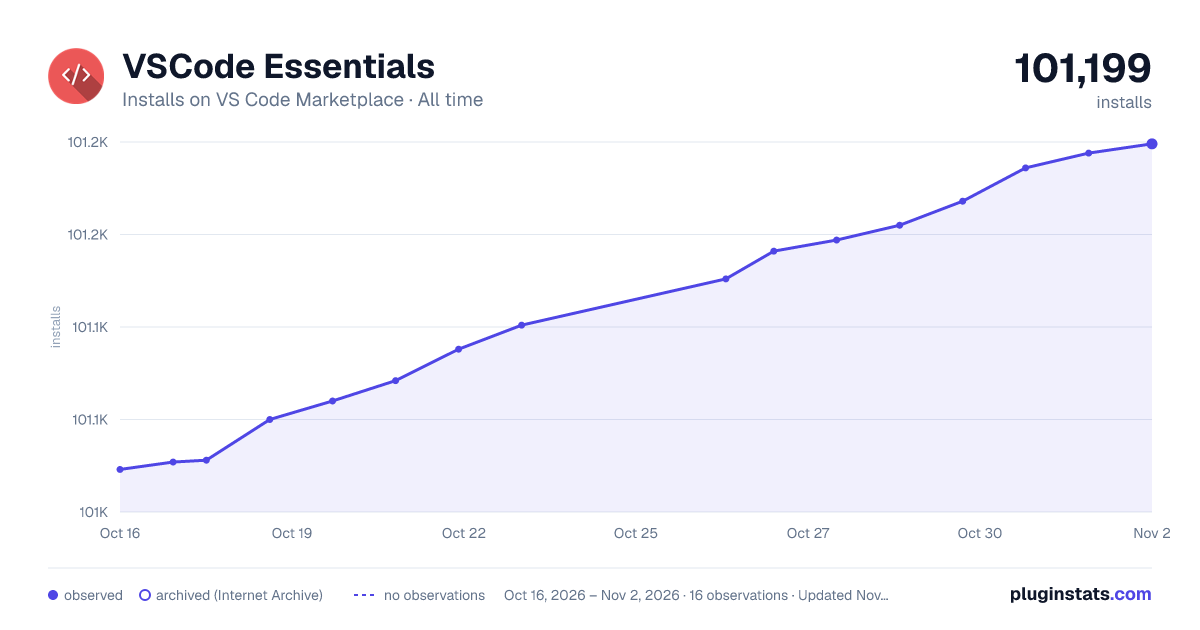
VSCode Essentials has 101,060 recorded installs on VS Code Marketplace, ranking #2352 of 2,501 tracked listings.
Rating: 5.00 / 5 from 7 ratings
About VSCode Essentials
VSCode Essentials (Extension Pack)


VSCode Masterclass (Coming Soon)
Follow on Twitter and subscribe at DevCast to get priority access.
Introduction
VSCode Essentials is a collection of many individual extensions that includes all of the functionality needed to turn VSCode into a ⚡ supercharged ⚡ integrated development environment (IDE).
This extension pack is language-agnostic, and does not include functionality for specific programming languages or frameworks. Instead, this extension's objective is to remain relatively lean while delivering powerful features that all developers can benefit from.
Features
- Enhanced comment highlights, styling, and wrapping
- Todo manager
- Snippet manager and generator
- Run code
- Spell check
- Real-time collaboration with edits, calls, chats, and comments
- Formatting of multiple files
- Advanced git tooling
- Multiple clipboards (clipboard ring)
- Code screenshots
- Project manager
- Detection of non-printing characters
- Smart backspacing (delete indentation/whitespace)
- Cursor navigation with the ability to go to any character with a few keystrokes
- Macros for executing multiple commands with a single keyboard shortcut
- Extended multi-cursor functionality (incrementing, inserting numeric sequences, etc.)
- Hack VSCode's stylesheets for UI elements that aren't yet included in the settings or official theme API
- Semantic indent and scope guides
- Automatic and manually added (tagged commits) local edit history
- Bookmarks for marking lines of code and quickly jumping back to them
- Giving workspaces unique colors to help identify the editor when working with multiple instances, using Live Share, or taking advantage of remote development
- Add syntax highlighting to log files and to VSCode's output/debug panels
- Toggle the display of hidden files in the explorer
- GitHub Gist management with interactive playgrounds, code snippets, and notes
- Synchronize edits you make in a Search Editor back to source files.
Recommended Settings
All Autocomplete
{
  // // TODO: Add files that you want to be included in IntelliSense at all times.
  // // Enable to get autocomplete for the entire project (as opposed to just open files). It's a
  // // good idea to read the All Autocomplete extension's documentation to understand the performance
  // // impact of specific settings.
  // "AllAutocomplete.wordListFiles": ["/src/"],
}
CodeStream
{
  "codestream.autoSignIn": false,
}
Customize UI
{
  "customizeUI.stylesheet": {
    // NOTE: Only hide icons if you're already familiar with their functionality and shortcuts
    // Hides specific editor action icons
    ".editor-actions a[title^=\"Toggle File Blame Annotations\"]": "display: none !important;",
    ".editor-actions a[title^=\"Open Changes\"]": "display: none !important;",
    ".editor-actions a[title^=\"More Actions...\"]": "display: none !important;",
    ".editor-actions a[title^=\"Split Editor Right (⌘\\\\)\"]": "display: none !important;",
    ".editor-actions a[title^=\"Run Code (⌃⌥N)\"]": "display: none !important;",

    // Adds a border below the sidebar title.
    // TODO: Update `19252B` in the setting below with the hex color of your choice.
    ".sidebar .composite.title": "border-bottom: 1px solid #19252B;",

    // Leaves only the bottom border on matching bracket border.
    ".monaco-editor .bracket-match": "border-top: none; border-right: none; border-left: none;",

    // Changes color of the circle that appears in a dirty file's editor tab.
    // TODO: Update `00bcd480` in the setting below with the hex color of your choice.
    ".monaco-workbench .part.editor>.content .editor-group-container.active>.title .tabs-container>.tab.dirty>.tab-close .action-label:not(:hover):before, .monaco-workbench .part.editor>.content .editor-group-container>.title .tabs-container>.tab.dirty>.tab-close .action-label:not(:hover):before": "color: #00bcd480;",
  },
}
GitLens
{
  // Toggle from command palette as needed.
  "gitlens.codeLens.enabled": false,
  "gitlens.currentLine.enabled": false,

  // Keep source control tools in same view.
  "gitlens.views.compare.location": "scm",
  "gitlens.views.fileHistory.location": "scm",
  "gitlens.views.lineHistory.location": "scm",
  "gitlens.views.repositories.location": "scm",
  "gitlens.views.search.location": "scm",
}
Macros…
Description from the VS Code Marketplace listing.
- acejump
- ai-assisted development
- all autocomplete
- bookmarks
- call
- chat
- clipboard ring
- code discussion
- code runner
- code screenshots
- code spell checker
- codestream
- collaboration
- comment wrapping
- control snippets
- cursor navigation
- customize ui
- customize vscode stylesheets
- delete indentation
- delete whitespace
README badge
Show your rank in a README or on your website. The badge updates automatically.
Charts
Images: 30d · 1y · all time · 1600×900 dark



Adoption over time
7/30/90-day growth
Ranking history
Ratings over time
Listing placement
Listing placement
Filled points are observed values; hollow points come from Internet Archive snapshots of the listing page. Dashed segments span periods with no observations — values between points are not interpolated.
Each band is one page of 20. Installs on a linear scale. Placement is projected from installs, so it can differ from the marketplace's own sort order. Hover a dot to see the listing.
Recent observations
Full history (5)Similar VS Code Marketplace Extension Packs plugins
All 20 VSCode Essentials alternativesData source
Install counts, average rating, and rating counts come from the public Visual Studio Marketplace gallery API. Installs are cumulative and exclude updates.
Listing: https://marketplace.visualstudio.com/items?itemName=jabacchetta.vscode-essentials. First seen Oct 16, 2026; last successful collection Oct 20, 2026. See the methodology.