 PluginStats
Mobile Preview - Phone & Tablet Simulator installs statistics
By Lirobi · VS Code Marketplace · Visualization
Mobile preview inside VS Code: test your responsive web app in iPhone, Android and iPad device frames with live reload. No browser, no emulator, no DevTools.
Mobile Preview - Phone & Tablet Simulator has 157,026 recorded installs on VS Code Marketplace, ranking #1807 of 2,501 tracked listings.
Rating: 5.00 / 5 from 2 ratings
About Mobile Preview - Phone & Tablet Simulator
Mobile Preview — Phone & Tablet Simulator for VS Code
See your web app on an iPhone, Android phone or iPad, right next to your code. Mobile Preview puts your localhost in a realistic device frame inside VS Code (and Cursor, Windsurf, VSCodium): live reload, accurate viewports, landscape mode, focus mode. No browser switching, no DevTools device toolbar, no emulator to boot.
<!-- DEMO GIF: place the screen recording here, e.g. <img src="https://mobilepreview.lirobi.com/images/demo.gif" alt="Mobile Preview demo" width="760"> -->| Without Mobile Preview | With Mobile Preview |
|---|---|
| Resize the browser window or open DevTools device mode | One panel next to your code, already on the right device |
| Alt-tab on every change | Changes appear as you type |
| Guess what a real iPhone shows | Real device dimensions, notch, Dynamic Island and status bar |
Works with React, Next.js, Vue, Vite, Angular, Svelte, Astro, Remix, Gatsby — any framework that runs in a browser.
<table> <tr> <td><img src="https://mobilepreview.lirobi.com/images/new-iphone16pro.png" alt="iPhone 16 Pro Preview" width="380"></td> <td><img src="https://mobilepreview.lirobi.com/images/new-iphone16prolandscape.png" alt="iPhone 16 Pro Landscape mode" width="380"></td> </tr> <tr> <td><img src="https://mobilepreview.lirobi.com/images/new-s25ultra.png" alt="Samsung Galaxy S25 Ultra Preview" width="380"></td> <td><img src="https://mobilepreview.lirobi.com/images/new-galaxytabs6.png" alt="Samsung Galaxy Tab Preview" width="380"></td> </tr> </table>Why developers love it
- Zero setup — auto-detects your dev server (React, Vue, Next.js, Vite, Angular, Svelte, and more). Open the panel, it's already loaded.
- Side-by-side — code on the left, phone on the right. Changes appear as you type.
- Accurate viewports — each device frame uses real pixel dimensions, so what you see matches what users see.
- Landscape mode — flip any device sideways with one click. Dynamic Island, notch and status bar all rotate correctly.
- Focus mode — one click hides the toolbar so only the phone is left, centered and as large as the panel allows. Esc brings the toolbar back.
- Recent URLs — the address bar remembers your last 12 URLs in a scrollable list, filtered as you type.
- Favorites with shortcuts — save your go-to devices and switch with ⌘1–5.
- Framed screenshots — export your page inside the device frame as a PNG (portrait or landscape, transparent or solid background, 2× or 3×). 3 free captures, then Pro. Uses the Chrome, Edge, Brave or Chromium already installed on your computer.
- Works with any URL — local dev server, staging, production. If it loads in a browser, it works here.
Export framed screenshots
Click Capture to export your page inside the current device frame as a PNG, in portrait or landscape. Choose with or without the frame, a transparent or solid background, and 2× or 3× resolution. Save it to a file or copy it. Your first 3 captures are free; unlimited captures are part of Pro.
<img src="https://mobilepreview.lirobi.com/images/demo-capture.gif" alt="Capture menu: frame, background and scale options, then the exported PNG (sample page)" width="600">Screen recording of the Capture feature on a sample page. Capture uses the Chrome, Edge, Brave or Chromium already installed on your computer (nothing is downloaded). If none is found, set mobile-preview.screenshotBrowserPath.
The toolbar at a glance
| Control | What it does |
|---|---|
| Device name | Opens the device list, with search. Pro devices are tagged PRO |
| Rotate | Switches between portrait and landscape |
| Focus | Hides the toolbar to show only the phone (Esc to leave) |
| Capture | Exports the phone as a PNG (3 free, then Pro) |
| … | Favorites and quick switch (⌘1–5) |
| PRO / Upgrade | License window: unlock Pro, view your license, deactivate this computer |
| Address bar | Type a URL, pick a recent one, detect your dev server (magnifier), reload |
Quick Start
- Install the extension
- Start your dev server (
npm run dev,yarn start, etc.) Ctrl+Shift+P→ Mobile Preview: Show- The extension detects your server automatically (if not, enter the url in the address bar)
Free vs Pro
Free — no credit card, no time limit
- 3 iPhone devices
- 1 saved favorite
- 3 landscape previews
- Auto-detection of your dev server, live reload, framework badge
- Framed screenshot export (PNG, 2× or 3×), 3 free then Pro
Pro — €6.99, one-time payment, lifetime access (no subscription)
- 38 devices — all iPhones, Android phones, foldables, iPads and Android tablets
- Up to 5 saved favorites with ⌘1–5 shortcuts
- Landscape mode for all devices
- New devices added regularly at no extra cost
What's New in v3.2
- Focus mode is a button in the toolbar, and the phone stays centered when the toolbar is hidden.
- Rotate has a clearer icon and label.
- Recent URLs under the address bar.
- Deactivate this device from the license window, to move your license to another computer.
- Captures: 3 free, then Pro (same rule as landscape).
- One consistent behavior for every menu and window: click outside or press Esc to close.
- The license window now follows your VS Code theme.
- Device presets were removed: applying one only switched to its first device.
What's New in v3
- Landscape mode — flip any device sideways with one click. Dynamic Island, notch and status bar all rotate correctly.
- Realistic phone frames — pixel-accurate bezels, Dynamic Island, notch and hole-punch camera, authentic status bar with live clock, battery and signal.
Device Library
Free (3 devices) iPhone 16 · iPhone 17 · iPhone 17 Pro Max…
Description from the VS Code Marketplace listing.
- android emulator
- android preview
- browser preview
- cross-device
- device frame
- device mockup
- dynamic island
- hot reload
- ipad preview
- iphone preview
- iphone simulator
- keybindings
- live reload
- localhost preview
- mobile development
- mobile preview
- mobile simulator
- mobile-first
- nextjs
- phone simulator
README badge
Show your rank in a README or on your website. The badge updates automatically.
Charts
Images: 30d · 1y · all time · 1600×900 dark


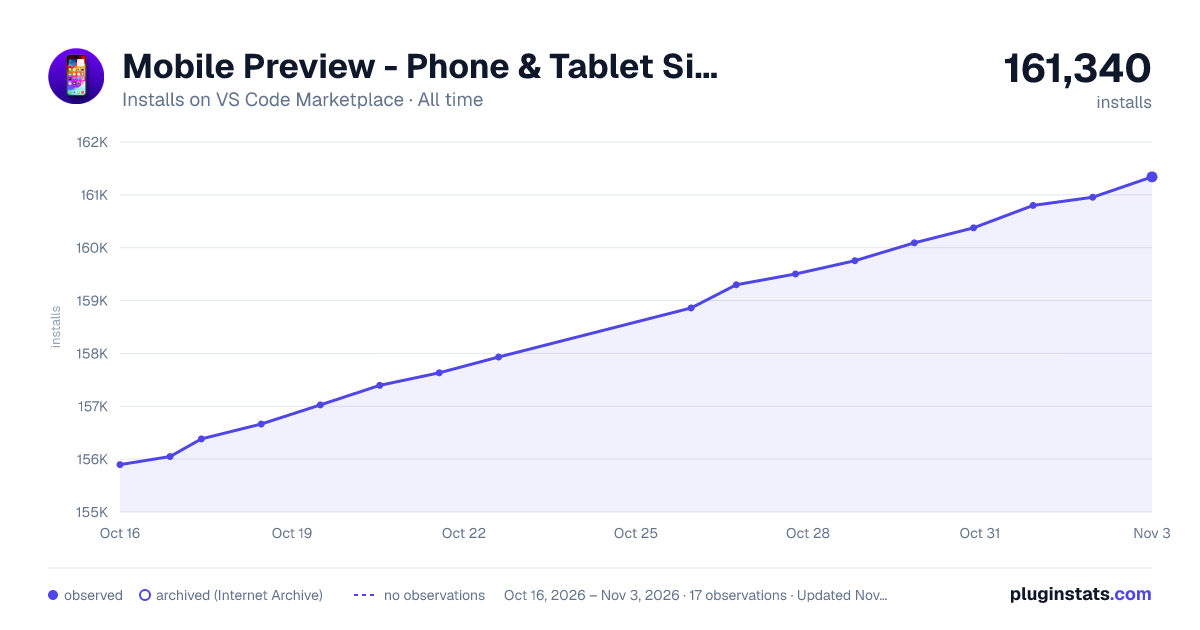

Adoption over time
7/30/90-day growth
Ranking history
Ratings over time
Listing placement
Listing placement
Listing placement
Filled points are observed values; hollow points come from Internet Archive snapshots of the listing page. Dashed segments span periods with no observations — values between points are not interpolated.
Each band is one page of 20. Installs on a linear scale. Placement is projected from installs, so it can differ from the marketplace's own sort order. Hover a dot to see the listing.
Recent observations
Full history (5)Similar VS Code Marketplace Visualization plugins
All 20 Mobile Preview - Phone & Tablet Simulator alternativesData source
Install counts, average rating, and rating counts come from the public Visual Studio Marketplace gallery API. Installs are cumulative and exclude updates.
Listing: https://marketplace.visualstudio.com/items?itemName=lirobi.phone-preview. First seen Oct 16, 2026; last successful collection Oct 20, 2026. See the methodology.