 PluginStats
Alternate File installs statistics
By will-wow · VS Code Marketplace · Other
Switch to and create spec files for any framework
Alternate File has 194,161 recorded installs on VS Code Marketplace, ranking #1556 of 2,501 tracked listings.
Rating: 4.80 / 5 from 5 ratings
About Alternate File
vscode-alternate-file



In Vim, you can often go to the "alternate file" for the active buffer - usually the spec file for an implementation, or vice versa - by pressing :A. This extension adds that functionality to VS Code.
VSCode-Alternate-File reads a config file based on the .projections.json file from Tim Pope's Projectionist. This lets you specify where the spec files for different types of files in your project are set up. One you add a .projections.json (and reload your editor), you can then jump between an implementation and spec file, and optionally create empty files if they don't exist.
Features
All commands are under the control pane. Or, you can set up shortcuts.
Initialize Projections File- Create a new.projections.jsonin the root of the current workspace. You can pass in the name of some frameworks to get reasonable projection defaults.Alternate File- Switch to the alternate file (if found) in the current paneAlternate File in Split- Switch to the alternate file (if found) in a split paneCreate Alternate File- Switch to the alternate file (if found) in the current pane. If not found, create the file.Create Alternate File in Split- Switch to the alternate file (if found) in a split pane. If not found, create the file.

.projections.json
To describe your project's layout, create a .projections.json in the root of your project.
Each line should have the pattern for an implementation file as the key, and an object with the pattern for the alternate file (usually the spec file, but it can be whatever you want). Use a * in the main pattern and a {} in the alternate pattern to note the part of the path that should be the same between the two files. A * can stand in for an arbitrarily deep path.
Split paths
If your test paths have an extra directly in the middle of them, like with app/some/path/__test__/file.test.js with Jest, you can use {dirname} for the directory path and {basename} for the filename. You can do the same thing on the implementation side with the standard glob syntax: ** to represent the directory path, and * to represent the filename, like app/**/something/*.js.
If your paths have more than two variable parts, that can work too! You can use multiple sets of **/{dirname} pairs, which allows you to do something like:
"apps/**/lib/**/*.ex": {
  "alternate": "apps/{dirname}/test/{dirname}/{basename}_test.exs"
}
Multiple alternates
If your project is inconsistent about where specs go (it happens to the best of us), you can also pass an array to alternate. The extension will look for a file matching the first alternate, then the second, and so on. When you create an alternate file, it will always follow the first pattern.
Note that this isn't part of the original projectionist spec, but it's sometimes handy.
Examples
{
  // Basic
  // app/foo/bar/file.js => app/foo/bar/file.spec.js
  "app/*.js": { "alternate": "app/{}.spec.js" },
  // Dirname/Basename
  // app/foo/bar/file.js => app/foo/bar/__test__/file.test.js
  "*.js": { "alternate": "{dirname}/__test__/{basename}.test.js" },
  // Globbed implementation:
  // app/foo/bar/js/file.js => test/foo/bar/file_test.js
  "app/**/js/*.js": { "alternate": "test/{}/_test.js" },
  // Multiple alternatives
  // app/foo/bar/file.jsx =>
  //   app/foo/bar/file.spec.jsx OR app/foo/bar/file.spec.js OR
  //   spec/js/foo/bar/file_spec.js
  "app/*.jsx": { "alternate": ["app/{}.spec.jsx", "app/{}.spec.js", "spec/js/{}_spec.js"] }
}
For .projections.json files for popular frameworks, see the sample-projections. If your framework isn't in there, PRs for new sample-projections are welcome!
Shortcuts
There aren't any shortcuts set up by default. If you'd like to add some shortcuts, you can put Open Keyboard Shortcuts File in the command pane and add something like the following:
{
  "key": "ctrl+alt+a",
  "command": "alternate.alternateFile",
  "when": "editorTextFocus"
}
The commands are:
alternate.alternateFile
alternate.alternateFileInSplit
alternate.createAlternateFile
alternate.createAlternateFileInSplit
VSCode-Vim support
If you use vscode-vim, it might be easier to add a leader-key shortcut, like the alternate file command from Spacemacs
{
  "vim.normalModeKeyBindingsNonRecursive": [
    {
      "before": ["<leader>", "p", "a"],
      "commands": [{ "command": "alternate.alternateFile" }]
    },
    {
      "before": ["<leader>", "p", "s"],
      "commands": [{ "command": "alternate.alternateFileInSplit" }]
    }
  ]
}
Unfortunately you don't seem to be able to add your own ex-commands to vscode-vim, so you can't set up :A.
Contributing
The core logic is implemented in alternate-file. Any changes to the matching and finding logic should go there.
To run a
Setup
Clone the repository, then…
Description from the VS Code Marketplace listing.
- alternate
- projectile
- projections
- spec
- test
- vscode
README badge
Show your rank in a README or on your website. The badge updates automatically.
Charts
Images: 30d · 1y · all time · 1600×900 dark


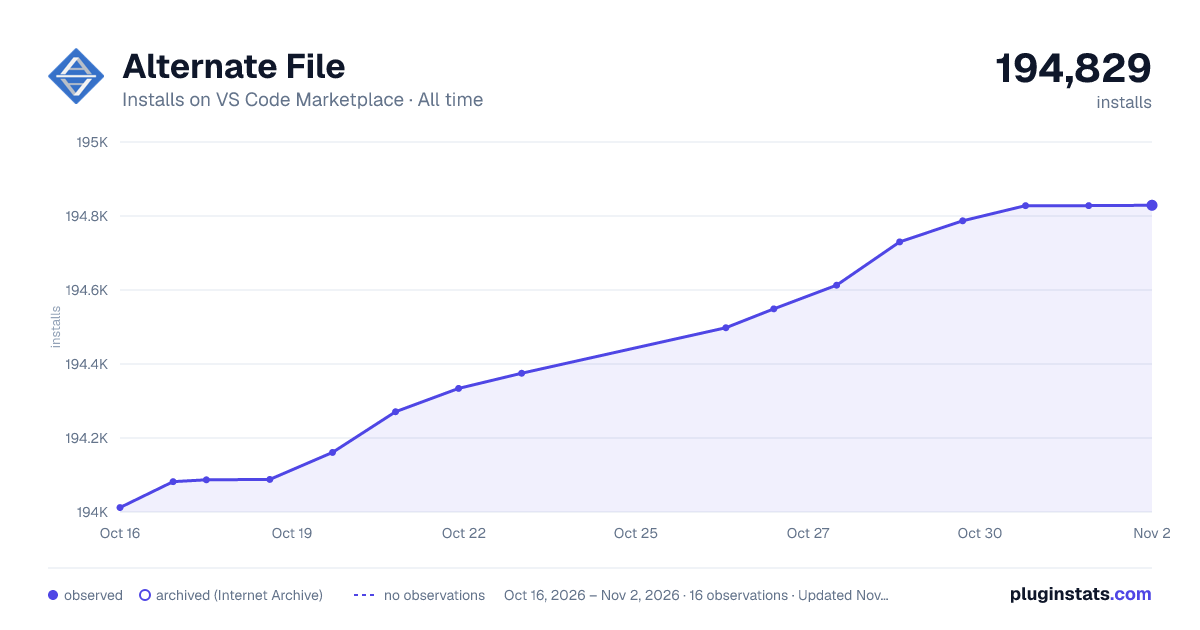

Adoption over time
7/30/90-day growth
Ranking history
Ratings over time
Listing placement
Listing placement
Filled points are observed values; hollow points come from Internet Archive snapshots of the listing page. Dashed segments span periods with no observations — values between points are not interpolated.
Each band is one page of 20. Installs on a linear scale. Placement is projected from installs, so it can differ from the marketplace's own sort order. Hover a dot to see the listing.
Recent observations
Full history (5)Similar VS Code Marketplace Other plugins
All 20 Alternate File alternativesData source
Install counts, average rating, and rating counts come from the public Visual Studio Marketplace gallery API. Installs are cumulative and exclude updates.
Listing: https://marketplace.visualstudio.com/items?itemName=will-wow.vscode-alternate-file. First seen Oct 16, 2026; last successful collection Oct 20, 2026. See the methodology.