 PluginStats
CodeMetrics installs statistics
By Kiss Tamás (2 listings) · VS Code Marketplace · Other
Computes complexity in TypeScript / JavaScript files.
CodeMetrics has 1,185,603 recorded installs on VS Code Marketplace, ranking #491 of 2,501 tracked listings.
Rating: 4.42 / 5 from 50 ratings
About CodeMetrics
Code Metrics - Visual Studio Code Extension
Computes complexity in TypeScript / JavaScript / Lua files.
Complexity calculation
The steps of the calculation:
- create an AST from the input source file
- walk through each and every node of it
- depending on the type of the node and the configuration associated with it create a new entry about the node. This entry contains everything necessary for further use (e.g. a textual representation for the node, complexity increment, child nodes etc.)
- show the sum of complexity of child nodes for methods and the maximum of child nodes for classes
Please note that it is not a standard metric, but it is a close approximation of Cyclomatic complexity.
Please also note that it is possible to balance the complexity calculation for the project / team / personal taste by adjusting the relevant configuration entries (content assist is provided for all of them for easier configuration).
For example if one prefers guard clauses, and is ok with all the branches in switch statements then the following could be applied:
"codemetrics.nodeconfiguration.ReturnStatement": 0,
"codemetrics.nodeconfiguration.CaseClause": 0,
"codemetrics.nodeconfiguration.DefaultClause": 0
If You want to know the causes You can click on the code lens to list all the entries for a given method or class. (This also allows You to quickly navigate to the corresponding code)
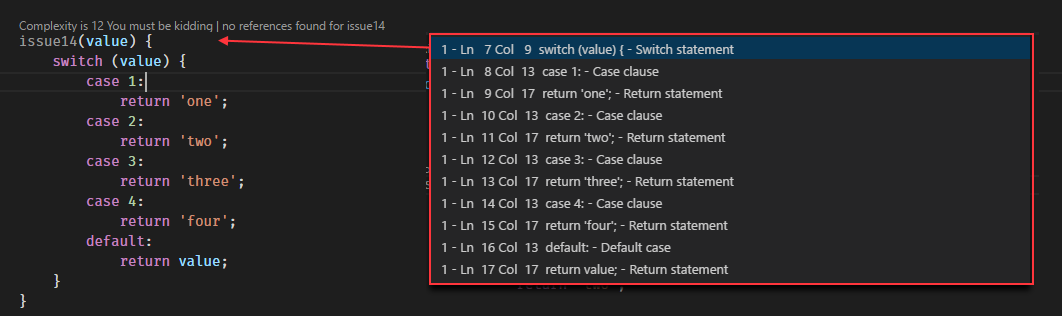
It looks like this



Install
How to install Visual Studio Code extensions
Direct link to Visual Studio Code Marketplace
Customization
In the workspace settings one can override the defaults.
For a complete list please check the configuration section in the package.json.
For the most commonly used ones, one should do a search for codemetrics.basics
in the settings ui.
{
  // highest complexity level will be set when it exceeds 15
  "codemetrics.basics.ComplexityLevelExtreme" : 15,

  // Hides code lenses with complexity lesser than the given value
  "codemetrics.basics.CodeLensHiddenUnder" : 5,

  // Description for the highest complexity level
  "codemetrics.basics.ComplexityLevelExtremeDescription" : "OMG split this up!",

  // someone uses 'any', it must be punished
  "codemetrics.nodeconfiguration.AnyKeyword": 100
}
Commands
- Toggle code lenses for arrow functions
- Toggle code metrics
They can be bound in the keybindings.json (File -> Preferences -> Keyboard Shortcuts)
{ "key": "f4",                    "command": "codemetrics.toggleCodeMetricsForArrowFunctions",
                                     "when": "editorTextFocus" },
{ "key": "f5",                    "command": "codemetrics.toggleCodeMetricsDisplayed",
                                     "when": "editorTextFocus" }
Change Log…
Description from the VS Code Marketplace listing.
- code
- html
- javascript
- javascriptreact
- lua
- metrics
- typescript
- typescriptreact
- vscode
- vue
README badge
Show your rank in a README or on your website. The badge updates automatically.
Charts
Images: 30d · 1y · all time · 1600×900 dark


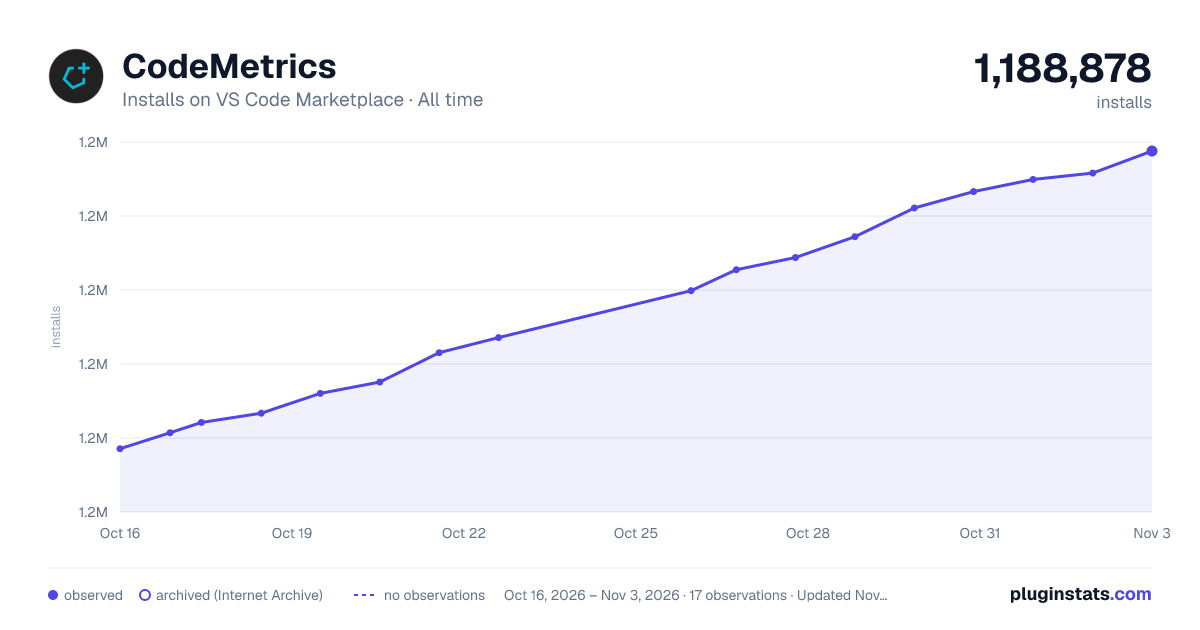

Adoption over time
7/30/90-day growth
Ranking history
Ratings over time
Listing placement
Listing placement
Filled points are observed values; hollow points come from Internet Archive snapshots of the listing page. Dashed segments span periods with no observations — values between points are not interpolated.
Each band is one page of 20. Installs on a linear scale. Placement is projected from installs, so it can differ from the marketplace's own sort order. Hover a dot to see the listing.
Recent observations
Full history (5)Similar VS Code Marketplace Other plugins
All 20 CodeMetrics alternativesCodeMetrics on other marketplaces
Data source
Install counts, average rating, and rating counts come from the public Visual Studio Marketplace gallery API. Installs are cumulative and exclude updates.
Listing: https://marketplace.visualstudio.com/items?itemName=kisstkondoros.vscode-codemetrics. First seen Oct 16, 2026; last successful collection Oct 20, 2026. See the methodology.