 PluginStats
SSH FS installs statistics
By Kelvin Schoofs · VS Code Marketplace · Other
File system, terminal and task provider using SSH
SSH FS has 794,629 recorded installs on VS Code Marketplace.
It ranks #620 of 2,501 tracked VS Code Marketplace listings by installs.
It is rated 4.5 out of 5 from 113 ratings.
PluginStats has 4 daily observations since Oct 16, 2026; the latest is from Oct 19, 2026.
Rating: 4.50 / 5 from 113 ratings
About SSH FS
SSH FS
This extension allows mounting remote folders as local workspace folders, launch integrated remote terminals and run ssh-shell tasks.
Features
Config editor
The built-in config editor makes it easy to create and edit configurations:
The config editors stores this, by default, in your User Settings (settings.json) as:
This config is configured to copy settings (e.g. username, host, ...) from my PuTTY session. Due to me having loaded my private key in Pageant (PuTTY's agent), this config allows me to create a connection without having to provide a password/passphrase. It also specifies that all file operations _(ssh://hetzner/some/file.js)_ are relative to the /root directory on the server.
Configurations are read from your global User Settings, the current workspace's settings, and any JSON files configured with sshfs.configpaths. Even when the workspace overrides this setting, the globally-configured paths will still be read. The workspace versions do have higher priority for merging or ignoring duplicates.
Terminals
Using a simple button or the command palette, a remote terminal can be started:
_Uses $SHELL by default to launch your default user shell. A config option exists to change this, e.g. "ksh -" or "exec .special-profile; $SHELL"_
If a connection is already opened for a configuration, there is no need to reauthenticate. As long as the configuration hasn't changed, existing connections (both for workspace folders and terminals) will be reused.
Remote shell tasks
A new task type ssh-shell is added to run shell commands remotely:
The task terminal opens a full PTY terminal on the server.
Remote workspace folders
Using a simple button or the command palette, we can mount a remote workspace folder as a regular local workspace folder:
_Same configuration used as from the Config editor above._
This works seamlessly with extensions using the vscode.workspace.fs API _(added in VS Code 1.37.0)_, although not all extensions switched over, especially ones making use of binary files.
As can be seen, right-clicking a remote directory gives the option to instantly open a remote terminal in this directory.
The extension supports any ssh:// URI. I actually opened ssh://hetzner/ng-ui as my folder, which resolves to /root/ng-ui on my remote server. By default, the button/command opens ssh://hetzner/ which would then mount /root, as that is what my Root config field is set to. You can set it to whatever, including ~/path.
Miscellaneous
The extension comes with a bunch of other improvements/features. Internally the ssh2 package is used. The raw config JSON objects _(as seen in Config editor)_ is, apart from some special fields, a one-on-one mapping of the config options supported by this package. Power users can edit their settings.json to e.g. make use of the algorithms.cipher field to specify a list of ciphers to use.
Some other features worth mentioning:
Prompt host/username/password/... for every connection
Active connections are reused to minimize prompts. A connection gets closed if there's no terminal or file system using it for over 5 seconds.
Proxy settings
Several proxy types (SSH hopping, HTTP and SOCKS 4/5) are supported:
SSH Hop refers to using another configuration to hop through, similar to OpenSSH's ProxyJump:
SFTP Command/Sudo and Terminal command
The extension supports using a custom sftp subsystem command. By default, it uses the sftp subsystem as indicated by the remote SSH server. In reality, this usually results in /usr/lib/openssh/sftp-server being used.
The SFTP Command setting allows specifying to use a certain command instead of the default subsystem. The SFTP Sudo setting makes the extension try to create a sudo shell _(for the given user, or whatever sudo defaults to)_ and run SFTP Command _(or /usr/lib/openssh/sftp-server by default)_. For most users, setting this to should allow operating on the remote file system as root. Power users with esoteric setups can resort to changing SFTP Command to e.g. sudo /some-sftp-server, but might run into trouble with password prompts.
The Terminal command option, as mentioned in Terminals, allows overriding the command used to launch the remote shell. By default, the extension launches a remote shell over the SSH connection, runs cd ... if necessary, followed by $SHELL to start the user's default shell. This config option allows to replace this $SHELL with a custom way way of starting the shell, or configuring the provided default SSH shell.
Links
• GitHub (Issues | (Pre)-releases | Roadmap | Sponsor) • Visual Studio Marketplace • Open VSX Registry
Description from the VS Code Marketplace listing.
- filesystem
- remote
- remote-menu
- scp
- sftp
- ssh
- sshfs
- sync
- terminal
Where SSH FS sits in the listing
Each band is one page of 20. Installs on a log scale. Placement is projected from installs, so it can differ from the marketplace's own sort order. Hover a dot to see the listing.


Charts
Images: 30d · 1y · all time · 1600×900 dark


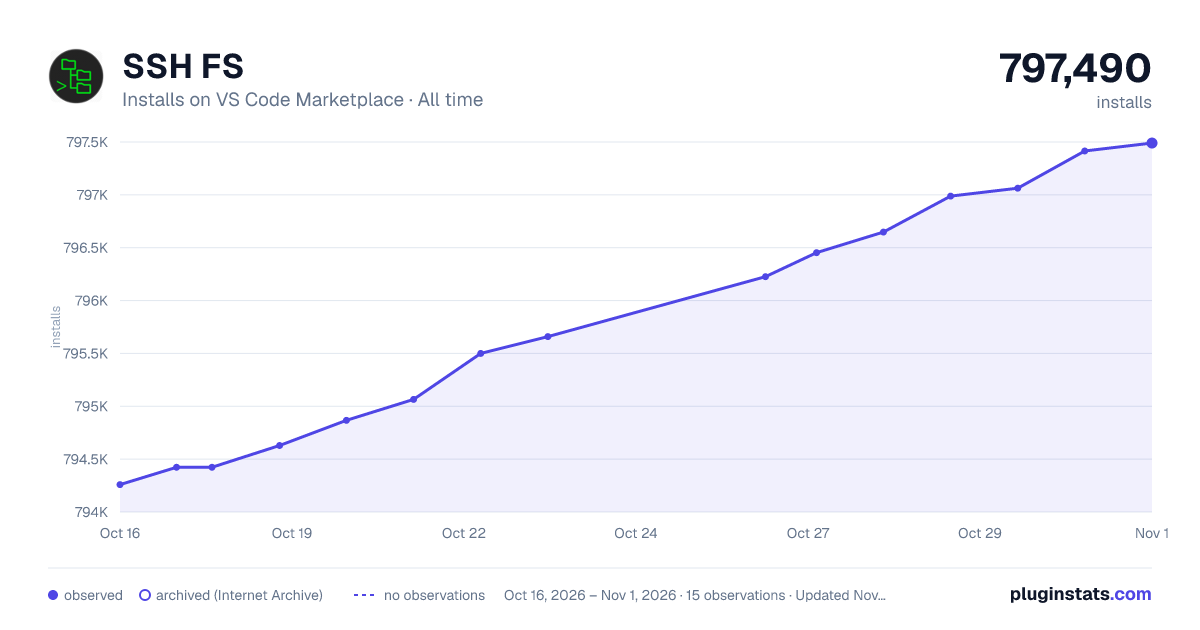

Adoption over time


7/30/90-day growth


Filled points are observed values; hollow points come from Internet Archive snapshots of the listing page. Dashed segments span periods with no observations — values between points are not interpolated.
Recent observations
Full history (4)Similar VS Code Marketplace Other plugins
Data source
Install counts, average rating, and rating counts come from the public Visual Studio Marketplace gallery API. Installs are cumulative and exclude updates.
Listing: https://marketplace.visualstudio.com/items?itemName=Kelvin.vscode-sshfs. First seen Oct 16, 2026; last successful collection Oct 19, 2026. See the methodology.