 PluginStats
Font Awesome Gallery installs statistics
By tomasvergara · VS Code Marketplace · Visualization
VSCode Extension Sidebar Panel with a gallery view of FontAwesome's 6/7 free icons.
Font Awesome Gallery has 95,828 recorded installs on VS Code Marketplace, ranking #2431 of 2,502 tracked listings.
Rating: 4.43 / 5 from 7 ratings
About Font Awesome Gallery
Font Awesome Gallery
Browse, search, and copy Font Awesome icons without ever leaving VS Code.






What is this?
Font Awesome Gallery is a VS Code sidebar extension that puts the entire Font Awesome free icon library at your fingertips. Search icons by name or keyword, browse by category, and copy the exact format your project needs — all without switching context.
Version 1.0.0 is the biggest update in the extension's history. After 4 years, the entire codebase has been rewritten from the ground up: new build system, Svelte 5, FA v7 support, and a long list of features requested by the community.
Features
Icon Browsing
- FA v5, v6, and v7 support: switch between versions from the command palette or toolbar
- Smart search: find icons by name, label, or keyword with weighted ranking (name matches come first)
- Category filter: browse by any of the official FA categories
- Grid and List view: toggle between a compact grid and a detailed list
- Icon size controls: use the A- / A+ buttons in the toolbar to resize icons to your liking
- "New" badge: icons added in recent Font Awesome releases are marked so you always know what's new
Favorites and Recents
- Favorites: click the heart on any icon to save it; filter your favorites from the category selector
- Recent icons: the last 20 icons you interacted with are tracked automatically and available as a filter
Copy and Insert
Click any icon to trigger your configured action. Right-click (or long-press) to open a context menu with every available format:
| Format | Example |
|---|---|
| Class name | fa-solid fa-heart |
| HTML tag | <i class="fa-solid fa-heart"></i> |
| React JSX | <FontAwesomeIcon icon={faHeart} /> |
| Vue array | ['fas', 'heart'] |
| Unicode |  |
| SVG inline | Full <svg> markup, no dependency required |
- Insert at cursor: instead of copying, paste the icon code directly into your active editor at the cursor position
- Configurable click behavior: set the primary click to copy or insert from the command palette
UX Details
- Hover tooltip: see the icon name, class code, unicode value, and all available styles on hover
- Open on fontawesome.com: jump to the official icon page directly from the tooltip
- Keyboard navigation: move between icons with the arrow keys and activate with Enter
- Infinite scroll: the gallery loads icons progressively as you scroll; no "Load more" button
- Persistent settings: your preferences (version, view mode, click behavior, favorites, recents) survive across VS Code sessions
- FA v5 deprecation notice: a subtle banner reminds you that Font Awesome 5 is no longer maintained
Installation
Search for Font Awesome Gallery in the VS Code Extensions panel, or install it directly from the Marketplace:

Command Palette
All extension settings are available from the command palette (Ctrl+Shift+P / Cmd+Shift+P). Search for Font Awesome:
| Command | Description |
|---|---|
| Use FA 5 / 6 / 7 | Switch the active Font Awesome version |
| Toggle Grid Type | Switch between grid and list view |
| Set Click: Copy | Primary click copies the icon code |
| Set Click: Insert | Primary click inserts at the cursor |
| Set Copy Content: Classname / HTML / React / Vue / Unicode / SVG | Choose the default copy format |
| Set Icon Labels: Class Name / Unicode | Change the label shown under each icon |

Running Locally
- Clone the repository.
- Run
npm install. - Run
npm run watchto start the esbuild watcher. - Press
F5to launch a VS Code Extension Development Host with the extension loaded.
npm install
npm run compile
npm run watch   # keep this running
# then press F5 in VS Code
To regenerate the icon data from the official FA npm packages:
npm run build:icons
Changelog
See CHANGELOG.md for the full version history.
License
See LICENSE for license details.
Description from the VS Code Marketplace listing.
README badge
Show your rank in a README or on your website. The badge updates automatically.
Charts
Images: 30d · 1y · all time · 1600×900 dark


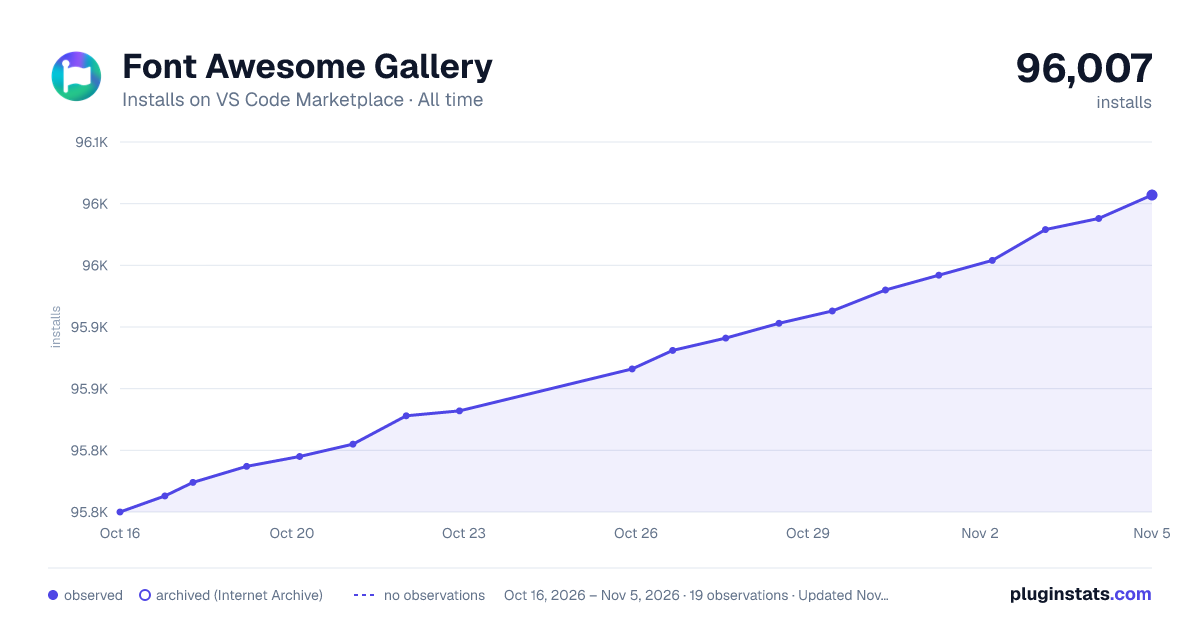

Adoption over time
7/30/90-day growth
Ranking history
Ratings over time
Listing placement
Listing placement
Filled points are observed values; hollow points come from Internet Archive snapshots of the listing page. Dashed segments span periods with no observations — values between points are not interpolated.
Each band is one page of 20. Installs on a linear scale. Placement is projected from installs, so it can differ from the marketplace's own sort order. Hover a dot to see the listing.
Recent observations
Full history (7)Similar VS Code Marketplace Visualization plugins
All 20 Font Awesome Gallery alternativesData source
Install counts, average rating, and rating counts come from the public Visual Studio Marketplace gallery API. Installs are cumulative and exclude updates.
Listing: https://marketplace.visualstudio.com/items?itemName=tomasvergara.vscode-fontawesome-gallery. First seen Oct 16, 2026; last successful collection Oct 22, 2026. See the methodology.